Level up your business security with free, on-demand training and certification. Explore 1Password Academy today →
troubleshooting
94 Topics
ssh agent and ansible 12 prompting incessantly
I've been using the SSH Agent in 1Password for a couple of years now, with very little trouble. This includes lots of SSH to individual machines as well as a fair amount of ansible scripting using versions prior to 12 and run directly from Terminal. Recently, I did a `brew upgrade` and ended up with Ansible 12. After that, it has become commonplace that ansible scripts run on my local machine and talking to nearby devices over the network result in 1passwd SSH agent prompting for every...single...command. I rolled back to ansible 10 (11 not available directly in Brew any longer) and the behavior returned to normal: prompting at the outset of my ansible script and not again until the next time I run a script. Running Ansible (as opposed to directly sshing in Terminal) has always prompted at the run, and usually for each individual destination machine, but that has been it. With the change to Ansible 12, the prompting from the SSH agent in 1password is now such that it is not usable. For the time being, I can roll back to ansible 10, but that won't be the case forever. Does anyone else have experience with this? Any recommendations for either diagnostics or solutions other than just disabling 1password's otherwise-highly-useful SSH Agent?Solved217Views0likes4CommentsNew getting-started guides, AI search, and LLM-ready docs for 1Password dev tools at 1password.dev
Hi everyone! We've been investing in making 1Password's developer documentation genuinely useful from the first click, and we wanted to share what's now live over at 1password.dev. 📖 New getting-started guides We've published workflow-based getting-started guides across every major tool area: SSH & Git, 1Password CLI, SDKs (Go, JavaScript, Python), Environments, integrations, and more. Instead of jumping between reference pages, you can follow a clear path from setup to working integration, organized around how you actually build. 🔍 AI-powered search across the docs You can hit Ctrl+K on any page and ask a question in plain language. The built-in AI assistant searches the full documentation set and gives you a direct answer with links to the relevant pages. It’s a much faster way to find what you need, especially if you’re not sure which tool or section to look in. Try it: open 1password.dev, hit ⌘+K, and type “How do I set up git commit signing with multiple GitHub accounts?” 🤖 Docs built for AI dev workflows If you use AI coding assistants like Cursor, Copilot, Windsurf, or Claude, our docs are now natively consumable. Every page is available as Markdown (append .md to any URL), and we serve llms.txt and llms-full.txt at the site root so your tools can reference 1Password docs directly. Details here: Build with LLMs 🏗️ Refreshed docs structure The documentation is now organized around the way developers work, with clearer navigation across SSH & Git, CLI, SDKs, Environments, secrets management, and integrations. If you've found our docs hard to navigate in the past, it's worth another look. 📌 One practical note: our developer docs now live at 1password.dev. All your existing developer.1password.com links and bookmarks redirect automatically, so nothing breaks. We'd love your feedback If you run into any issues or have suggestions, let us know in this thread. You can also reach us in the 1Password Developers Slack. Happy building! 🔐65Views1like0Comments
.env files inaccessible in macos
I have a .env file mounted in MacOS (Sequoia). I'm able to access it in the terminal and it behaves as expected, but I cannot get it to show up in Finder or file dialogs. This matters because I'm trying to use it in an Intellij Idea run configuration, which uses the OS file selection dialog to select environment files and doesn't allow specifying those file locations explicitly. Even if I save it without the `.` prefix, it still doesn't show up. Other ".whatever` files are visible, as well as zero length files, so I gather that named pipes are just generally not supported...? I hope that I'm missing something, because this does not seem to be niche use of this technology, but I haven't run across any indication that anyone else experiencing this problem. Is there a workaround I've missed? Is no one actually using .env files for development in this very popular IDE on this reasonably popular OS?43Views0likes1Comment
ssh agent popup does not appear
Hello, I've been using 1p ssh agent on multiple platforms, but on windows in particular it's been giving me trouble. For whatever reason, in powershell, the ssh agent appears to be running, I can run a ssh-add -l and it gives me the keys I expect including my github key: but if I run a git clone or git pull, the request fails with a permission denied error: The 1 password prompt for key authorization never shows up and so no valid key is presented to the server. Any suggestions on how to debug this properly? This key is valid and I use it on osx and Linux without issue.47Views0likes1CommentLinux beta breaks git signing - removes execute bit on op-ssh-sign
I ran into an error today after updating the Linux client from stable to the latest beta. When I went to commit git chang.s the commit failed with this error: fatal: cannot exec '/opt/1Password/op-ssh-sign': Permission denied error: fatal: failed to write commit object Someone in their great wisdom broke 1Password by removing permissions. The file permissions change from working: .rwxr-xr-x@ 3.9M root root 20 Apr 22:22 onepassword-mcp .rwxr-xr-x@ 1.5M root root 20 Apr 22:22 op-ssh-sign To whatever something thought this is going to do: .rw-r-Sr--@ 3.8M root onepassword-mcp 14 May 04:24 onepassword-mcp .rw-r--r--@ 1.5M root root 14 May 04:24 op-ssh-sign Please fix the file permissions for the git signing functionality.19Views0likes0CommentsAWS Secrets Manager integration: destination won't persist, zero API calls reaching AWS
Hi all, Looking for help / similar reports on the AWS Secrets Manager (Environments) integration. Our sync has completely stopped working and re-creating the integration does not bring it back. A support ticket is already filed; posting here in case anyone has hit the same and found a faster fix. ## Symptoms - Changes in 1Password Environments (additions, edits, deletions of any variable) do **not** propagate to AWS Secrets Manager. - The integration card in the 1Password UI stays in the unconfigured "Configure destination" state. There is no "connected" / "ready" indicator, just the configuration prompt. - This affects **all environments** simultaneously, not just one. - The "Configure destination" save action visually succeeds with no error, but immediately reverts the screen back to the unset "Configure destination" state. Re-entering and saving multiple times produces the same revert. The destination is never persisted. - Recreating the integration (deleting and setting it up again, even with a brand new target secret name) does not restore sync. The new target secret is also never written to. - This was working previously; the last successful sync (visible in AWS as the secret's `LastChangedDate`) was 25 days before the issue began, and the freeze started without any change on our side. ## Environment - 1Password plan: Individual - 1Password Desktop App: 8.12.12 (Windows, latest) - AWS region: us-east-1 ## What we've verified on the AWS side - AWS CloudTrail (`lookup-events` filtered by the target secret's resource name) shows **zero `UpdateSecret` / `PutSecretValue` events** in the past 24 hours from any principal — i.e., 1Password is not even attempting an API call. There is no AccessDenied / ThrottlingException either, just no request reaching AWS. - IAM role / SAML provider used by the integration still exists with unchanged trust policy and `secretsmanager:*` permissions on the target. - KMS key is intact, no SCP changes in the org. - Other AWS-bound integrations from our account work normally. ## Parallel fresh integration test To rule out integration-specific corruption, we set up a completely new parallel integration without deleting the existing one: - New 1Password Environment (different name) - New SAML Identity Provider in AWS (different name) - New IAM Policy in AWS (different name, scoped to a new secret name pattern) - New IAM Role in AWS (different name, with `SAML:sub` trust condition matching the SAML subject value provided in the 1Password configuration page) - New target secret name in 1Password's destination config Result: **identical failure mode**. - Clicking "Create integration" reverts the destination to unset, no error shown. The integration card never moves out of the unconfigured state. - AWS CloudShell verification: zero matching secrets created, zero `CreateSecret` events recorded across the entire account in the time window of the parallel save attempts. - A sanity-check `describe-secret` call against an unrelated existing secret returns successfully, confirming our AWS CLI access is functional. This pattern (no API call at all, save action not persisted, parallel fresh integration also broken) suggests an account-level issue on the 1Password side — possibly invalidated integration credentials, a stuck sync worker, or a silent server-side validation failure preventing the destination from being persisted. We can't diagnose further from the AWS side. ## Questions 1. Has anyone else seen this — silent sync stop affecting all environments simultaneously, with the save action visibly succeeding but the destination never persisting? 2. Is there a way (CLI / SDK / admin console) to check the integration's internal sync status / last-attempted-sync timestamp / error log on the 1Password side? 3. Any way to force-trigger a sync attempt from outside the standard "save in environment" path? Save-and-edit no longer triggers anything reaching AWS. We have already filed a support ticket. Posting here in case anyone has hit the same and found a fix faster than support turnaround. Thanks!32Views0likes1Comment
1Password CLI environment-related commands fail on Intel Mac, possibly due to signature validation
I’m seeing an issue where the 1Password CLI does not correctly run environment-related commands on an Intel-based Mac. The failure appears to be related to binary/code signing validation. > op run --environment ... -- printenv fish: Job 1, 'op environment read 2bmx7zkychv…' terminated by signal SIGKILL (Forced quit) Here is the crash log (remove some thread backtrace due to limit): ------------------------------------- Translated Report (Full Report Below) ------------------------------------- Process: op [59910] Path: /usr/local/Caskroom/1password-cli@beta/2.35.0-beta.01/op Identifier: op Version: 2.35.0-beta.01 Code Type: X86-64 (Native) Parent Process: fish [59375] Responsible: kitty [14560] User ID: 501 Date/Time: 2026-05-02 18:05:51.2642 +0800 OS Version: macOS 15.7.5 (24G624) Report Version: 12 Bridge OS Version: 10.4 (23P4242) Anonymous UUID: 844DB6FD-8F63-7D9C-3083-40414E0A20BD Sleep/Wake UUID: B00B71FC-964D-4477-A51E-A9935E498590 Time Awake Since Boot: 29000 seconds Time Since Wake: 28548 seconds System Integrity Protection: enabled Crashed Thread: 6 Exception Type: EXC_BAD_ACCESS (SIGKILL (Code Signature Invalid)) Exception Codes: UNKNOWN_0x32 at 0x0000000156f8e180 Exception Codes: 0x0000000000000032, 0x0000000156f8e180 Termination Reason: Namespace CODESIGNING, Code 2 Invalid Page VM Region Info: 0x156f8e180 is in 0x156f8e000-0x156f8f000; bytes after start: 384 bytes before end: 3711 REGION TYPE START - END [ VSIZE] PRT/MAX SHRMOD REGION DETAIL VM_ALLOCATE 156f8d000-156f8e000 [ 4K] r-x/rwx SM=PRV ---> VM_ALLOCATE 156f8e000-156f8f000 [ 4K] r-x/rwx SM=PRV VM_ALLOCATE 156f8f000-156fcf000 [ 256K] rw-/rwx SM=PRV Thread 0:: Dispatch queue: com.apple.main-thread 0 libsystem_kernel.dylib 0x7ff813de46f6 __psynch_cvwait + 10 1 libsystem_pthread.dylib 0x7ff813e242ae _pthread_cond_wait + 988 2 op 0x10b826c30 0x10b7a3000 + 539696 3 op 0x10b824a9d 0x10b7a3000 + 531101 4 op 0x10b80741e 0x10b7a3000 + 410654 5 op 0x10b8071ce 0x10b7a3000 + 410062 6 op 0x10b7e1b8e 0x10b7a3000 + 256910 7 op 0x10b7bb4bd 0x10b7a3000 + 99517 8 op 0x10b7ec94c 0x10b7a3000 + 301388 9 op 0x10b7ee753 0x10b7a3000 + 309075 10 op 0x10b7ef7d1 0x10b7a3000 + 313297 11 op 0x10b7efdf8 0x10b7a3000 + 314872 12 op 0x10b80159a 0x10b7a3000 + 386458 ... Thread 6 Crashed: 0 ??? 0x156f8e180 ??? 1 op 0x10bd97727 0x10b7a3000 + 6244135 2 op 0x10bd96fa5 0x10b7a3000 + 6242213 3 op 0x10bee5233 0x10b7a3000 + 7610931 4 op 0x10bee5b49 0x10b7a3000 + 7613257 5 op 0x10c091e71 0x10b7a3000 + 9367153 6 op 0x10c0919c5 0x10b7a3000 + 9365957 7 op 0x10c0933b5 0x10b7a3000 + 9372597 8 op 0x10c092ee5 0x10b7a3000 + 9371365 9 op 0x10c093006 0x10b7a3000 + 9371654 10 op 0x10c09e8be 0x10b7a3000 + 9418942 11 op 0x10c388358 0x10b7a3000 + 12473176 12 op 0x10c37b507 0x10b7a3000 + 12420359 13 op 0x10b9abad4 0x10b7a3000 + 2132692 14 op 0x10b9ac40f 0x10b7a3000 + 2135055 15 op 0x10c3b5145 0x10b7a3000 + 12656965 16 op 0x10c3dceef 0x10b7a3000 + 12820207 17 op 0x10b7e7bbd 0x10b7a3000 + 281533 ... Thread 6 crashed with X86 Thread State (64-bit): rax: 0x000000c005a14c68 rbx: 0x000000c006dcdd60 rcx: 0x000000c005a14c68 rdx: 0x000000c002797e80 rdi: 0x000000c006dcdd60 rsi: 0x0000000000000000 rbp: 0x000000c005e86e58 rsp: 0x000000c005e86e20 r8: 0x000000c005e5d7f0 r9: 0x000000c005a14c68 r10: 0x000000c005e87160 r11: 0x0000000156f8e180 r12: 0x0000000000000000 r13: 0x000000c005e5d7f0 r14: 0x0000000157012c60 r15: 0xffffffffffffffff rip: 0x0000000156f8e180 rfl: 0x0000000000010206 cr2: 0x0000000156f8e180 Logical CPU: 9 Error Code: 0x00000015 (invalid protections for user instruction read) Trap Number: 14 Binary Images: 0x10b7a3000 - 0x10c677fff op (*) <b94e596f-db17-3310-e7fa-6792df4da5ad> /usr/local/bin/op 0x7ff813de1000 - 0x7ff813e1db1f libsystem_kernel.dylib (*) <36476b44-ed17-3c77-a077-7bd570a2be54> /usr/lib/system/libsystem_kernel.dylib 0x7ff813e1e000 - 0x7ff813e29fd7 libsystem_pthread.dylib (*) <6dab85b5-cac6-3724-b54a-4a4bc952faac> /usr/lib/system/libsystem_pthread.dylib 0x0 - 0xffffffffffffffff ??? (*) <00000000-0000-0000-0000-000000000000> ??? 0x7ff813cc2000 - 0x7ff813d4ab67 libsystem_c.dylib (*) <af8eeb1e-b5f3-3c5d-bd68-5843267048b1> /usr/lib/system/libsystem_c.dylib External Modification Summary: Calls made by other processes targeting this process: task_for_pid: 0 thread_create: 0 thread_set_state: 0 Calls made by this process: task_for_pid: 0 thread_create: 0 thread_set_state: 0 Calls made by all processes on this machine: task_for_pid: 1 thread_create: 0 thread_set_state: 0 VM Region Summary: ReadOnly portion of Libraries: Total=411.2M resident=0K(0%) swapped_out_or_unallocated=411.2M(100%) Writable regions: Total=957.6M written=0K(0%) resident=0K(0%) swapped_out=0K(0%) unallocated=957.6M(100%) VIRTUAL REGION REGION TYPE SIZE COUNT (non-coalesced) =========== ======= ======= Activity Tracing 256K 1 Kernel Alloc Once 8K 1 MALLOC 647.2M 39 MALLOC guard page 24K 6 STACK GUARD 56.1M 19 Stack 152.6M 20 Stack Guard 4K 1 VM_ALLOCATE 1.3G 87 __DATA 16.4M 279 __DATA_CONST 33.9M 300 __DATA_DIRTY 436K 90 __FONT_DATA 2352 1 __LINKEDIT 161.8M 2 __OBJC_RO 61.3M 1 __OBJC_RW 2396K 3 __TEXT 249.4M 305 __TPRO_CONST 16 2 mapped file 32.7M 3 shared memory 36K 4 =========== ======= ======= TOTAL 2.6G 116418Views0likes0Comments
1password-credentials.json invalid?
Hi there I'm trying to setup the operator in my kubernetes cluster however, the connect server is complaining about the credentials. {"log_message":"(E) Server: (unable to get credentials and initialize API, retrying in 30s), Wrapped: (failed to FindCredentialsUni │ │ queKey), failed to loadCredentialsFile: Server: (LoadLocalAuthV2 failed to credentialsDataFromBase64), illegal base64 data at input byte 0","timestamp":"2026-04-30T19:05:07.6488449 │ │ 95Z","level":1} On investigation it seems that the data in the (freshly downloaded) file is not decoding as valid base64. (I'm downloading via windows and accessing file from WSL bash). For instance, this:- jq -r '.encCredentials.data' 1password-credentials.json | basenc --base64url -d > /dev/null && echo OK || echo BAD returns BAD, i.e. thinks that the data property is not decodable. image tags: 1password/connect-api:1.7.3 1password/connect-sync:1.7.3 Any help would be welcome, thanks in advance!Solved26Views0likes1CommentSSH Bookmarks - broken on macOS
Hi, spent half a day on getting my (around 15) SSH keys and config sorted out. No success, at least not in "the way it's meant to be" by 1Password. I'm pretty sure I did everything correctly (all on macOS): set the agent in config, checked all the right boxes to get the "Include" file, include it in configuration And still, when I do `ssh -vvv ...` I see that the user and host gets matched to the correct *.pub key, but the agent insists on offering every single key it knows. And we now where this ends - back in my shell, not on the remote machine. So finally after several hours, I gave up and just copied the corresponding `IdentityFile` statements directly into config, remove the "Include" and can happily login to my remote shells. Which kind of defeats the purpose of SSH bookmarks. By the way I also never made it work to have a "Host" definition in my config while using its name as a url. Docs say that it works, it does not (at least for me). Example in config: Host machine-a Hostname machine-a.example.org User chilledbeany and in 1Password: ssh://machine-a No match. Only with ssh://chilledbeany@machine-a.example.org it matches, which is again, kind of wrong. So, any guidance on what I do wrong or getting it fixed in 1Password is appreciated.Solved203Views0likes4CommentsService Account Permissions Issue: Vault Access Restricted to Read-Only
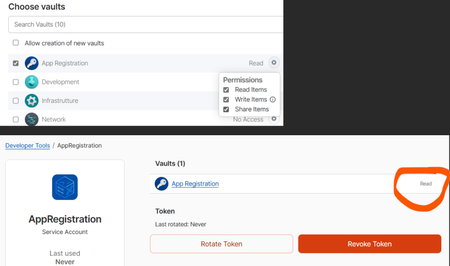
Hi all, I'm having trouble with the permissions of the service account. Even though I grant it read, write and share permissions on a vault when creating the service account, the account is actually created with read-only permissions. This is evident both from the attached image and from the code I am running (Python SDK) which can access the vault for reading, but not for writing. The error I am getting is: you do not have the right permissions to perform this action: not sufficient permissions for the item update operation I also tried to create the service account again with all the necessary permissions, but the problem persists, even though I grant it permission to create vaults. I have no idea what it could be or what else I could try. ThanksSolved459Views0likes5Comments