Our community is getting an upgrade on July 2nd! Learn more in the FAQs →
windows
21 TopicsImproved date formatting in the 1Password desktop app
Hello 1Password Community! With the next update to the 1Password desktop app (version 8.10.80), we have improved how date formats are handled when viewing and editing an item. Leading up to this update, there has been some inconsistency with how the desktop application has handled date formats when viewing and editing items. In some cases, date formats were being determined by the display language set in 1Password whereas in other cases, date formats were being determined by the language set against the device. This has led to some users seeing different date formats within the desktop app causing confusion. With this update, we've made things consistent by ensuring that dates saved against items always appear in a format determined by the locale set against your device (both when viewing and editing items) and never by the display language set in 1Password. This way, the desktop application can support more date formats than just the ones tied to the display languages that we support. Along with the recent improvements that we made to the date picker, we are hoping that you enjoy a much improved experience with dates in the 1Password desktop application! Thank you!1.4KViews4likes28CommentsMay 2026 at 1Password: Native macOS AutoFill, a new developer site, and more!
In May, we introduced new features for Autofill on macOS and Android, as well import/export enhancements, and a way to create items more efficiently. We also relaunched our developer documentation hub with new quick start guides, powerful search features and a fresh domain change to match. In case you missed it macOS native AutoFill in beta We know you've been waiting for this one! In the latest 1Password for Mac beta release (version 8.12.22) we've integrated 1Password with Apple's native Passwords API. This allows your password manager to act as a system-level Credential Provider on macOS. Using the native Passwords API, alongside Universal Autofill and 1Password in the browser, will give you a more consistent filling experience across macOS. This is one of our most requested features, and we’re working hard to bring it to the production channel after the beta release. Follow these steps to try macOS AutoFill for yourself: Install the latest version of the 1Password for Mac beta. Navigate to 1Password Settings > Autofill > Set up macOS AutoFill. Select “Turn On” from the macOS permission prompt. If you’re using Safari, confirm Safari Settings > AutoFill > User names and passwords is enabled. * This feature requires macOS 14 Sonoma on Apple silicon. We’d love to hear your feedback on the update in our announcement post! Updated developer documentation Interested in setting up a service account for your AI agent, securely provisioning secrets, or managing your project’s environment variables? You’ll find in-depth guides covering all this and more on 1Password.dev, our new developer documentation hub. Our team has refreshed and reorganized the documentation to make it even easier to get started with our developer tools. We’ve also added some new get-started guides for developers, admins, and partners, as well as enhanced search functionality that lets you ask questions in plain language. 👉Read the full announcement in the Developer Community. More product updates announced this quarter If the macOS update wasn’t enough, May also brought a number of product updates including: the Autofill health check, Credential Exchange Protocol (CXP), and smarter login creation. You often need to tweak multiple system settings in multiple menus to ensure a consistent autofill experience on Android. If you miss a setting, or your device changes something without telling you, it can be tough to track down and fix the issue. Our new Autofill health check brings these settings into one place and highlights any settings that need to be changed. You might recall that we’ve been working on a new way to import and export data. This work is part of an industry wide effort to better facilitate credential migration across different systems with the CXP. That new process is now live in iOS and Android, making it easier to move everything including passkeys (yes, you can now export passkeys!) between different password managers. Last but not least: instead of starting with a blank login item, you can now type the name of widely used websites, like Reddit or Steam, into the title to prefill key fields. This not only means you can create items faster, but also helps ensure your items are filled where you use them. Random but Memorable May 7th was World Password Day! To mark this special day, we sat down with 1Password CISO Jacob DePriest to talk about the future of identity security. If you want to know where the cybersecurity industry is going, this one's for you!". In our latest episode, Gerald Auger, founder of Simply Cyber, shares his tips to stay secure during the summer travel season. The future of identity security | World Password Day special! Cybersecurity tips for the modern traveler Don’t forget to subscribe to the Random but Memorable YouTube channel! Release note highlights Browser Extension Creating a new item in the 1Password browser extension now opens a pop-up window instead of opening the full 1Password app window. Fixed an issue where you weren’t prompted to update a saved login after you changed your username on a site but kept the same password. Fixed an issue where the 1Password could lock unexpectedly after you switched tabs. Fixed an issue where 1Password in Safari could show an endless loading state when it couldn’t connect to the desktop app. Mac, Windows, and Linux You can now use Codex to interact directly with 1Password Environments using a local MCP server (currently in beta). We’ve improved support for importing your data from Bitwarden using CSV files. Secondary windows of the 1Password app will now open on your active display instead of your primary display. You’ll no longer see the option to share an item if item sharing is turned off for your 1Password account. iOS, and Android [iOS only] You can now control whether or not you’re prompted to unlock 1Password when you see prompts to save items in 1Password for Safari. [iOS only] Fixed an issue where you could see two prompts to unlock with Face ID when you selected a login to fill above your keyboard. [Android only] Fixed an issue where dates wouldn’t be localized according to your system locale settings if your in-app language was set to “Use system defaults”. [Android only] Fixed an issue where similar Identity items would be hidden from Autofill suggestions.525Views2likes0CommentsImport, autofill, organize: What's new in 1Password this quarter
Hey everyone! We’ve got a new round of updates rolling out this quarter, focus on some of the everyday parts of using 1Password such as migrating your data, saving new passwords, getting Autofill set up, and keeping your items easier to find for later. Here’s a quick look at what’s new: 🚚 A direct way to move your credentials into 1Password Switching password managers hasn’t always felt straightforward. Exporting sensitive data into files, moving them yourself, and importing them again adds friction and risk. We’re improving that with a direct credential transfer. This work is part of the Credential Exchange Protocol (CXP), an industry effort to make credential migration more secure and interoperable. We helped author the FIDO Alliance’s Credential Exchange Format (CXF), a proposed standard that defines how credentials like passwords, passkeys, and other sensitive data can be structured and transferred safely between providers. For you, this means a simpler experience on both iOS and Android, letting you move your credentials into 1Password without relying on manual export and import, and eliminating the need to handle sensitive files yourself. 🤖 Autofill health check on Android Android Autofill depends on a handful of system settings, and when one of them is off, it’s not always obvious what’s wrong or where to fix it. The new Autofill health check brings those settings into one place and checks them for you. If something’s off, like Autofill not being turned on, the wrong service selected, or a required permission turned off, 1Password explains what needs attention and takes you to the right Android setting to fix it. You’ll find it on the home screen under Help > Autofill health check. 🧠 Smarter login item creation When you add a new login, you can now search for the service you’re saving, and 1Password will fill in the name, website, and icon automatically. So instead of ending up with an item called “login” or a long URL, you get a cleaner entry like “Instagram” with the right details already in place. You can still edit anything before saving, but the starting point is a lot better. Read the full breakdown, including a closer look at each update on the 1Password blog: https://1password.com/blog/import-autofill-organize-whats-new-in-1password-this-quarter As always, we’d love to hear what you think. If you’ve tried any of these updates already, or if there’s another part of saving, filling, importing, or organizing in 1Password that still feels clunky; let us know below!286Views1like1CommentApril 2026 at 1Password: Post-quantum protection, External Checks close the access gap, and AI-era security
In April, we began rolling out new protections that will keep your data safe in a world with quantum computers, we expanded how teams can enforce access with External Checks in 1Password Device Trust, and shared new thinking on AI agents, credential sprawl, and what it takes to secure systems in a faster-moving threat landscape. In case you missed it A first step toward post-quantum security Introducing the first major milestone in our post-quantum cryptography (PQC) journey: as post-quantum protection in the 1Password web app! 1Password now supports hybrid post-quantum key exchange in PQC-capable browsers like Chrome or Firefox. It all happens automatically – no user action required. This helps protect against "harvest now, decrypt later" attacks, where adversaries capture encrypted traffic today in the hope that future quantum computers will be able to decrypt it. This is the first phase of a broader post-quantum roadmap focused on protecting your data against the threats of today and tomorrow. Read more about our first step toward post-quantum security. Building a Mythos-ready security program AI is accelerating how quickly vulnerabilities can be found and exploited, and security programs need to keep up. We looked at what security leaders can do now to prepare for a world where AI-driven vulnerability discovery happens at machine speed. The takeaway: patching still matters, but it can't be the entire strategy. Teams also need to limit the blast radius by controlling access, isolating agentic identities, replacing long-lived secrets, and making it harder for a single exploit to escalate into a larger breach. Read the full post on building a Mythos-ready security program. External Checks in Device Trust 1Password Device Trust can now factor in signals from other systems before allowing access to protected apps. With External Checks, access decisions can include more than device posture. Admins can pull in things like security training completion, policy acknowledgments, MFA enrollment, active employment status, and other verification signals from external systems. External Checks closes the gap between having a policy in place and actually enforcing it when someone tries to reach company apps and data. Learn more about External Checks in 1Password Device Trust. What we learned using AI agents to refactor a monolith We shared a behind-the-scenes look at how 1Password used AI agents to help refactor a large Go monolith. The work demonstrated how agents can be genuinely useful, especially for analyzing large codebases, building deterministic tools, and executing well-scoped changes. It also showed where they still need strong constraints, clear specifications, and human judgment. Read more about what we learned using AI agents to refactor a monolith. Protecting against OAuth-based supply chain breaches Credential sprawl continues to spread across SaaS apps, developer tools, automation workflows, and AI agents. OAuth makes it easy to connect new tools, but those connections can quietly become supply chain risks when permissions are broad, long-lived, or poorly tracked. We looked at how OAuth-based supply chain attacks happen, how Google Workspace admins can check which third-party apps currently have access, and why ongoing discovery is more effective than a one-time audit. Read more about protecting against OAuth-based supply chain breaches and credential sprawl. Chasing Entropy (Season 2) Season two of Chasing Entropy kicked off in April with three new episodes: Why secure-by-design is an incentives problem, with Bob Lord. Dave Lewis and Bob Lord get into secure-by-design principles, AI systems, software supply chains, and why security outcomes need to be owned at the organizational level. What cyber conflict reveals about power and doctrine, with Allie Mellen. Dave talks with analyst and author Allie Mellen about cyber conflict, attribution, geopolitics, and why defenders need to understand intent, not just indicators. Why friction is a security risk, with Dustin Heywood. Dave and IBM's Dustin Heywood (aka EvilMog) get into agentic AI, machine identity, quantum planning, and why security controls that add friction tend to get bypassed. Listen to Chasing Entropy wherever you get your podcasts. Random but Memorable April brought three new episodes of Random but Memorable to catch up on: What it takes to protect – and break into – data centers with Deviant Ollam Are you oversharing with AI? Author Jamie Bartlett has thoughts What to do if you’ve been hacked, with Glenn Wilkinson This month covered the physical side of security, safer AI habits, what to do after a compromise, and how supply chain attacks are feeding into one another. Release note highlights Browser extension Added settings that let you choose which item types appear as autofill suggestions in the inline menu. Reorganized Autofill settings for easier navigation. Fixed an issue where the browser extension didn’t unlock with the 1Password app. Fixed issues with the sign-in banner and Quick Access suggestions in Chrome and Chromium-based browsers on Mac. Fixed several autosubmit and website-specific autofill issues. Mac, Windows, and Linux Improved localization across supported languages. Updated the wording for unlock preset options. Fixed an issue where a LastPass import could fail if the account had multi-factor authentication enabled. Improved how 1Password recovers drafts of items. App icons shown in SSH, CLI, and SDK authentication prompts now display more quickly. [Mac only] Improved handling for shortened Apple Maps links. [Windows only] Fixed an issue where 1Password couldn’t be used as the Windows passkey manager when installed on an external drive. [Linux only] Added a “Start at login” setting, enabled by default in Settings > General. iOS and Android Improved localization across supported languages. Updated the wording for unlock preset options. Improved how 1Password recovers drafts of items. [iOS only] Fixed an issue that could cause excessive background battery use after using AutoFill. [iOS only] Fixed an issue that could prevent 1Password for Safari from unlocking. [Android only] Fixed a crash that could occur when first launching the app. 1Password CLI Added Shell Plugin support for Claude Code CLI, Scaleway CLI, AWS SAM CLI, AWS eksctl, AWS awslogs, and OpenAI Codex CLI. The AWS CDK shell plugin now supports AWS profiles that assume a role with the --profile flag. op run now properly terminates subprocesses when cancelled. 1Password CLI commands now support the Account Trust Log when authenticating with the 1Password desktop app.416Views0likes1CommentUpcoming 1Password webinars
Hi folks, Here's an overview of all the webinars we have coming up in the next several weeks. I hope we'll see you there! Tuesday, May 12th at 8 AM PDT / 11 AM EDT (60 minutes): What's new? 1Password MSP Edition Join our quarterly webinar that is designed to keep you informed, equipped, and connected. During this session you will hear the latest updates from 1Password, get answers to your questions, and learn from your peers. Tuesday, June 2nd at 9 AM PDT / 12 PM EDT (60 minutes): What's new? The 1Password quarterly security spotlight and roadmap review In this webinar, you can look forward to learning about our recent product releases, a glimpse into our product roadmap, upcoming events with 1Password, a deep dive into actionable ways 1Password can support your business' security goals. Thursday, June 4th at 11 AM BST / 12 PM CEST / 1 PM EEST (60 minutes): What's new? The 1Password quarterly security spotlight and roadmap review This is the same webinar, but scheduled to be more convenient for Europe, the Middle East, and Africa.56Views0likes0CommentsMarch 2026 at 1Password: Securing access for humans and AI agents
In March, we introduced 1Password Unified Access – a platform that helps teams discover risk, secure credentials, and audit access across humans, agents, and machine identities. We also shipped some highly requested updates for 1Password Enterprise Password Manager, including Automated Provisioning. In case you missed it 1Password Unified Access is here On March 17, we introduced 1Password Unified Access Pro, a new way for organizations to discover, secure, and audit access across humans, AI agents, and machine identities. As agentic AI embeds itself into IDEs, automation pipelines, browsers, and workflows, the old model of "authenticate once, trust for the session" breaks down. Credentials are no longer just used by people — they're used by local agents, CI/CD pipelines, scripts, and AI-native tools, often outside the visibility of traditional identity systems. Unified Access tackles this head-on via three pillars: Discover. Surface exposed SSH keys, plaintext .env files, long-lived API tokens, and local AI agent activity on employee devices and browsers. Secure. Centralize credentials and developer secrets in 1Password Enterprise Password Manager. Then, control how humans, agents, and machine identities access them. Audit. Maintain a unified trail of who (or what) accessed which credential and when, across every identity type. 👉 Read the full blog post: Identity Security for Humans and Their AI Agents Verified emails from 1Password It should be easy to tell when an email from 1Password is authentic. To help you separate potential scams from legitimate emails, we've added a verified authentication indicator to emails from 1password.com, 1password.ca, and 1password.eu, You'll see them in supported inboxes including Gmail, Apple Mail, Fastmail, and Yahoo. By meeting the strict requirements for verified senders, you can instantly confirm that communication is genuinely from 1Password, and not a phishing attempt. 👉 Read more about how to identify emails from 1Password. Now available: Automated provisioning hosted by 1Password Provisioning is now built directly into 1Password – no SCIM bridge to deploy, no servers to maintain, and no ongoing infrastructure overhead. Connect your identity provider, add a URL and token, and you'll be up and running in minutes. Automated Provisioning is built differently to most hosted provisioning solutions. 1Password's zero-knowledge architecture means our infrastructure can't read your data. Automated Provisioning is powered by a confidential computing enclave, so cryptographic operations happen in isolation — not accessible to 1Password operators or even the underlying cloud provider. 👉 Read the full blog post: Automated Provisioning hosted by 1Password: A Simpler, Smarter Way to Manage Access Random but Memorable Two new episodes dropped this month on our Signal and Webby Award-winning security podcast, and both will teach you to be a better detective: Everything you need to know about OSINT with Kolina Koltai from Bellingcat How to spot AI-generated phishing emails with Bron Gondwana from Fastmail 👉 Reminder: Subscribe to the Random but Memorable YouTube channel to watch video versions of each episode! Release note highlights Browser Extension We’ve fixed an issue that would prevent Autofill from working properly on many websites. We’ve fixed an issue where turning off the option to offer and fill logins and other items in fields could cause other features to stop working properly. Mac, Windows, and Linux We’ve fixed an issue that could prevent the app from opening and cause a blank screen or error message. [Linux only]: You can now select Open Configuration in Settings > Browser to more easily connect the 1Password app to additional browsers. [Windows only]: You can now connect additional browsers installed outside of C:\Program Files, making it easier to use browsers installed at the user level. iOS, and Android We’ve fixed an issue that could prevent the app from opening and cause a blank screen or error message. [Android only]: You’ll no longer see multiple entries for the same login in your autofill suggestions. [iOS only]: We’ve fixed an issue where you couldn’t add an expiration date to an item on an iPad. [iOS only]: We’ve improved performance when scrolling in the AutoFill pop-up. [iOS only]: In Safari, the extension now locks when the 1Password app locks.206Views0likes0CommentsFebruary 2026 at 1Password: Benchmarking AI security & helping developers access secrets everywhere
February was all about AI agent security and developer workflows. From benchmarking model behavior to expanding programmatic access in 1Password Environments and SDK authentication, we continued strengthening how teams build and secure with 1Password. In case you missed it An ongoing conversation on OpenClaw and AI agents OpenClaw exploded in popularity this month, sparking curiosity across AI and tech circles. In short, OpenClaw is an AI agent that runs locally and performs personal assistant-style tasks such as managing your calendar, checking your email, or prioritizing tasks in your GitHub repository. From making reservations to building custom integrations, users have been quick to push the boundaries of OpenClaw. But with the excitement has also come concern. Agent gateways, such as OpenClaw, have access to the systems where they’re installed, making them a prime target for malicious actors. Since the beginning of the year, we’ve already seen skills that secretly instruct AI agents to deliver malware. As the use of tools like OpenClaw expands, it’s increasingly important to understand how to use them securely, and where the potential threats lie. Interested in the whole story? Our VP of Product, Jason Meller, has penned two recent write-ups on the topic: It’s incredible. It’s terrifying. It’s OpenClaw From magic to malware: How OpenClaw's agent skills become an attack surface Security Comprehension and Awareness Measure benchmark You might know how to spot and avoid phishing attacks, but can AI agents navigate the same scenarios? In our testing, even the most capable AI models were susceptible to common phishing strategies. As AI agents take on more tasks for us, and begin to act like employees, how they handle phishing is becoming a significant security concern. That’s why we built the Security Comprehension and Awareness Measure (SCAM). It’s a benchmark that tests how AI models handle phishing attacks when performing tasks like scanning your inbox or filling credentials. Security Comprehension and Awareness Measure (SCAM) Demo Alongside the benchmark, we also created a security skill. that serves as a phishing crash course for AI models. Introducing this skill improved the likelihood that each model we tested would detect and avoid a phishing test by as much as 59.9%. Programmatic access to 1Password Environments beta and desktop SDK authentication general access Building on last year’s introduction of 1Password Environments, we’re now adding programmatic read-only access. This release allows you to programmatically fetch secrets via CLI and SDKs when those secrets are needed, and only for the time that they are needed. Secure your secrets at runtime with the 1Password CLI and Environments With many thanks to our developer community for testing and feedback, we’re also introducing an update to 1Password SDKs. SDK integrations can now authenticate through the 1Password desktop app with a biometric, or password prompt. This supports workflows such as vault management, vault permissions, and batch item operations. Secure your desktop apps with 1Password SDKs Read the full launch post Evolving our partner ecosystem The 1Password Partner Program enables MSPs and other partners to help their customers adopt the familiar security solutions we provide. This program includes access to sales and technical training, as well as go-to-market resources to support onboarding and growth. We’re now focusing on simplicity, transparency, and consistency to best serve our mutual customers, and help partners scale their businesses. If you’re interested in becoming a partner, or learning more about the program you can read more in our blog post, or check out our partner program site. Random but Memorable February marks the start of a new season for Random but Memorable, our award-winning cybersecurity podcast! In this month’s episodes you can learn about practical security for the people you care about most, as well as guiding children to securely adopt AI tools. How security professionals actually protect their own families AI security tips for modern families with Childnet Release note highlights 1Password in the Browser 1Password items are now immediately cleared from the browser extension when a user is suspended. We’ve fixed an issue where 1Password could get stuck in a loop of repeatedly unlocking in Safari. We now correctly detect GitHub redirect URLs in the “Sign in with” flow. We’ve fixed an issue where 1Password could unexpectedly reload on a new tab in Firefox. Mac, Windows, and Linux We’ve fixed an issue where a prompt to turn on two-factor authentication couldn’t be selected. We’ve fixed an issue where the multi-factor authentication prompt could be missing when trying to unlock the app. We’ve added a new developer setting to enable SDK integrations, so you can authenticate SDKs with authorization prompts from the 1Password desktop app. If you load an empty .env file in Developer > Environments, it will now show a message saying no variables were found. [Windows only]: 1Password now supports a wider set of custom trusted browsers. [Windows only]: We’ve fixed an issue where the Windows Hello prompt could appear behind other windows or seem unresponsive. [Linux only]: We’ve updated our Flatpak Freedesktop dependencies to version 25.08. iOS, and Android [iOS only]: We’ve fixed an issue where Secure Note text would be cut off. [iOS only]: We’ve fixed an issue where exporting through Credential Exchange could fail for items with empty or incomplete website addresses. [iOS only]: We’ve fixed an issue where fields were intermittently visible when switching apps on iOS 26 if “Lock on Exit” was set to “Immediately”. [iOS only]: When a file attachment preview screen is dismissed in search results, it no longer re-appears automatically. 296Views1like0Comments
January 2026 at 1Password: Taking on credential sprawl and advanced phishing scams
We kicked off 2026 with a big step forward for access governance with 1Password Unified Access, rolled out stronger phishing protection, and shipped a steady stream of fixes and improvements across every platform. In case you missed it Governing access beyond SSO with 1Password Unified Access In January, we announced the public preview of 1Password Unified Access, a new capability that helps organizations discover and govern company-owned credentials — including shared and non-SSO accounts that often fall outside traditional identity systems. Unified Access combines 1Password Enterprise Password Manager and 1Password SaaS Manager to give admins a clearer view of which apps rely on traditional credentials, who has access, and when that access should be rotated or revoked. When someone changes roles or leaves, you can revoke access and rotate credentials with a single action. For employees, the App Launcher brings both SSO and non-SSO apps into one place, making it easier to get work done without hunting for logins scattered across portals and vaults. The public preview is available to 1Password EPM Business customers in US-hosted environments with at least 100 users. 👉 Read the announcement and learn how to join the public preview. Introducing extra protection against phishing attempts 1Password has always protected you by refusing to autofill credentials on mismatched sites. But we know that sometimes you might not realize why autofill didn't work—so you'd manually copy and paste instead, which could still get you phished. Now, we've added an extra layer of protection. When you try to paste a password into a site that doesn't match the URL saved in 1Password, you'll see a warning pop-up in your browser—a gentle nudge to slow down and double-check the URL before you continue. Phishing attacks are everywhere right now, and thanks to AI, they're harder to spot than ever. Those fake login pages look almost perfect, and it only takes one quick moment to accidentally hand over your credentials to a scammer. This feature is rolling out to all Individual, Family, and Business customers over the next few weeks. For Individual and Family users, built-in phishing protection will be enabled by default. If you're a 1Password Admin, you can enable it for your team in Authentication Policies in the admin console. 👉 Learn more about phishing protection. Random but Memorable We kicked off the new year with an episode focused on cybersecurity resolutions that are actually worth sticking to! This episode turns advice from last season's guests into a practical checklist, covering small, ten-minute wins like freezing your credit, using passkeys, turning on MFA, cleaning up your digital junk drawer, and adopting a "politely paranoid" mindset to spot scams before they do damage. "If your heart rate increases, your caution should too. If a situation is urgent, contact the sender through a trusted channel, NOT the website, email, or phone number you see in the message." – Dave Lewis, Global Advisory CISO 👉 Listen to the episode Release note highlights 1Password in the Browser When setting up the 1Password extension in Firefox, you now see the permissions page first. We've improved localization for a number of our supported languages. We've fixed an issue where a scrollbar could appear unexpectedly on webpages. We've fixed an issue where the 1Password extension could break syntax highlighting for code blocks on some websites. Mac, Windows, and Linux We've fixed an issue where you couldn't interact with the prompt to turn on two-factor authentication when signing in to the app. We've improved localization for a number of our supported languages. We've fixed an issue where one-time password fields from Bitwarden login items didn't import correctly. We've updated the account icon shown in the authentication prompt when using the CLI or SDK desktop app integrations to have rounded corners. We've fixed an issue where the step to download the 1Password extension was missing from Guided Setup for individual and family accounts. We've fixed an issue where selecting the Create vault button multiple times could cause multiple vaults to be created. We've fixed an issue where items containing files could be duplicated or moved into accounts where file storage was turned off. [Mac only]: We've added Dark Mode and clear 1Password icons for macOS Tahoe. [Windows only]: You now only see the Windows Passkeys setup prompt if an unlocked account has the setting "Passkey item support" enabled. [Windows only]: We've added settings to reduce lag and choppy performance on some high refresh rate G-SYNC monitors. [Windows only]: We've fixed intermittent connection issues between the MSIX version of 1Password for Windows and the browser extension. [Windows only]: We've fixed an issue where op-ssh-sign-wsl.exe could fail to translate Windows Subsystem for Linux (WSL) paths to Windows paths, causing Git commit signing to fail in WSL. [Windows only]: We've fixed an issue that prevented ADMX templates from being ingested and applied in Microsoft Intune. [Linux only]: We've improved error messages and made restarting device enrollment smoother when it fails. [Linux only]: The Linux import callouts now point to the correct support article. [Linux only]: Pressing the Alt key now focuses the 1Password menu icon instead of showing the legacy menu bar. iOS and Android We've made improvements to item import and export functionality. We've improved localization for a number of our supported languages. We've fixed an issue where one-time password fields from Bitwarden login items didn't import correctly. We've fixed an issue where the step to download the 1Password extension was missing from Guided Setup for individual and family accounts. We've fixed an issue where items containing files could be duplicated or moved into accounts where file storage was turned off. [iOS only]: We've fixed an issue where search would dismiss when a recent search was selected on iPadOS 26. [iOS only]: We've fixed an issue in Guided Setup where the Autofill step couldn't be marked as complete. [iOS only]: We've fixed a visual issue with the item list menu on iOS 18. [iOS only]: We've fixed an issue where the "Pull down to search instantly" search tip was dismissed too quickly on first sign in. [iOS only]: We've fixed an issue where the search field didn't work when linking a related item, and the full list of items was shown regardless of your search. [Android only]: We've improved the password autofill experience and added passkey support for Vanadium on GrapheneOS. [Android only]: We've fixed an issue where the bottom navigation didn't restore the last selected tab after restarting the app. [Android only]: We've improved autofill in Android apps where username fields were hard to fill or didn't show suggestions.430Views1like1CommentOfficial Release: 1Password now supports Windows 11 Passkeys!
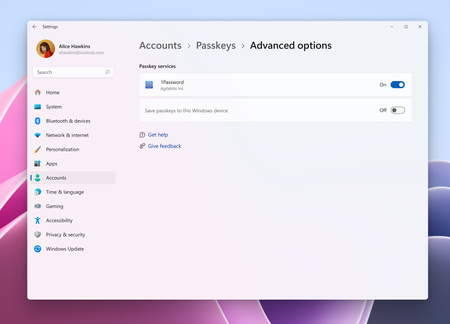
Hey 1Password Community! I’m incredibly excited to announce that 1Password for Windows now supports the native passkey API on Windows 11! As of today, we’re the first and only third-party passkey manager to offer native Windows passkey support in stable. > Passkeys > Advanced Options. After 6 months in beta and working hard to address all your feedback, today’s the day we finally bring desktop-level support for passkeys on Windows 11. No browser, no problem. You’ll be able to seamlessly sync and manage passkeys on Windows, with 1Password as your credential manager. We’re also introducing an improved onboarding flow to enable 1Password passkeys on Windows 11 to better meet you where you are. arding flow to make it easier to enable 1Password as a passkey provider on Windows 11 As previously mentioned during beta, this integration requires the MSIX version of 1Password for Windows. It uses the MSIX technology to better support all the functionality Windows 11 offers, including system-level passkeys. We’ve already begun the process of migrating nightly and beta users to the MSIX build, and we’re starting to migrate those on stable today. If you’d like to get a jump start, you can download the latest version of 1Password for Windows below. To try out the new passkeys feature on Windows: Ensure you are on the most up-to-date version of Windows 11. Download the latest version of 1Password for Windows here. Enable the passkey feature in your desktop app through the new onboarding prompt, or with Settings > Autofill and enabling the Show passkey suggestions setting. You should be redirected to enable 1Password as the system authenticator. If not, enable System Settings > Account > Passkeys > Advanced options. Then, enable 1Password using the toggle. As of today, the ability to use passkeys is available to all Windows 11 users. We’d again like to thank the Windows Security team for partnering with us so closely in order to get this out the door. Try it out and let us know what you think!2.8KViews1like5CommentsDecember 2025 at 1Password: More browser options, easier sign-in, and safer saving and filling
Welcome to your monthly roundup of what’s new in the world of 1Password! Additional browsers now supported in 1Password for Windows 1Password now supports additional browsers on Windows including Zen, Opera, Waterfox, and Floorp. This much-requested update lets you save and autofill vault items without leaving your preferred browser. Now in beta: New sign-in experience in 1Password browser extension If you have an Individual or Families membership, you can choose to try a new feature in the beta and nightly version of the 1Password browser extension. This new sign-in experience combines all the sign-in methods – passwords, passkeys (coming soon), social logins, OIDC & SAML – into a single, simple interface focused on getting you where you want to go. To activate this in the beta or nightly version of the 1Password browser extension, go to Settings -> Autofill & save and switch on Sign in with Universal Sign On. Let us know what you think! New policies available to administrators for auto-save and auto-submit If you’re a 1Password Enterprise Password Manager administrator, you now have more granular control over filling and saving behavior: Autosave: Choose which item types 1Password can offer to save (credit cards, identities, logins, OTPs, passkeys, social logins, etc.). Autosubmit: Control whether 1Password can automatically submit forms after filling or if you want users to do that step themselves. Now in beta: Improved email options for account recovery We’re rolling out new account recovery options in beta for 1Password Enterprise Password Manager administrators . If you aren’t seeing this option yet, hang tight – you will soon. Administrators can choose to route recovery emails to specific users to get faster follow-ups and reduce email volume – or even send them to your internal IT ticketing tool. We hope this makes account recovery a simpler, faster process for everyone and would love to hear your feedback on it. The complete first season of the Chasing Entropy podcast available It’s a wrap on the first season of our new show, the Chasing Entropy podcast! This season Dave Lewis, 1Password Global Advisory CISO, sat down with dozens of CISOs and security leaders to discuss how security works in their organizations and what keeps them up at night. All episodes are available now wherever you listen to podcasts. Release note highlights Browser Extension We’ve added a new setting to manage whether 1Password.com automatically unlocks when your 1Password browser extension is unlocked. You can find the setting in the browser extension under Settings > Security > “Sign in to 1Password in the browser automatically”. Mac, Windows, and Linux Fixed a bug so Large Type no longer disappears when the display zoom is set above 100%. [Mac only]: We’ve expanded the additional browsers you can connect to the 1Password app to include browsers that use more complex background processes, such as SigmaOS and Atlas. [Windows only]: We’ve fixed an issue that caused the 1Password app to become unresponsive for 30 seconds after you turned on passkey support. [Linux only]: You no longer need to authenticate approval prompts on Wayland when 1Password is already unlocked. [Linux only]: We’ve fixed an issue that prevented the authorization prompt from appearing on Wayland. iOS, and Android We’ve moved the location of the “Unlock with device” setting under the “Unlock” heading in Settings > Security. We’ll resume our monthly highlights in January, 2026. We hope you have a wonderful end to 2025, and we’ll see you in the new year!1.1KViews1like7Comments