
dfibuch
August 27, 2026

Feedback: Universal sign-in, a new Autofill Experience

  • August 27, 2026
  • 166 replies
  • 431 views

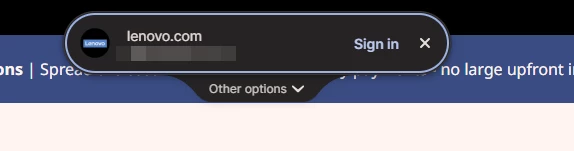
Noticed this morning this Sign in prompt when I go on a site that is stored in my 1P. Can’t find any info about it. Anyone got any ideas when it was released and do we have any control over it?



Pinned Reply By 1P_Dave

Hello folks! 

Thanks for all the feedback everyone has shared about 1Password’s new universal sign-in experience. 1Password now brings password, passkey, and other sign-in options into a single and convenient prompt for all of your logins. 

As we continue refining the new experience, based on feedback and reports from customers, the new experience has been temporarily turned off for 1Password Business users. If you use 1Password through your employer, you’ll see the classic experience for now. We plan to re-enable the new experience for business customers soon and will share updates as they become available.

If you use a personal 1Password account, and you’d like to use the classic experience too, you can follow these steps: 

  1. Right click the 1Password icon in your browser’s toolbar and select Settings.
  2. Choose Autofill & save from the side menu.
  3. Toggle off Use universal sign-in for logins.

-Dave

166 replies

September 9, 2026

Unfortunately, this feature cannot be disabled on macOS or in Safari, even though the toggle in the settings is turned off … At the moment, we can't work with our usual workflow and at our usual speed. Please make sure that this feature can at least be disabled …

1P_Dave
1Password Employee
1Password Employee
September 9, 2026

@WeLoveTech 

You can turn off Universal Sign-in using the steps in the pinned post here. Once you’ve turned off that setting you should no longer see the sign-in prompt appear in the top-centre of the page and you should see suggestions appear underneath the username/password fields again: 

Are you still seeing the prompt in the top-centre of the screen? 

-Dave

September 9, 2026

And with the newest Safari Update this is not working. Even though I have disable the part in the settings it still appears as it is enabled...with the former version it was possible to disable it.

September 9, 2026

This new feature is actively worse then the previous ones. First it shows up so far away from the login that is sometimes hard to spot, second it keeps asking me to log in when I am already logged in to a site, but most importantly it is absolutely TERRIBLE if you have multiple logins to the same site. There is NO search, and the logins are in no obvious order. My company has 40+ logins saved to the same site, and it is an absolutely terrible experience to try and find anything. Previously I just typed in the username box and the one I wanted popped right up. Now it is awful. I have turned off thew new experience and will not use it again without a major rework. 

September 10, 2026

I have this exact sane problem, even when logged into a site I am being prompted as I navigate around the website.

1P_Dave
1Password Employee
1Password Employee
September 10, 2026

Hello! I’ve replied to you here

-Dave

September 9, 2026

Multiple members of my work team (including me) disliked it immediately. Weeks later, they hated it. Today we disabled it -- which wasn’t easy since (unknown to us at the time) the setting doesn’t exist in the main 1PW app. You can only see it directly in the browser plug-in settings.

In any case, some folks like autofill, some don’t. But nobody wants a popout box obstructing the page asking you if you want to use autofill...that sort of defeats the purpose of autofill, yeah?

1P_Dave
1Password Employee
1Password Employee
September 10, 2026

@BikeMaker 

I’m sorry that Universal Sign-in doesn’t meet your needs for now, you can definitely return to the classic experience if you prefer that! 

The setting to turn off the feature is in the browser since it’s a browser-only feature and some people don’t use the desktop app. 

-Dave

September 10, 2026

I dislike this new universal sign in, it has been a hinderance, I have deactivated it now. The problem is it does not work for all websites, so it is not saving time. Sometimes when it misses the Username I try manually typing the data in and the new overlay keeps stopping my text. Yes, easy to fix and log in but when you're logging into 50+ sites its annoying. 

1P_Dave
1Password Employee
1Password Employee
September 10, 2026

@henryk 

I’m sorry that you ran into issues with the new sign-in experience. Are you able to share some of the websites where you ran into this issue so that we can take a look? 

-Dave

September 10, 2026

I like this new feature, but for some sites (Target for example) even when I am logged in it continues to pop-up on every page I navigate to. Are you aware of this issue?

1P_Dave
1Password Employee
1Password Employee
September 10, 2026

@thebruge 

This is a known issue with Target and a bug report is filed with our team to get this fixed, for now you can dismiss the prompt on those pages. I’m sorry for the inconvenience. 

Are there any other websites where you saw the same issue? If you did, so that we can get this fixed, can you share a little more information about these sites with our support team: 

  1. Open the website in question and sign in.
  2. Wait until you see the sign-in prompt appear when you’re already signed in. 
  3. Right-click on the page and click "1Password - Password Manager" > Help > Collect Page Structure. 

Attach the resulting JSON file to an email message addressed to support@1password.com

With your email please include:

You should receive an automated reply with a Support ID number. Please post that number here. Thanks very much!

-Dave

September 10, 2026

Thanks, if I find any other pages that hit this issue I will send over the details as you requested.

1P_Dave
1Password Employee
1Password Employee
September 10, 2026

Thank you! 

-Dave

sameerchavan
September 10, 2026

There is another issue with desktop on Mac for Chrome. The new login experiene of showing a pop-up in the center of the screen to login is quite annoying. Some users may like it. But its intrusive and confusing when I have a dozen login for the same site like google. I turned off that in your chrome extension settings but it still keep showing everytime. How to get rid of this. Can I roll back the vesion to kill this? 


Regards,

Sameer

1P_Dave
1Password Employee
1Password Employee
September 10, 2026

@sameerchavan 

Thank you for the feedback, I’ve shared it with the team. You can find instructions to revert back to the classic experience here

-Dave

1P_Dave
1Password Employee
1Password Employee
September 10, 2026

Hello folks! 

Thanks for all the feedback everyone has shared about 1Password’s new universal sign-in experience. 1Password now brings password, passkey, and other sign-in options into a single and convenient prompt for all of your logins. 

As we continue refining the new experience, based on feedback and reports from customers, the new experience has been temporarily turned off for 1Password Business users. If you use 1Password through your employer, you’ll see the classic experience for now. We plan to re-enable the new experience for business customers soon and will share updates as they become available.

If you use a personal 1Password account, and you’d like to use the classic experience too, you can follow these steps: 

  1. Right click the 1Password icon in your browser’s toolbar and select Settings.
  2. Choose Autofill & save from the side menu.
  3. Toggle off Use universal sign-in for logins.

-Dave

September 11, 2026

These instructions were working earlier this week but seem to be out of date now. I’ve updated to the latest extension (8.12.37.1) and there’s no longer a “Use the new autofill experience for sign in.” setting. There’s a “Use universal sign in for logins” option now, but even turning that off doesn’t stop the annoying round pill from showing at the top of the screen. Is there another setting to turn off?

1P_Dave
1Password Employee
1Password Employee
September 11, 2026

@andyn3 

Thank you! I’ve edited my post above to match the phrasing in the latest version of 1Password. 

even turning that off doesn’t stop the annoying round pill from showing at the top of the screen

So you see the prompt for all logins? Or just for some? Can you share a website where you see the prompt so that I can take a look? 

-Dave

September 12, 2026

I just noticed that the universal sign in doesn’t offer the same options as the user name field icon does. This is incredibly annoying because I have to go up there, realize that the proper option isn’t available and then move my mouse a second time to go back to the input field. 

Here are some examples:
For my credit card sign in, I have three entries. 2 I use every week and 1 I rarely use. The universal sign in showed me 1 I use every week and the 1 I rarely use. It didn’t show me the other one I use every week. But when I go to the user name field, I get all three.

second example:
I have many signins for TD because they share a common authentication infrastructure. The universal sign in only showed me the TD Easy web options, even when I was on webbroker’s sign in. When I click on the user name field of the webbroker page, the options presented are the webbroker options listed first, which is perfect. 

September 13, 2026

With the proliferation of Passkeys and such, I agree that this is a nice feature. It would be even better if there was the option of a (customizable) keyboard shortcut that would trigger sign-in, so that you don't always have to click.