
dfibuch
August 27, 2026

Feedback: Universal sign-in, a new Autofill Experience

  • August 27, 2026
  • 194 replies
  • 486 views

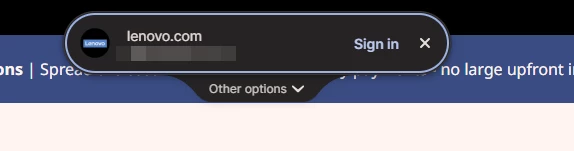
Noticed this morning this Sign in prompt when I go on a site that is stored in my 1P. Can’t find any info about it. Anyone got any ideas when it was released and do we have any control over it?



Pinned Reply By 1P_Dave

Hello folks! 

Thanks for all the feedback everyone has shared about 1Password’s new universal sign-in experience. 1Password now brings password, passkey, and other sign-in options into a single and convenient prompt for all of your logins. 

As we continue refining the new experience, based on feedback and reports from customers, the new experience has been temporarily turned off for 1Password Business users. If you use 1Password through your employer, you’ll see the classic experience for now. We plan to re-enable the new experience for business customers soon and will share updates as they become available.

If you use a personal 1Password account, and you’d like to use the classic experience too, you can follow these steps: 

  1. Right click the 1Password icon in your browser’s toolbar and select Settings.
  2. Choose Autofill & save from the side menu.
  3. Toggle off Use universal sign-in for logins.

-Dave

194 replies

September 17, 2026

This feature has been fine for personal use in my experience, but awful for business where we have a SaaS product with dozens to hundreds of logins we’re sharing on the same domain.

It needs to allow you to search and filter down by title like the old login method would filter (specifically if we saved an item as “{productName} - {tenantName}” as the login item name, we could type {tenantName} into the username box and it would filter the popup to only those values). 


A more concrete example would be a website running on mysaasplatform.com. If we had a tenant named TestUSEast, we may have a url like login.mysaasplatform.com/testuseast. 1Password shows all the options for mysaasplatform.com and we would typically start typing testuseast into the username box and it would filter the options in the dropdown to our “MySaaSPlatform - TestUSEast” login item.

This is a must have feature (or something equivalent that’s easy to use) to use this new sign in experience in our business accounts. 

1P_Dave
1Password Employee
1Password Employee
September 21, 2026

@zsexton 

Thank you for the feedback! I’ve passed your request for a way to filter/search through login suggestions to our team internally. 

-Dave

September 18, 2026

Just have to say hats off to the 1P team. The new chrome extension sign-in banner that floats at the top of the page rather than dropping down from the form field is absolutely awesome. I have many sites with multiple logins defined (web site testing for example), and the drop down selector is so much better than the old behavior. I also love the selector appearing at the top of the page. Would love to see the same behavior in Firefox. Probably not possible in chrome on android, but boy it would be a lifesaver there as it is so hard to pick out the right login for a site with multiple saved.

1P_Dave
1Password Employee
1Password Employee
September 21, 2026

Thank you for the feedback! We’re thrilled that you’re loving the feature in Chrome and we’re working to release it for Firefox as soon as possible. We’ll also continue to look into what we can do to bring a similar feature to Android in the future. 

-Dave

September 19, 2026

This was already an issue prior to the new “universal login” update to 1Password, but i’m wondering if there’s a way, maybe some sorta dial, that allows you to tell 1Password to stop suggesting a login to a web site that i’m already logged into? Or suggesting to sign into / autofill fields that have nothing to do with anything password related?

September 21, 2026

I am trying to stop this universal sign-in toast from coming up every time I go to a web site in chrome. I’ve gone to settings and disabled Universal Sign-In but i still get the drop down. Latest version of everything. Tried quitting and starting chrome.  Please help! This is the most annoying thing. I can’t stand that it isn’t easy to opt-out of new features that disruptively disturb known workflows. Instead of doing my work, I’ve spent the last 45 minutes dealing with this. Argh!!!!

1P_Dave
1Password Employee
1Password Employee
September 21, 2026

@jimmyjayp 

Make sure that you’ve followed these steps: 

  1. Right click the 1Password icon in your browser’s toolbar and select Settings.
  2. Choose Autofill & save from the side menu.
  3. Toggle off Use universal sign-in for logins.

You’ll need to do this in each browser, and browser profile, where you use 1Password. If you still see the new sign-in experience after following these steps then can you share a screenshot of the prompt that you see? 

-Dave

September 21, 2026

As I said, I did that - it didn’t stop the behavior.

September 21, 2026

Everyone who’s updated at my company is having the same painful experiences.

1Password never presents the passkey list at our 2FA screen. It times out after a few minutes and falls back to the Windows passkey-select prompt.

Once you log in and are taken to your dashboard 1Password shows “Finish signing in on this page” even though there are no credential fields on the page.

This update feels like a beta test and does not match the quality of experience I expect from 1Password.

September 21, 2026

I debugged the process pretty extensively. What I found was that in 10 out of 10 tries 1Password failed to show the use-passkey prompt when we call `navigator.credentials.get()` immediately on page load. We added a change to wait for page load or 500ms, whichever is longer, before calling `navigator.credentials.get()`. This resulted in the prompt appearing in 10 out of 10 tries.


This is an ugly solution. The better solution requires implementation by 1Password: If 1Password accepts the ceremony, it should queue the request until the UI layer is ready and the picker can be hosted; else, decline immediately so the browser handles the request without a 30-second stall.
 

Both options are better than the current behavior of silently failing.

September 21, 2026

@1P_Dave Based on what I've experienced (and reported in my comment above) and on comments from others here, it seems that version 8.12.37.1 of the extension broke the ability to disable universal sign in for passkeys. That is, I have “Use universal sign in for logins” switched off, but I’m seeing the new centered pill UI on sites for which I have a passkey saved. This wasn’t happening prior to September 11, when 8.12.37.1 was released.

Can you confirm that this is the case? I believe you can reproduce it on webauthn.io if you switch off universal sign on.

I reported this last week in a support case, but I haven’t heard anything back there. Given that this has been broken for 10 days now, I’m pretty shocked at the lack of response. Breaking passkeys for an enterprise customer with hundreds of thousands of employees would seem like kind of a big deal.

1P_Dave
1Password Employee
1Password Employee
September 21, 2026

@DaveTO 

I’m sorry for the confusion, this is expected behaviour. We now use the centre prompt for passkeys and “Sign in with” notifications to simplify the experience, rather than showing two separate prompts near the top of the page. The classic passkey prompt was already quite similar to the new centre prompt, so we decided to consolidate these interactions into a single, consistent experience while still giving folks the option to turn the new experience off for password autofill. 

Turning off the new sign-in experience will restore the classic inline menu below the username and password fields for autofill.

I reported this last week in a support case, but I haven’t heard anything back there. Given that this has been broken for 10 days now, I’m pretty shocked at the lack of response. Breaking passkeys for an enterprise customer with hundreds of thousands of employees would seem like kind of a big deal.

I’m very sorry for the delay. I see that my colleague replied to you on Thursday, and I understand how frustrating it is to be waiting for a response. You’ll receive another reply to your latest email soon.

-Dave

September 22, 2026

@1P_Dave  Thanks for confirming. From daily use though, the centre prompt is not an
equivalent replacement for the classic one:

a) It doesn't always trigger — e.g. git.typo3.org at the 2FA step.
b) It's far more intrusive: large and right in the middle of the page.
c) It only shows a single suggestion, so picking the right entry often costs an
   extra click.

Please consider letting the toggle cover passkeys as well.