
dfibuch
August 27, 2026

Feedback: Universal sign-in, a new Autofill Experience

  • August 27, 2026
  • 166 replies
  • 431 views

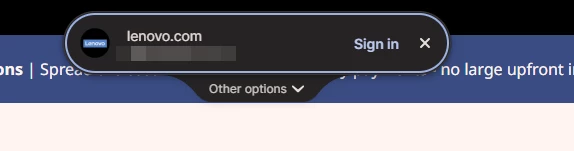
Noticed this morning this Sign in prompt when I go on a site that is stored in my 1P. Can’t find any info about it. Anyone got any ideas when it was released and do we have any control over it?



Pinned Reply By 1P_Dave

Hello folks! 

Thanks for all the feedback everyone has shared about 1Password’s new universal sign-in experience. 1Password now brings password, passkey, and other sign-in options into a single and convenient prompt for all of your logins. 

As we continue refining the new experience, based on feedback and reports from customers, the new experience has been temporarily turned off for 1Password Business users. If you use 1Password through your employer, you’ll see the classic experience for now. We plan to re-enable the new experience for business customers soon and will share updates as they become available.

If you use a personal 1Password account, and you’d like to use the classic experience too, you can follow these steps: 

  1. Right click the 1Password icon in your browser’s toolbar and select Settings.
  2. Choose Autofill & save from the side menu.
  3. Toggle off Use universal sign-in for logins.

-Dave

166 replies

September 14, 2026

I’m using Chrome, and the latest extension update (8.12.37.1) seems to have made this situation even worse.

I tried the new “universal” experience for a day or two when it was first released, then disabled it, and things were fine. But since Friday, I’m not getting prompted to sign in with a passkey to my company SSO (IBM w3 ID) at least 9 out of 10 times I try. When I do get prompted, it’s using the new UI.

I've opened a support ticket (780022), but I had not succeeded at getting a passkey prompt at that point, so the connection to the universal experience was not as clear. I only found this post afterwards, so I thought I’d add my two cents here, as well.

On the larger topic, I really agree with shigeomix’s thoughtful comment. I can see why a Product Manager would ask for a simpler user experience that “just works,” but I think there are difficult trade-offs that should have been considered carefully, and they were not.

We have all been dealing with login forms for decades. We’re very comfortable with the experience. It is jarring to steal focus and pop up a UI element in an unexpected place. We know that this is an imperfect process based on common patterns and heuristics, not a deterministic protocol, so it’s scary to lose control.

If you want to hide the familiar experience and replace it with a single click, you’d better be sure you’re nailing it 100% of the time. You released this feature, enabled by default, without even being anywhere close. This experience is broken on multi-page logins, it’s worse than the old one when you have many logins for a single site, it pops up seemingly at random when you’re already logged in on some sites. And now the old experience is broken for passkeys, too.

For a company that depends on the trust of users to manage their most sensitive data, this is not a good look.

September 14, 2026

This new autofill functionality and UX appeared without any explanation or documentation that I can locate. I did not enable the “new autofill experience”, and I’d love to get off the ride. Why can’t non-business users also have the “Classic” experience option?


The new sign-in presentation significantly reduces functionality and UX quality. It is too far from the sign-in input fields on a large display, the “Autofocus 1Password sign-in prompts when they appear” option does not work (typically a double-tab or click is required), the options are not displayed without a down arrow after obtaining focus on the 1Password pop-up, the options order isn’t similar to the previous behavior.


The macOS autofill functionality with 1Password as the credential provider (what you get when the new “experience” is disabled,  is not better and requires unlocking for every user, regardless of the 1Password security settings.


I get that obtaining new users is the focus of all development, but please try not to break the habits of your existing users:


  • Don’t change default behaviors for existing installations.
  • If you have to significantly change the UI, like the ultimately basic function of using credentials, have a really good reason, and explain it to existing users with a video BEFORE you change it.
Skurfer
September 14, 2026

I turned it off not because I don’t like it, but because I don’t want to see any UI from 1Password. I just want to hit ⌘\ on an unmodified page. I’ve always turned off the visual noise that would appear in username/password fields and now I’ve turned off this new feature as well. Not because it’s bad, I just don’t need a visual overlay for something I have a keyboard shortcut for,

The exception would be when there’s a passkey available. There’s no getting around a prompt in that situation.

September 14, 2026

Some of the issues I’ve run into are nuisance problems, such as the “complete sign-in” box appearing over the top of several sites like the Google admin console.  But the one that is driving me absolutely crazy has been mentioned up the thread but I want to reiterate it as hopefully it is an easy fix:

I have a whole bunch of servers sitting in various URLs with admin portals, so I’ll have xxxxx.mydomain.com and yyyy.mydomain.com, previously the default behavior in the autofill at the user page seemed to look at the entire URL, so if I was at yyyy.mydomain.com it’d default to that credential.  The new UI seems to only look at mydomain.com so its default choice is frequently incorrect.  I have to either cancel the little pill popup and go to the user entry to use the correct (legacy behavior) autofill, or I have to go to the somewhat clunky dropdown on the pill popup.

September 14, 2026

The issue where it was appearing on pages even when signed in was happening on our site.

We tracked it down to a “Connect with us on Twitter” link causing a false positive. Probably because it looks like a sign in link.

This is enough to trigger it:

<a>Twitter Connect with z</a>

Adding data-1p-ignore to the element prevents the dialog.

<a data-1p-ignore>Twitter Connect with z</a>


September 15, 2026

So, I’m seeing this Universal Sign-in behavior on multiple of my computers, but only in Edge or Safari.  Firefox does not show this - is that expected?

September 15, 2026

It’s honestly very confusing. I prefer the previous version.
Thankfully, it can be disabled.

Since I’m here, I’d also like to ask you to improve the web extension (Brave Origin). Whenever I want to edit or create a new item, I have to open the full window, which takes around 10–15 seconds to load. It’s really frustrating.

Why can’t we edit items directly from the extension itself?