
July 29, 2026
Question

Microsoft 365 passkey

  • July 29, 2026
  • 3 replies
  • 20 views

I’m having two issues with Microsoft 365 passkeys when using the 1Password desktop app on Windows.

1. Registering a new passkey

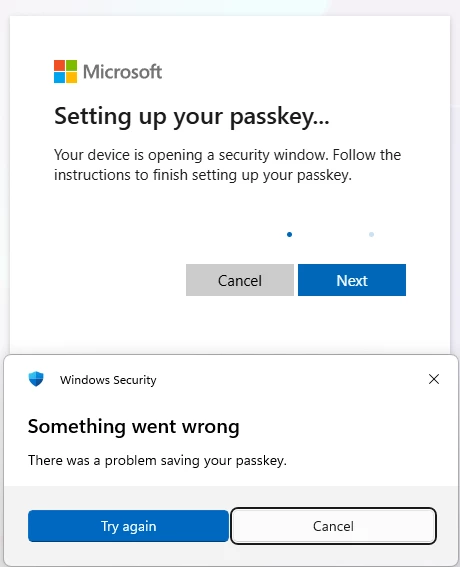
When I try to save a new Microsoft 365 passkey through the 1Password Windows desktop app, either to an existing 1Password item or by creating a new item. Windows Security displays the following error:

“Something went wrong. There was a problem saving your passkey.”


2. Using an existing synced passkey

I already have a passkey that was created and saved using the 1Password app on my mobile phone. The passkey is synced and visible in the 1Password Windows desktop app.

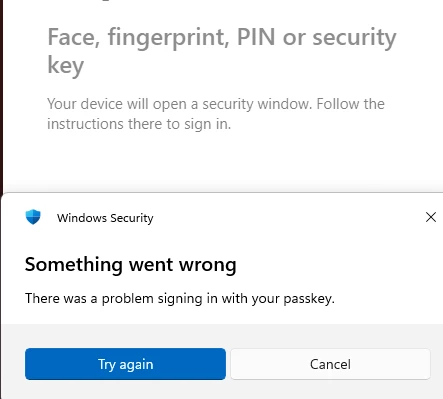
However, when I try to use it on the Windows PC, a Windows Security popup displays the following error:

“Something went wrong. There was a problem signing in with your passkey.”

Both issues occur when the authentication flow is handled through the 1Password Windows desktop app.


I have no such problems with any of the browser extensions, they work fine, both registering and using passkeys.


Version info:
1Password for Windows 8.12.30 (81230021)
Windows11 25H2 build 26200.8655

This topic has been closed for replies.

3 replies

Trevor_1P
1Password Employee
1Password Employee
July 29, 2026

Hi ​@addooco_rs,

Thank you for sharing those details. To help us further look into the cause of the error, I'd like to ask you to recreate the issue then create and share a 1Password diagnostics report from your Windows PC:

Send a diagnostics report (Windows)

Attach the diagnostics to an email message addressed to support@1password.com. With your email please include:
- A link to this thread: 
https://www.1password.community/1password-at-work-58/microsoft-365-passkey-25159

- Your forum username: addooco_rs

You should receive an automated reply from our BitBot assistant with a Support ID number.  Please post that number here.  Thank you!

July 31, 2026

705191

Trevor_1P
1Password Employee
1Password Employee
August 5, 2026

Hi ​@addooco_rs,

Thank you for confirming that! I see that you’re in conversation with the Support team over email, so I’ll close this thread to keep things organized.