
August 17, 2026
Solved

Private Vault's visible after move to hosted SCIM solution

  • August 17, 2026
  • 1 reply
  • 0 views

I moved our account from the hosted SCIM bridge to the managed 1Password hosted solution. 


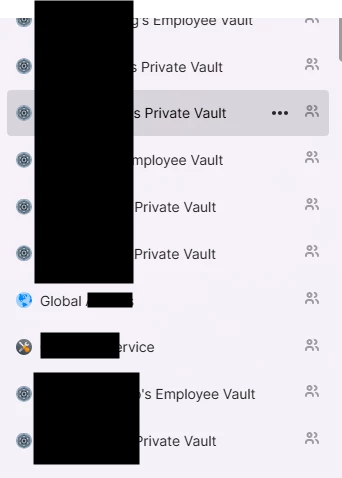
After the move, I (as an account owner / admin) can see in my 1Password apps the private or employee vault of all invited users listed, see below for example.


This is not everyone but it seems it’s all invited users (via provisioning) that have not setup their account. I cannot see anything inside the vaults but these are cluttering up my vault view. 


Best answer by Saqibs

resolved, below is from support:


The visibility of invited user's vaults would be expected behaviour for the user that actioned the migration. 
 
The reason for this is that you will now be a member of the Provision Managers group, which has access to the vaults for invited users that have yet to accept their invitation.
 
If you do not require access to these vaults you can remove yourself from the Provision Managers group via the below steps:

  1. Log in to 1Password web.
  2. Select Groups from the sidebar.
  3. Select Provision Managers.
  4. Select Manage against Members.
  5. Uncheck yourself from the list.
  6. Select Update group membership


1 reply

SaqibsAuthorAnswer
August 17, 2026

resolved, below is from support:


The visibility of invited user's vaults would be expected behaviour for the user that actioned the migration. 
 
The reason for this is that you will now be a member of the Provision Managers group, which has access to the vaults for invited users that have yet to accept their invitation.
 
If you do not require access to these vaults you can remove yourself from the Provision Managers group via the below steps:

  1. Log in to 1Password web.
  2. Select Groups from the sidebar.
  3. Select Provision Managers.
  4. Select Manage against Members.
  5. Uncheck yourself from the list.
  6. Select Update group membership