
July 6, 2026
Question

Secure Input blocking other apps event taps

  • July 6, 2026
  • 8 replies
  • 28 views

Hello,


I know this bug has been reported a gazillion times, but I have exact reproduction steps that hopefully will help you solve the issue
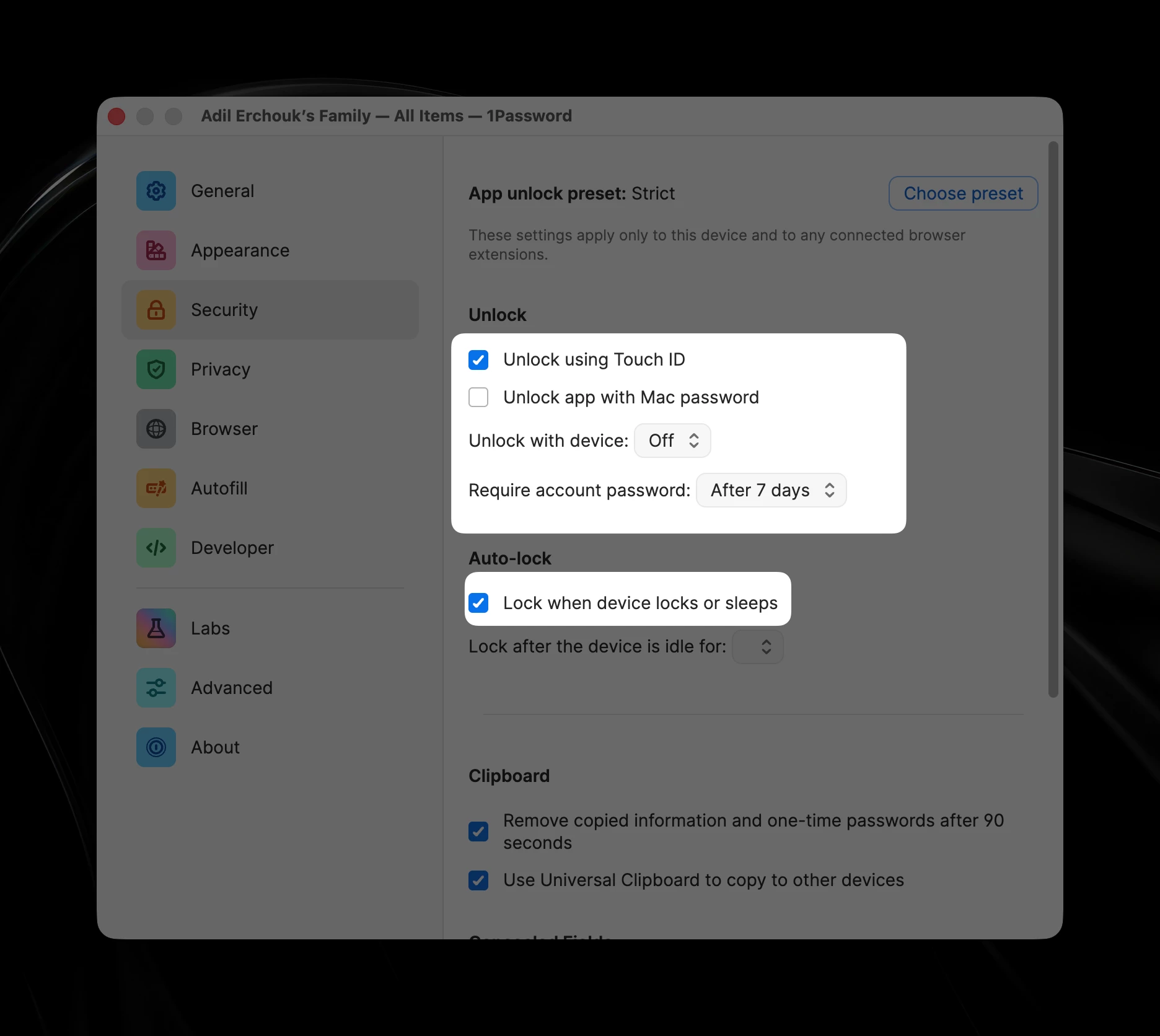
Settings to reproduce the issue
  1. Make sure to have these few Security options 
    1. Unlock app with Mac password: off
    2. Unlock with device: off
    3. Lock when device locks or sleeps
  2. Keep two windows on screen, 1Password and another focusable app
  3. Focus 1Password, lock it (⇧⌘L)
  4. Focus the other application
  5. Lock the screen (⌃⌘Q) - at this stage you might notice 1Password focus flashing
  6. Unlock the screen
  7. Your second application is still focused but you can notice the account password field of  1Password highlighted with the accent color border

From step 7, 1Password is blocking Secure Input and the only way to get out of it is terminating the app or focus then unfocus.

Also at this stage, the system falsely reports other apps as holding Secure Input (using `ioreg -l -w 0 | grep SecureInput`). It often reports `loginwindow` as the holder of Secure Input.


Hopefully, this will help you fix the issue or report it to Apple if it’s an OS issue.


Best regards,

Adil


8 replies

1P_Gem
1Password Employee
July 7, 2026

Hi ​@adilerchouk, thanks for taking the time to share such detailed reproduction steps! I can confirm that I’m able to reproduce this exactly as you’ve described.


Could you let me know your macOS and 1Password versions so I can get this information filed with our developers for further investigation?

July 7, 2026

Thank you, here’s my details:

1Password for Mac 8.12.30 (81230010)

macOS 26.5.1 (25F80)

1P_Gem
1Password Employee
July 8, 2026

Hi ​@adilerchouk, thanks for your reply! I’ve filed this with our developers for further investigation, including all of the details and reproduction steps you’ve provided here.


If you have any further questions or concerns, let me know.

July 10, 2026

This is a “me too”. In my case macOS 15.7.7 and 1Password 8.12.26 with symptoms just as described by ​@adilerchouk 

So this is happening with recent updates of both Tahoe and Sequoia. Maybe this is an interaction between 1Password and one of the many security fixes which are in recent Tahoe and Sequoia updates.

1P_Gem
1Password Employee
July 13, 2026

Hi ​@gilby101, thanks for letting us know you’re running into this behaviour as well. I’ve added your case to the issue on file for our developers to see.

July 16, 2026

Hi, I have another 100% repro, seems mostly correlated to either the Auto-lock settings.

  • Open 1password app, unlock it
  • Then without closing the window switch to something else
  • Lock screen or move laptop to sleep
  • Wait until auto-lock happens (depends on the duration in settings)
  • Unlock laptop. 1Password has Secure Input on, no matter if it's in foreground or not
1P_Gem
1Password Employee
July 16, 2026

Hi ​@adilerchouk, thanks for this additional information! I’ve added these steps to the internal issue as well, to aid our developers in their investigation.

July 16, 2026

This issue is the most frustrating thing I experience daily. It seems like something has regressed because I didn’t have this issue at such frequency.
It’s 100% reproducible as OP described. In short:

  • Open 1password app, unlock it
  • Then without closing the window switch to something else
  • Lock screen or move laptop to sleep
  • Wait until auto-lock happens (depends on the duration in settings)
  • Unlock laptop. 1Password has secure input enabled, no matter if it's in foreground or not. So any hotkeys with option key or hyper key don’t work. Same for snippet expansions in tools like Raycast / TextExpander.

The culprit is most likely is that 1Password app doesn’t check if the app is in foreground before enabling secure input. It should be an easy fix. Please pass it to the team.


July 16, 2026

If it helps, here’s a prompt the dev team can paste in their coding agent for investigation:


## Problem

1Password holds macOS Secure Event Input (EnableSecureEventInput) even when the app is not the frontmost application. While it is held, no other app can install a CGEventTap, which breaks global hotkeys and keystroke handling system-wide (Raycast Hyper Key / Option hotkeys, TextExpander snippet expansion, Logi Options+ mouse buttons, etc.). Secure Input is a process-global, reference-counted flag, so any process that enables it and does not disable it starves every other event-tap consumer on the system.

## Reproduction (100% reliable)

  1. In Settings > Security, turn OFF “Unlock app with Mac password” and set “Unlock with device” to Off, i.e. account-password unlock, the default for most users.
  2. Open the 1Password app and unlock it.
  3. Without closing the window, switch to another app.
  4. Lock the screen or put the laptop to sleep.
  5. Wait for 1Password auto-lock to trigger, per the idle timeout.
  6. Unlock the Mac. Do NOT bring 1Password to the foreground.
  7. Try a global hotkey in another app, e.g. an Option- or Hyper-based Raycast shortcut. It will not fire.

Confirm the holder with: `ioreg -l -w 0 | grep SecureInput`

`kCGSSessionSecureInputPID` will point at the 1Password process even though it is backgrounded and locked.

## Root cause (expected)

Secure Input is enabled on the password-entry / unlock UI but is not disabled when the app resigns active or when that UI is dismissed by the lock/sleep path. The wake-from-lock + auto-lock sequence re-presents or re-focuses the unlock field while the app is in the background, so the enable path runs but the corresponding disable path never does. The enable call is likely not gated on “app is frontmost”, and/or the disable is tied only to explicit window close / field blur, which the sleep path skips.

## Fix requirements

  1. Only enable Secure Input when the app is BOTH frontmost / active AND a secure field actually has key focus. Never enable it while backgrounded.
  2. Disable Secure Input on every exit path: field blur, window resign-key, and especially `applicationDidResignActive` / app deactivation. Treat deactivation and the pre-sleep / lock notification as a hard “disable now” trigger.
  3. Keep the enable / disable reference count balanced, with every Enable paired with exactly one Disable, so repeated lock / unlock cycles cannot leak an extra hold.
  4. Re-evaluate state on `NSApplicationDidBecomeActive` and on wake: if a secure field regains focus while frontmost, re-enable; otherwise ensure it is disabled.
  5. Add a regression test / manual check that runs the repro above and asserts `kCGSSessionSecureInputPID` is clear while 1Password is backgrounded.

## Electron / Rust notes

  • If Secure Input is driven by Chromium’s native `<input type=password>` handling, verify Chromium releases it on blur AND on app deactivation for this specific view; the lock / sleep flow can dismiss the renderer state without firing the blur that Chromium relies on.
  • If the Rust core or native shim calls `EnableSecureEventInput` directly, in addition to Chromium, you likely have a double-hold: audit both layers and make one owner responsible for the full enable / disable lifecycle.
  • Do not rely on process termination to release the flag; the whole point is that it leaks for the lifetime of a long-running, backgrounded app.

Deliver a minimal PR that scopes Secure Input strictly to frontmost + focused-secure-field, with explicit teardown on deactivate and sleep, plus the regression check above.

1P_Gem
1Password Employee
July 16, 2026

Hi ​@pitnikola, thanks for your comment! I’ve added your case and the details you’ve provided to the internal issue for our developers to see as well.