
Oct 15, 2026 12:32 PM UTC
Question

TeamCity Entra login doesn't work automatically

Hi,

When trying to login to Jetbrains TeamCity with Entra, 1P gets stuck with this message but never manages to “click the link”. It works with other similar services like Octopus Deploy.


Brgds

Jonas Hilmersson
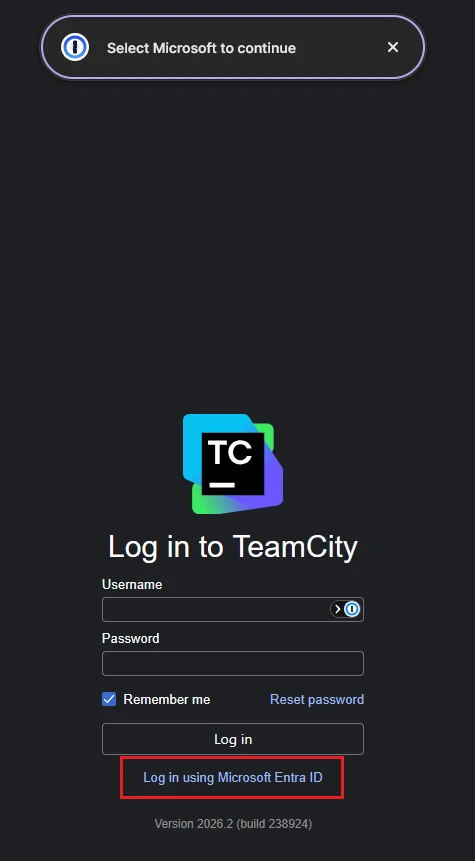


3 replies

Trevor_1P
1Password Employee
1Password Employee
Oct 20, 2026 3:55 PM UTC

Hi ​@jonashilmersson,

I’ve tried reproducing this on my end, but don't seem to be able to get to the same sign-in page as you. If you’re able to, could you share the URL of the specific sign-in page, as well as what browser you’re using?

Oct 20, 2026 6:55 PM UTC

Hi,

Sorry but this is behind a corporate firewall so it’s not accessible without a VPN. But it’s a on-premise installation of the Jetbrains TeamCity  (https://www.jetbrains.com/teamcity/) product. Perhaps you could contact them to see if they have a public demo site with Entra login enabled? Alternatively, I could send you the HTML source behind the login page if that helps.


Brdgs

Jonas Hilmersson

Trevor_1P
1Password Employee
1Password Employee
Nov 3, 2026 8:07 PM UTC

Hi Jonas,

It would be helpful if you could email the support team the page structure. To do so, could you follow the steps below?

  1. While on the sign-in page, right click the 1Password extension icon in your browser’s toolbar.
  2. Select Help > Collect Page Structure.
  3. Attach the JSON file to an email to support@1Password.com.

Within the email, please include:

You should receive an automated reply from our BitBot assistant with a Support ID number.  Please post that number here.  Thank you!