September 15, 2026
Question

"You need to enter your account password before you can use Windows Hello."

  • September 15, 2026
  • 4 replies
  • 6 views

Windows Hello + TPM integration blocked recently (seems to be at the same time as that new unified login prompt UI came out).

Every time I restart my computer, I am now asked to type in my full password.
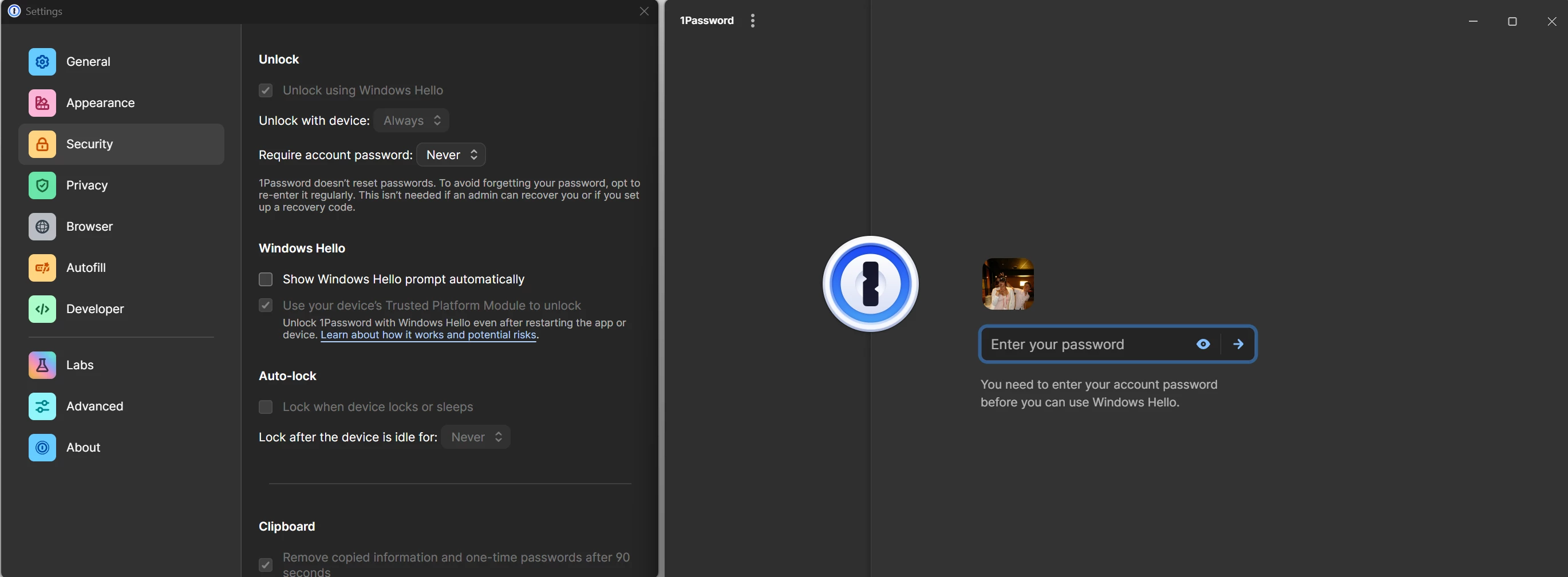
What I see after every boot.
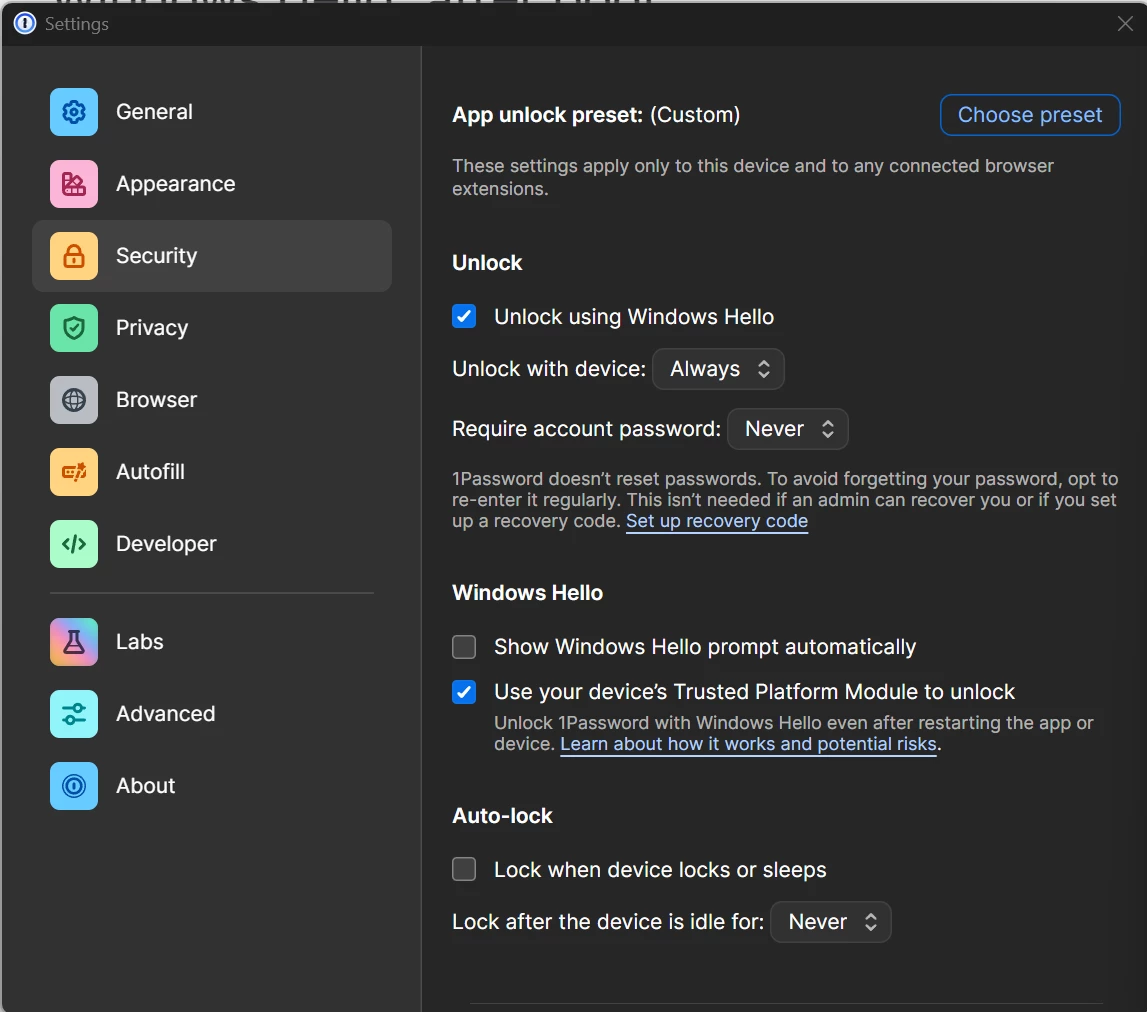
Showing my settings after logging in.

Generally, what happens is:

  1. I restart my PC.
  2. I go to a web-site that needs a password.
  3. 1Password asks me to enter my full password.
  4. Then 1Password uses Windows Hello to authenticate via facial recognition.
  5. Then 1Password uses Windows Hello again to authenticate via facial recognition again.
  6. Finally, my password is entered and I can get on with my day.

It seems very broken.

I can also just close out the prompt at step 4 or 5, and if I manually request the browser extension fill in the password again, it works.

4 replies

September 16, 2026

I’ve used 1Password for years. This feature has never worked on Windows for me. It’s much more consistent on macOS.

olegblAuthor
September 18, 2026

In my case it was working fine for years.

I think it was broken by the release of 1Password for Windows 8.12.36 on September 8 2026.

olegblAuthor
September 18, 2026

Local log analysis (%LOCALAPPDATA%\1Password\logs) shows two distinct, separate bugs:

1. The Windows Hello unlock key is not attempted at startup even when valid

In multiple sessions, the app's own status check reports the biometric key as ready before any user interaction, yet the app proceeds directly to a master-password prompt with no logged attempt to use the ready key:

INFO [...] [1P:app\op-app\src\app\backend\lock_screen.rs:118] System unlock is enabled: trueINFO [...] [1P:op-system-auth-enclave\src\lib.rs:166] Biometry is ready for 1 or more accountsINFO [...] [1P:app\op-app\src\app\backend\lock_screen.rs:155] Sys auth status Ready   (8 seconds elapse — no Hello/biometric unlock attempt logged)INFO [...] [1P:app\op-app\src\app\backend\lock_screen.rs:1014] Attempting to unlock with master password.

This exact sequence — Sys auth status Ready followed directly by Attempting to unlock with master password with nothing in between — repeated across independent app restarts (confirmed in at least two separate session logs). The biometric enrollment is valid and available; the client simply isn't offering/attempting it before falling back to password entry.

2. Re-saving the biometric key after password unlock intermittently fails as "UserCancelled," even when the Hello/PIN prompt is completed

After every master-password unlock, the app re-provisions its TPM-backed key (Adding system unlock key). This step fails with UserCancelled in the large majority of observed sessions — including cases where the PIN prompt was visibly completed by the user:

INFO [...] [1P:data\op-account-system-unlock\src\lib.rs:588] Adding system unlock key. Verifying keysets can be decrypted.WARN [...] [1P:app\op-app\src\app\backend\unlock.rs:630] failed to setup unlock secret: Failed to save encrypted unlock key: UserCancelled

This exact failure recurs across sessions from September 8 through September 17 (build 8.12.36), regardless of whether the enrolled Hello factor is facial recognition or PIN — ruling out a face-recognition-specific cause. A related but differently-worded failure (Enclave(Canceled)) appears in the log from September 8, the day 8.12.36 shipped.

There is also an intermittent, separate low-level failure in the same subsystem:

WARN [...] [1P:op-device-enclave\src\platform\windows\tpm.rs:118] Windows Hello key derivation failed with Error HRESULT(0x80098044), retrying once

This is a known NCryptDecrypt/key-derivation error also seen in other third-party apps performing TPM-backed Windows Hello key release (e.g. github.com/sirAndros/KeePassWinHello issues #113/#116/#118/#119/#120), suggesting a platform-level flakiness in Windows' key-release path that 1Password already has a one-shot retry for — the retry succeeds in some sessions and doesn't get exercised at all in others (straight UserCancelled instead).

Notably, the source file for this warning changed between versions — foundation\op-enclave\src\windows\tpm_hardware.rs:340 (seen Sept 8) versus op-device-enclave\src\platform\windows\tpm.rs:118 (seen Sept 13 onward) — indicating this subsystem was refactored/renamed in a recent release, which lines up with when this behavior became consistently noticeable.

Ruled out during investigation

  • TPM hardware/firmware health (confirmed ready via tpm.msc)
  • "For improved security, only allow Windows Hello sign-in for Microsoft accounts on this device" (confirmed off; toggling it made no difference)
  • Fast Startup / hiberboot (confirmed via Microsoft-Windows-Kernel-Boot Event ID 27 that the relevant reboot was boot type 0x0, a full cold boot, not a Fast Startup resume)
  • Unclean/crash shutdown (no correlating Event ID 41 near the reboot in question)
  • 1Password Security settings misconfiguration (settings already matched documented "correct" TPM-unlock configuration; full off→quit→on→re-setup cycle was also performed with no change)
  • Face-recognition-specific bug (PIN-only Hello exhibits the identical UserCancelled failure)
1P_Gem
1Password Employee
1Password Employee
September 18, 2026

Hi ​@ldinino and ​@olegbl, I’m sorry to hear that, since a recent update, you’ve been having trouble with Windows Hello unlock not persisting through restarts, despite having the TPM option enabled.

This is definitely something our support team will need to dig into further. Could you each create and share a 1Password diagnostics report from your Windows PC:

Send a diagnostics report (Windows)

Attach the diagnostics to an email message addressed to: support@1password.com 

With your email please include:
- A link to this thread: https://www.1password.community/1password-at-work-58/you-need-to-enter-your-account-password-before-you-can-use-windows-hello-25579
- Your forum username

You’ll receive a Support ID number. Please post that number here. Thanks!