Level up your business security with free, on-demand training and certification. Explore 1Password Academy today →
Forum Discussion

jmkiska
2 months agoNew Contributor
1Password in Safari
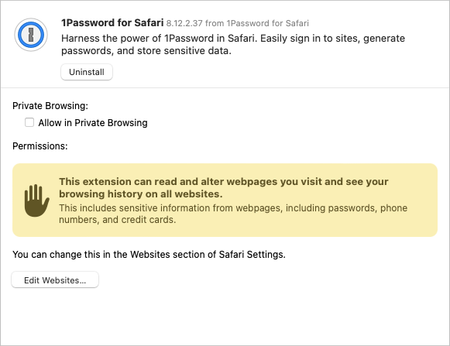
When I open the Safari Settings, and turn on the extension, where do I "Click Always Allow on Every Website."? I don't see that option on the screenshot below:
 2 months ago
Thanks for the feedback. I've been using the extension for a while and don't remember clicking that button. But every time there is an update I was always looking for it. I checked and I'm good.
John
jmkiska
2 months agoNew Contributor
Thanks for the feedback. I've been using the extension for a while and don't remember clicking that button. But every time there is an update I was always looking for it. I checked and I'm good.
John

1P_Dave Moderator
2 months agoModeratorIf you've been using 1Password for Safari for some time then it's likely that you gave 1Password access to other websites when you first installed it. Once access is granted after installation, you don't have to grant it again when updating 1Password for Safari.
-Dave



