Level up your business security with free, on-demand training and certification. Explore 1Password Academy today →
Forum Discussion

kinger
4 months agoNew Contributor
1Password on Linux missing window mgmt controls
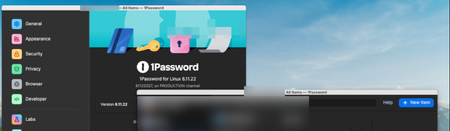
Just installed 1Password (8.11.22) on Elementary OS 8.1 using a Debian package downloaded from 1password.com. The application installed correctly and i am able to login and access my vault. However...
 4 months ago
Adding the technical resolution in case anyone else runs into this. Follows is what support sent me and it worked like a charm.
On elementary OS this behaviour is caused by an upstream limitation with Electron on Linux rather than a bug specific to 1Password. Native GTK applications work normally because they let the operating system draw the window title bar and controls (close, minimize, maximize). Electron apps, including 1Password, draw their own title bar and controls inside the app window instead (“client-side”window decorations).
Eelementary OS does not fully support Electron’s approach to drawing its own window controls, particularly when running under Wayland, which can result in the controls not appearing at all. Electron documents that on Linux the responsibility for window controls is shared between the application and the desktop environment, which can lead to inconsistent behaviour across different window managers. This limitation is discussed directly in Electron’s issue tracker here: https://github.com/electron/electron/issues/44540
As a workaround, forcing 1Password to run using X11 by running this command in Terminal: 1password --ozone-platform=x11 causes elementary OS to draw the window controls itself again, which restores the Closebutton (top left) and toggle between full screen (maximised) and windowed mode button (in the top right). You can also right click the menubar or tap Alt+Space on your keyboard to open additional settings from the menu that appears including Resize, Maximise or Hide, which may help workaround the limitation.
kinger
4 months agoNew Contributor
Adding the technical resolution in case anyone else runs into this. Follows is what support sent me and it worked like a charm.
On elementary OS this behaviour is caused by an upstream limitation with Electron on Linux rather than a bug specific to 1Password. Native GTK applications work normally because they let the operating system draw the window title bar and controls (close, minimize, maximize). Electron apps, including 1Password, draw their own title bar and controls inside the app window instead (“client-side”window decorations).
Eelementary OS does not fully support Electron’s approach to drawing its own window controls, particularly when running under Wayland, which can result in the controls not appearing at all. Electron documents that on Linux the responsibility for window controls is shared between the application and the desktop environment, which can lead to inconsistent behaviour across different window managers. This limitation is discussed directly in Electron’s issue tracker here: https://github.com/electron/electron/issues/44540
As a workaround, forcing 1Password to run using X11 by running this command in Terminal: 1password --ozone-platform=x11 causes elementary OS to draw the window controls itself again, which restores the Closebutton (top left) and toggle between full screen (maximised) and windowed mode button (in the top right). You can also right click the menubar or tap Alt+Space on your keyboard to open additional settings from the menu that appears including Resize, Maximise or Hide, which may help workaround the limitation.
- 1P_Timothy4 months ago
Community Manager
Thanks for sharing that context and workaround! I'm glad to hear our team could help get things sorted.





