Level up your business security with free, on-demand training and certification. Explore 1Password Academy today →
Under Review
Your post has been received and is awaiting approval.
Forum Discussion

Anonymous
9 months agoChecking your device to unlock some accounts
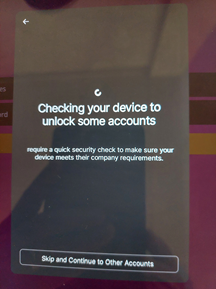
Is this from 1password? It was a new popup when I use autofill on my Samsung Tab S7. It does not go away after a while. The skip button does not word. Only go back helps. Then the autofill works ...
- 9 months ago
Hello Former Member! 👋
I'm sorry that you're seeing an unexpected prompt when trying to autofill on your Android device. This is indeed a prompt from 1Password and our team is aware of the issue. Our development team is currently working on a fix for the issue that we hope to release in a future update soon.
For the time being, as you noted, the prompt can be dismissed by tapping the Back button in your system navigation buttons along the bottom of your screen (or the relevant gesture, if you are using gesture based system navigation).
-Dave
edit: Edited my reply to add more information about the issue.
!31759

1P_Dave Moderator
9 months agoModeratorsparksis and megaroeny
I'm sorry for the disruption. Our developers have identified the cause of the unexpected prompt in 1Password for Android and the team is working on releasing a fix as soon as possible.
-Dave
#39681


