Level up your business security with free, on-demand training and certification. Explore 1Password Academy today →
Forum Discussion

fernandog
2 years agoDedicated Contributor
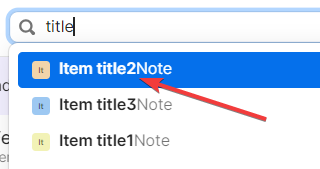
Cosmetic - Missing dash between title and note item in the search results
when searching for items, there is a missing dash in the search results to separate the title and note text
1Password Version: Not Provided
Extension Version: Not Provided
...

snozdop
1 year agoSuper Contributor
When I use the main Search box at the top of the 1Password app window, as I type it auto-populates the menu. However, for some reason, it has recently (can't recall when from) started showing the contents of the Notes field immediately after the Item name. Even if the item has a Username field entered it will prioritise the contents of the Notes field over the Username field. This means identifying the correct account by username when you have multiple accounts for the same service becomes impossible.
For example, I have a number of different Google accounts in my household for various people and various reasons (Gmail, YouTube, Analytics etc.) . I use the Notes field to remind me which account is used for what.
However, when I start typing "goog" into the search box, it shows me the following:
Only the third Google account down actually shows the username associated with the item, all the others show parts of the Notes field. This particular Google account item doesn't have any Notes.
Also, whereas the results that show the username are separated from the Item title by a em-dash (—) the others either butt against the Item title or have an ellisis (...).
I'm not sure what the logic is for showing the Notes field and not the username in the search results, but I'd like a way to turn it off.
1Password Version: 8.10.34
Extension Version: Not Provided
OS Version: macOS 14.4.1
Browser: Not Provided


