Level up your business security with free, on-demand training and certification. Explore 1Password Academy today →
Forum Discussion

Anonymous
3 years agoCtrl + \ no longer "activates" 1Password Windows
After upgrading to the latest version of 1Password Windows I noticed that whenever I am on a login page in Firefox (my primary browser) and press Ctrl + \ , nothing happens. In all the years I've bee...
Anonymous
3 years agoU.S. English keyboard layout.
Just to be clear, once the 1Password window is open, even when locked and out of focus, Ctrl + \ works correctly.
However, when I close the 1Password window (x out of it) and then open any login page, pressing Ctrl + \ does nothing.
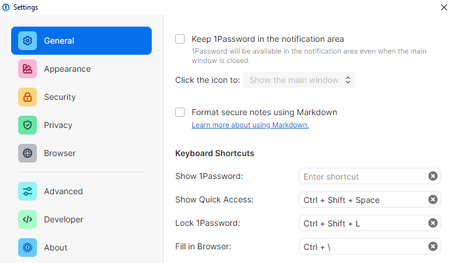
While writing this I looked at my 1Password program settings again and remembered that at some point I turned off "Keep 1Password in the notification area" because I never use it from there.
So I enabled that setting and guess what, now it works correctly again, even when the main 1Password window is locked and closed.
I checked Task Manager in both scenarios. When "Keep in notification area" is disabled and I x out of the 1Password window, I can't find any 1Password processes running at all. No wonder Ctrl + \ is not working. And when the setting is enabled, after locking 1Password and x-ing out of the main window, the 1Password processes are still running. Hence Ctrl + \ working correctly.
If keeping 1Password in the notification area is the only way to ensure Ctrl + \ always works, I am OK with that.
Thanks for helping me resolve this.


