Protect what matters – even after you're gone. Make a plan for your digital legacy today.
Forum Discussion

Anonymous
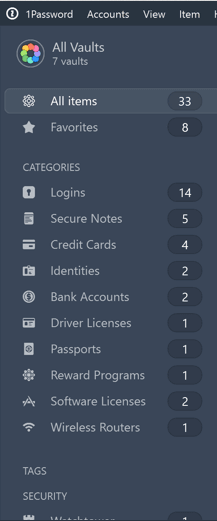
4 years agoDesperately need the categories section from 1Password Windows 7 Sidebar in 1Password 8
Please bring back the categories section in the sidebar from 1Password Windows 7 in 1Password 8; it's super difficult to navigate without it. The current sidebar is very unhelpful. Thank you!
...

roustem 1Password Team
4 years ago1Password TeamI can't find a way to rename vaults or change their icon. Either this functionality is fiendishly hidden, or it has not yet made it into the current build.
Sorry about that, @tiltowaitt. We don't have implemented yet. We also need to make it possible to change how the vault is shared.
I prefer the old search functionality, where typing in the search box filters the item list directly. This has a functional benefit, because there have been times in the past where I wanted to work on several similarly named items in a batch; the new search functionality impedes this type of workflow.
Does the ⌘+Return after you type in the search field work for you for filtering?
Interesting that you mentioned "filter". We had months of internal product debates on searching vs filtering. We wanted to make it easier to search and find the individual items and at the same time allow filtering when needed.
This is probably one of the trickiest part to do well. For example, most of the Login items have the website field with https://something.something but you probably would not want 1Password to show all of them when you type "http" in the search field. Or when you search for gmail, it would not be great if 1Password simply suggests all items that have yourname@gmail.com in the username field (I have over 700 of them):
Instead, 1Password 8 tries to show the items that might be more relevant and gives you a fallback to filtering with ⌘+Return:



