Level up your business security with free, on-demand training and certification. Explore 1Password Academy today →
Forum Discussion

ajahn
2 years agoSuper Contributor
Disabling keychain doesn't let me use Face ID with the Southwest Airlines app
I've never been able to get Face ID working with my Southwest app on my iPhone. I reached out to a friend at SWA and was told the following:
Our app stores your username and password in the keycha...
ajahn
2 years agoSuper Contributor
I actually work for Southwest Airlines. I contacted a co-worker that works in that area. He is the one that told me the username/password is stored in the keychain. I realize this is really not a 1P problem, but what I'm trying to figure out is how I can continue to use the keychain to get the Face ID to work, but not conflict with 1P, if that makes sense.
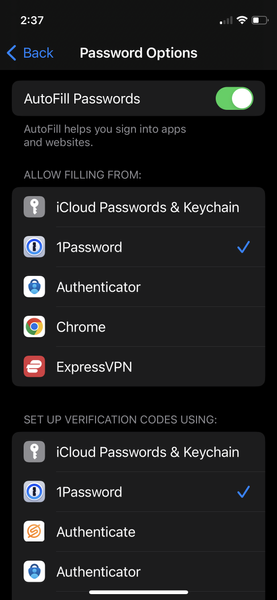
To answer your other questions: Yes, the login info is stored in 1P. I actually use it to log in to the app. But I would prefer to log in using Face ID, so I don't have to click on Passwords (below), which of course uses Face ID to open 1P, then fill in the username and password. I have not been able to get Face ID to work even when the keychain option is checked.
I assume that even if I un-check the "iCloud Passwords & keychain" in the "ALLOW FILLING FORM" section, the keychain is still working on the iPhone, but NOT when filling out a form. Is that right? Also, I also assume that the "iCloud Passwords & keychain" in the "SET UP VERIFICATION CODES CODES USING" section, is only for verification codes, and I should be able to check that without any 1P conflicts since I'm not using verification codes at the moment.
Thanks for trying to help me with this.


