Level up your business security with free, on-demand training and certification. Explore 1Password Academy today →
Forum Discussion

ajahn
2 years agoSuper Contributor
Disabling keychain doesn't let me use Face ID with the Southwest Airlines app
I've never been able to get Face ID working with my Southwest app on my iPhone. I reached out to a friend at SWA and was told the following:
Our app stores your username and password in the keycha...

1P_Dave Moderator
2 years agoModeratorThank you for the reply.
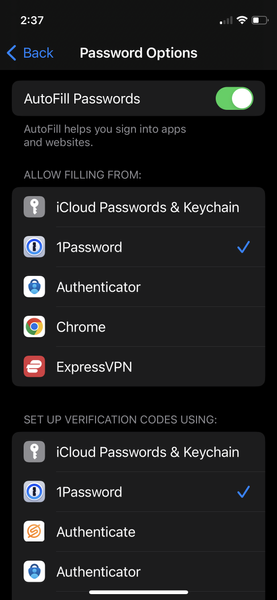
I assume that even if I un-check the "iCloud Passwords & keychain" in the "ALLOW FILLING FORM" section, the keychain is still working on the iPhone, but NOT when filling out a form. Is that right? Also, I also assume that the "iCloud Passwords & keychain" in the "SET UP VERIFICATION CODES CODES USING" section, is only for verification codes, and I should be able to check that without any 1P conflicts since I'm not using verification codes at the moment.
The options that you've mentioned have to do with Password AutoFill, the Apple technology that allows password managers to save and fill passwords inside of other apps. Apps still have the ability to save information to the iOS Keychain even if you disable Keychain for Password AutoFill. For example: when you enable Face ID unlock for 1Password itself 1Password stores in the iOS Keychain an obfuscated version of a secret that is equivalent to your account password. The secret is used to unlock 1Password when your face is recognized.
Here's a post from the Southwest Airlines subreddit that mentions that Face ID support is limited in their app: https://www.reddit.com/r/SouthwestAirlines/comments/127m19n/improvements_to_you_mobile_southwest_account/jef7u8s/
I'm not a Southwest Airlines customer myself but it sounds to me like the app may not actually support Face ID and is instead just allowing you to fill your username and password from Keychain using Face ID, the same experience that you're seeing with 1Password currently. You could confirm this by temporarily disabling 1Password for Password AutoFill and enable just Keychain to see the result. Let me know how that goes. 🙂
-Dave


