Level up your business security with free, on-demand training and certification. Explore 1Password Academy today →
Forum Discussion

JazzSax7
1 year agoNew Contributor
Do Not Offer to Save Password on Specific Subdomain
I am an IT administrator who uses 1Password for both personal and work accounts (with separate vaults), and I am part of multiple teams within my organization. I want to allow prompts to save and upd...

icon
9 months agoNew Contributor
Where is that option? I'm using 1Password 8.11.1 on a Mac, using Brave.
If I click on the 1Password extension I get the login selector window. It has two menus in it:
- hamburger menu
- Notifications
- Lock 1Password
- Settings
- Need Help?
- Report Issue
- Three dots (...)
- Edit
- Scan QR Code
- Add to Favorites
- Change Password
- Open in New Window
- Don't Sign In Automatically
- Share
- Copy Private Link
- Archive
If I click on the suggestions drop-down in a login field I get the expected list of login suggestions. There's an options icon and if I click on that I get these options:
- Password Generator
- Report an Issue
- Extension Settings
If I click on Extension Settings I get taken to a place where there's an Autofill tab that allows me to "Reset hidden pages" but I do not see anywhere to add to the list of hidden pages.

1P_SimonH Community Manager
9 months agoCommunity ManagerHi @icon,
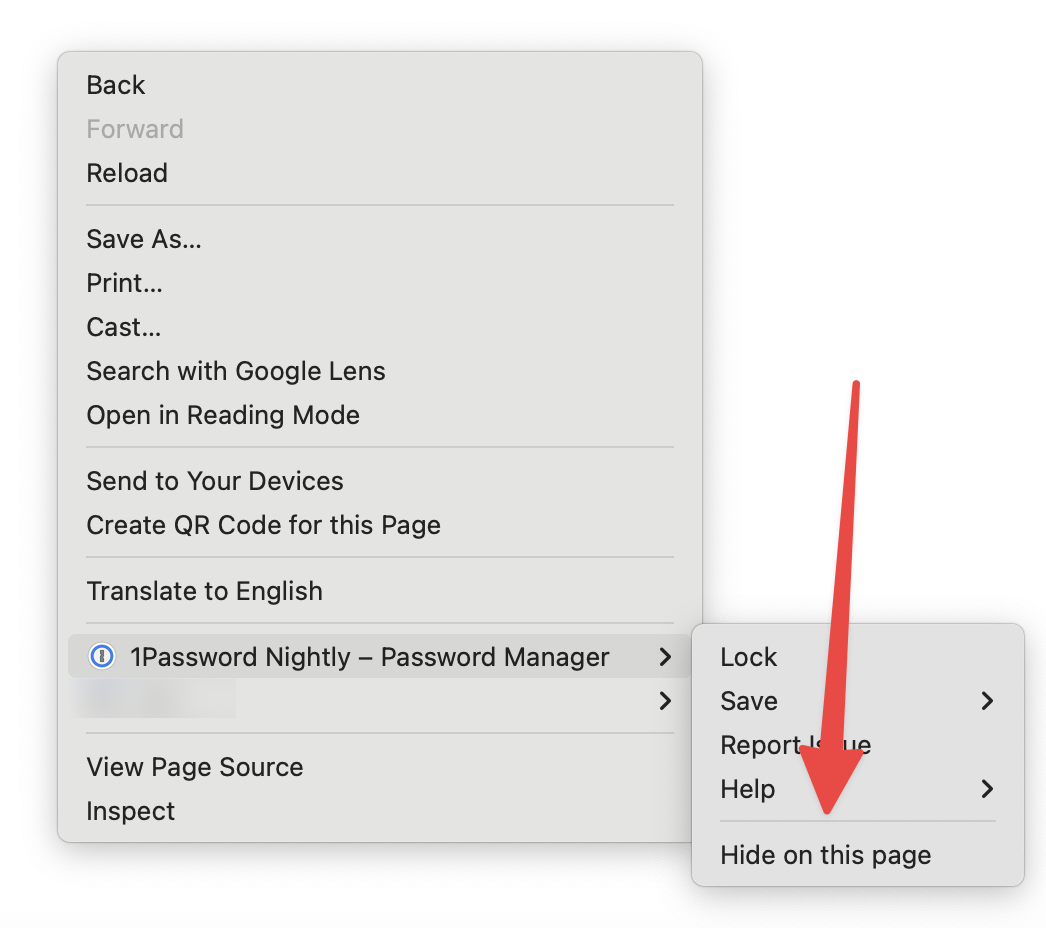
You just need to right-click anywhere on the webpage to bring up the contextual menu and you can select Hide on this page to keep 1Password from popping up on a page where you don't want to use it. Let me know if you have any questions!