Level up your business security with free, on-demand training and certification. Explore 1Password Academy today →
Forum Discussion

Anonymous
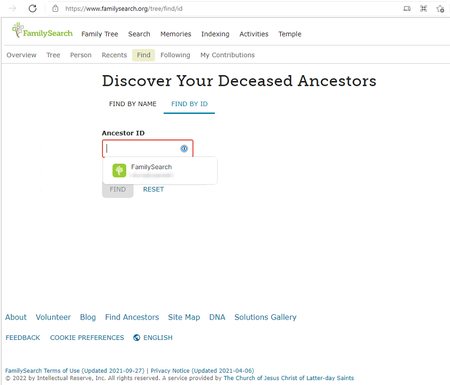
4 years agoFamilysearch.org "Ancestor ID" field prompting to autofill password after being signed in,
I recently got my grandfather set-up with 1password. He often uses FamilySearch.org genealogy work.
Everything works great except while inside familysearch.org in the person lookup section. the "...
Anonymous
4 years agoThanks for the quick reply @makay_murray! Unfortunately, it looks like 1Password thinks that the field should be filled with a username (from my testing), and I have not been able to find an ideal workaround for it. I will report this to our developers so that they can look into the issue and so that in the end we can teach 1Password to not make suggestions via that field.
At this time, there is not a way to disable 1Password for specific URL's, but it is indeed something that has been requested. I'll be happy to add your voice to the feature request, and I can also bring this up internally with my team. While I can't make any promises, I know this is something that would help many users, and I will do my best to advocate for it.
For now, the best options would be to have your grandfather click on ESC to close the inline menu when he clicks into that field. He can also click on the blue 1Password icon to close the inline menu.
One final option is to turn off the inline menu and keep it from automatically appearing in the browser. The thing to note though is that this would apply to all sites. If your grandfather doesn't mind, he can then click on the blue 1Password icon to bring up the inline menu so that he can save and fill his logins. I know this isn't an ideal solution, but it is something that could help with intrusive suggestions and yet would still allow your grandfather to utilize the inline menu when needed.
To keep the inline menu from automatically appearing:
- Right-click the 1Password icon on the top right corner of the browser and select Settings.
- Go to Autofill and turn off the "Show autofill menu on field focus" option.
I hope this can help for now. Let me know if you have any other questions!
ref: dev/core/core#10331
ref: dev/projects/customer-feature-requests#92