Level up your business security with free, on-demand training and certification. Explore 1Password Academy today →
Forum Discussion

Anonymous
4 years agoFeature Request: "Paranoid Mode"
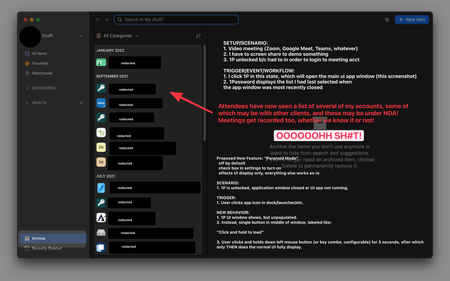
I'd like to request a new feature that I rather snarkily refer to as "paranoid mode". (Feel free to rename it!) Here's a rough screenshot marked up to give you some idea of what I'm talking about. Mo...

1P_Rob 1Password Team
4 years ago1Password TeamThis is an interesting idea, @jahio, thanks for the write-up. There are a couple good suggestions from others here for how to avoid mishaps with the way the app works today. I think of it kinda like desktop icons, too; it's a good idea to remove anything sensitive there before a call starts. I personally use collections a lot for this like @chris55 mentioned. Here are a couple more ideas:
- XIII mentioned locking 1Password. You can do that even when 1Password is in the background using a keyboard shortcut (Command-Shift-L on Mac by default but customizable in settings) or the menu bar icon. That way if you remember after the call started that you forgot to lock it you don't have to bring up the window to do so.
- You could lower your auto-lock setting as low as 1 minute to help prevent surprises.
I think if we were to implement a "paranoid mode", it would be based on a full lock (requiring password or biometrics) rather than holding a key combination or mouse click because we wouldn't want to confuse things by effectively having both a strong and weak way to "lock" the app. But perhaps there would be room for a feature like you described where 1Password just locks basically any time it's not being actively used. I'd be curious to hear how many others would use a feature like that.




