Level up your business security with free, on-demand training and certification. Explore 1Password Academy today →
Forum Discussion

Former Member
3 years agoFrustrations with Autofill
I'm a new 1Password user, so I'm praying that there's a simple solution to this...
I need to click a form field and immediately have a list of address/email/phone/credit card suggestions. ...
Former Member
3 years agoHi there @jacobthouseholder - welcome to 1Password 🙂
I'm sorry for the trouble you've run into filling Identity and Credit Card items, and I'll be happy to look into this further.
Currently, the autofill menu (the dropdown menu under a given website's field) will suggest 1Password items for Addresses, Emails, Credit Cards, and Logins/Passwords, and it is expected that it would not show up for Name and Phone Number, To fill all the information typically associated with a form (such as your examples), I'd suggest using the following method with 1Password:
- Left click the 1Password icon in your browser's toolbar - or press Cmd + Shift + X.
- Using the mouse, or arrow keys, select the Identity/Credit card item you'd like to fill, then click 'Autofill' or press Enter on the item.
Please tell me that isn't actually the process. That's 10x slower than just typing the information into the form myself. Why is this so complicated?
Using Cmd + \ utilizes a feature of the 1Password app (desktop app) called https://support.1password.com/quick-access/. We are working to improve filling Identity items from here, and I've passed your feedback along to the team here regarding that.
Ok, now I'm getting Stripe-powered credit card fields to suggest autofill if I click on the card field twice. It looks like it attempts to load the first time and fails, but loads the second time. Still no luck with name, email, phone, or company fields.
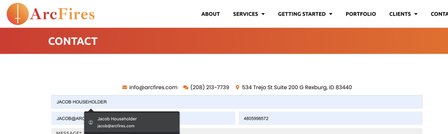
It's possible the website you're on may not be playing well with 1Password. I have a few questions on that, and the site screenshots you shared above as well:
- Could you share the URL for the site in which you're seeing Stripe-powered credit cards fields to fill after having to click twice?
- Could you share the URL for the site in your above screenshots? (if different from above)
- If you navigate to our testing site below, do credit cards fill as expected?
- https://fill.dev/form/credit-card-simple
I look forward to hearing back!


