Protect what matters – even after you're gone. Make a plan for your digital legacy today.
Forum Discussion

notmax
9 months agoOccasional Contributor
Hide 1Password when entering identity information
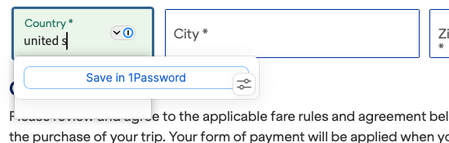
1Password Version: 8.10.80 Extension Version: 8.10.81.1 OS Version: macOS 15.5 Browser: Safari 18.5 (20621.2.5.11.8) This is not working for me. The save contacts field is off and 1password is st...

1P_Dave Moderator
9 months agoModeratorHello notmax! 👋
Thank you for reaching out! I understand that you're seeing 1Password unexpectedly offer to save addresses on certain pages and I do see how 1Password's prompts are conflicting with the suggestions coming from the website itself.
Try the following on the websites in question: right-click on the webpage and then click 1Password - Password Manager > Hide on this page.
Alternatively, you can turn off "Show autofill suggestions with a form field is in focus" and "Offer to save items in autofill suggestions" however this will apply on every website:
This will prevent the 1Password suggestions menu from appearing until you click on the 1Password icon in a field. This applies to both identity and login information, both when signing in and when creating a new account.
-Dave

notmax
9 months agoOccasional Contributor
Dave - appreciate the response but this just swaps one problem for another (now I won't remember any new passwords). Can we just make it work? I'd love to turn off identities altogether but at the very least when I tick the box saying "don't save contact information" it doesn't offer to save contact information. This feels like a bug: the switch is off, so why is it offering to save?
- 1P_Dave9 months ago
Thanks for the reply. "Offer to save contact information" controls the following autosave pop-up (which appears after you type in identity information and then submit it to a website) but it doesn't control the "Save in 1Password" button in the inline menu:
Did you try the first option that I suggested: 1Password - Password Manager > Hide on this page. This would only apply to the specific website where you enable this option, not other websites. I'd like to learn more if this option doesn't work for you.-Dave





