Level up your business security with free, on-demand training and certification. Explore 1Password Academy today →
Forum Discussion

sosomario
1 year agoOccasional Contributor
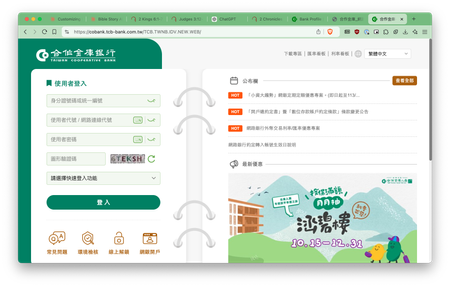
How do I configure my 1Password entry to fill-in my banking login for a Chinese banking site?
I suspect that my Chinese banking site isn't labeling the input fields the same way other native English websites are. 1Password has my correct information (user, password, website URLs) but when try...

1P_Evon 1Password Team
1 year ago1Password TeamHello there, sosomario.
I've done some testing on the website you shared and ran into the same behaviour. I modified the Login item by adding custom fields that mirror the website's labels, but I found that Autofill only works when the Customer ID and username fields are visible. I attached a short GIF demonstrating this.
I understand that exposing the Customer ID and username fields before auto-filling is not optimal. Therefore, I have submitted an issue for our development team to investigate further. In the meantime, I recommend https://support.1password.com/getting-started-browser/#use-drag-and-drop-to-fill-in-apps your credentials from the Login item as a workaround.
I hope that helps. Let me know if you have any questions.
-Evon
ref: dev/core/core#33944


