Level up your business security with free, on-demand training and certification. Explore 1Password Academy today →
Forum Discussion

13Jimpal
1 month agoOccasional Contributor
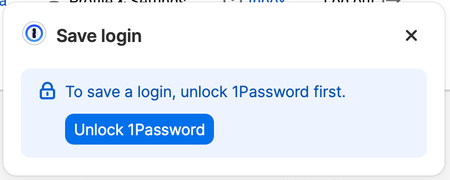
How do I get rid of these annoying popups?
Often when I have just logged in to a site on Safari, one or the other of these popups, shown here, comes up. They are unnecessary, particularly the first one, since I know how to do these actions on...

13Jimpal
1 month agoOccasional Contributor
I found a way to do it after a Google search. It's very obscure, and I spent far more time on it than something so easily turned off deserves. You must do it on the 1Password Extension.
You have to go to the 1Password website>1Password Extension Settings>Security Settings>Autofill&Save>Turn Off "Offer to Save and fill logins."
It works.

schneideris
1 month agoNew Contributor
Not finding the "1Password Extension Settings" option from 1Password.ca site, or in Safari.
- 13Jimpal1 month agoOccasional Contributor
For schneideris. I had a hard time finding it too. Not clear why 1Password has made Extensions so difficult to access. Here's how I did it:
Go to my.1password.com and log in. That's kind of difficult because you need to have your 1Password "Secret Key" on hand to do it. Once you are logged in there there is a small box that says "update security settings." Click on that and get "1Password extension settings." That's where you find "Autofill & Save", then click that and you will find "Offer to save and fill logins . . . ." Turn that off. Disappointingly, that seems to work mostly but not always to turnoff the annoying popups.
I can't understand why in this day and age 1Password has made this procedure so difficult and hard to find. I'm ashamed at myself for spending so much time to cut off this minor annoyance.
Perhaps I have done it the hard way. If you or anyone else can tell me how to reach 1Password Extensions in any easier manner I will appreciate learning about it.
Please let me know if this worked for you.
- schneideris1 month agoNew Contributor
Not seeing the small box that says "update security settings." I have searched all over the site. Just not showing up for me.
I wonder if it is a 1Password.com vs 1Password.ca (where I am) thing. I also wonder if it is because I have a Family account and am the administrator for it.
- 13Jimpal1 month agoOccasional Contributor
I found it in the 1Password Extension settings. It showed up when I opted to have "automatic sign-in" for this. See screenshot below.
Duh. Then, as an experiment, I removed automatic sign-in, and can't find this page again. I can't believe this is so hard.
So, here's the photo. If you can tell me how to get this page again I will appreciate it.