Level up your business security with free, on-demand training and certification. Explore 1Password Academy today →
Forum Discussion

JensPeterJensen
2 years agoNew Contributor
How to make user list alphabetic in dropdown?
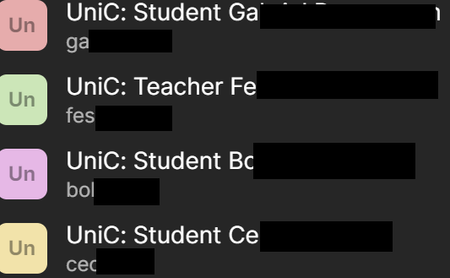
How do I make the list shown here be alphabetic? I want the teachers and students grouped in the list.
1Password Version: Not Provided
Extension Version: Not Provided
OS Version: W...

1P_Evon 1Password Team
2 years ago1Password TeamHey there JensPeterJensen, thank you for your reply. I appreciate the screenshot you shared, it's very helpful.
I can see that you're referring to the Inline menu below a field on a website. At the moment, the display results in the Inline menu is based on the following priority and cannot be adjusted from the 1Password browser extension:
- Favourited items.
- Closest matched subdomain.
- Alphabetical.
That being said, I understand the usefulness of being able to adjust the order of this list to your preference. Therefore, I've opened a feature request and shared your feedback with our product team for further review, so we can improve 1Password in the future.
I hope that helps. Let us know if there's anything else we can help you with.
-Evon
ref: 38405023