Protect what matters – even after you're gone. Make a plan for your digital legacy today.
Forum Discussion

Anonymous
4 years agoHow to remove annoying 1password auto-promotion ads ?
Hi,
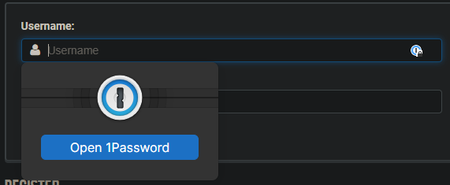
I am fed up with 1passwords promotion ads each time I click on a username field.
It is written also larger than any thing else on the webpage !
It is really annoying, I do not want t...

Jack_P_1P 1Password Team
4 years ago1Password TeamHi @Chriis:
Thanks for updating us. We're always exploring ways to make 1Password in the browser easier to use and I've brought your feedback up with the team.
Additionally you touched on Windows Hello a bit earlier not behaving as expected. After launching 1Password for Windows, 1Password requires your account password once after restarting your computer or launching 1Password before Windows Hello can be used to unlock 1Password.
While giving a presentation, if you'd like to completely hide the in-line menu in 1Password when giving presentations or similar, right click 1Password in your browser's toolbar, select Settings. Disable the setting "Offer to fill and save passwords". After doing this, the only visibility in your browser that 1Password is in use will be the 1Password icon in your browser's toolbar, which is also where you will be able to fill logins from, rather than them being displayed in line.
Jack



