Protect what matters – even after you're gone. Make a plan for your digital legacy today.
Forum Discussion

Anonymous
4 years agoHow to remove annoying 1password auto-promotion ads ?
Hi,
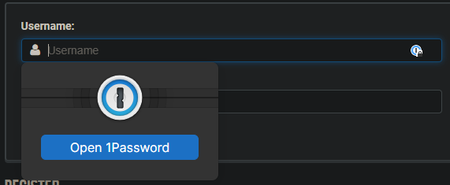
I am fed up with 1passwords promotion ads each time I click on a username field.
It is written also larger than any thing else on the webpage !
It is really annoying, I do not want t...

kevin_li 1Password Team
4 years ago1Password Team@Chriis Thanks for the follow-up.
Indeed, when the "Offer to fill and save passwords" option is turned off, we cannot autofill logins with the 1Password inline menu suggestion. It will effectively remove the 1Password logo from all the input fields.
Instead, we can use the "Autofill" button from the extension dialog to fill the login fields. As shown below:
-
And you can manually save login items with the option turned off:
-
Suppose the above is not what you are looking for. In that case, my suggestion is to activate the "Offer to fill and save passwords", but deselect the "Show autofill menu on field focus". It will effectively hide the inline menu. Then, when you want to see it, you can click the blue 1Password icon in the field to view suggestions. In addition, you can quickly close the suggestions by clicking the esc key. As shown below:
-
Let us know what you think.



