Protect what matters – even after you're gone. Make a plan for your digital legacy today.
Forum Discussion

Anonymous
4 years agoHow to remove annoying 1password auto-promotion ads ?
Hi,
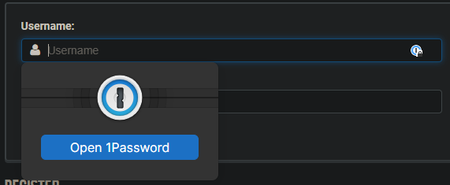
I am fed up with 1passwords promotion ads each time I click on a username field.
It is written also larger than any thing else on the webpage !
It is really annoying, I do not want t...

kevin_li 1Password Team
4 years ago1Password Team@Chriis You're most welcome. I'm happy that I could be of your assistance.
I totally agree with you. Turning off the "Offer to fill and save passwords" defeats the purpose of using 1Password. Plus, the "Show autofill menu on field focus" feature needs more improvement for our user experience. I apologize for the inconvenience.
We have an internal issue request regarding the inline menu display. I've added your voice to the list. Our development team is fully aware of the issue, and we are devoted to improving 1Password. Thank you for your valuable feedback.
Meanwhile, I understand that when you are at a conference, the inline menu can be intrusive. I'd like to offer another workaround for the situation:
We can right-click on the page to bring up the context menu, select 1Password - Password Manager, and then click on Hide on this page as shown below:
-
Currently, there are no settings for the "Hide on this page" option. Closing or refreshing the page won't affect the setting. However, when you quit the Chrome app completely, you will need to reset the option for the page. And this function is only for the exact page you're currently on.



