Level up your business security with free, on-demand training and certification. Explore 1Password Academy today →
Forum Discussion

ninja0n3
5 months agoNew Contributor
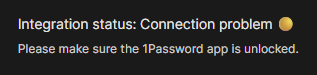
Integration Status Connection Problem W11
Hello, I started encountering this issue out of nowhere a couple of days ago. I didn't actively update any of the software involved in this problem. This was working fine before, and then all of a ...
 4 months ago
After communicating with support, we managed to resolve the issue.
It seems like the chrome extension looks for the windows app to be installed in the C drive, and I had all my Windows App installs defaulted to my D drive.
I temporarily switched the install drive to C, uninstalled and reinstalled 1Password, switched the setting back to D, and now it seems to be working.
I've had this setting in place for a number of years now; and I can't be the only one with a setup like this (non default install drive). I feel like the extension shouldn't rely on a hardcoded location to determine the connectivity; at the very least having a setting to point to the right location would be workable.
I don't think this requirement is documented anywhere.
In any case, this issue is resolved for me.

1P_Dave Moderator
4 months agoModeratorHello ninja0n3! 👋
I'm sorry that the integration between the 1Password app and 1Password in the browser aren't working properly. Did you recently move to the MSIX from the EXE version?
As a first step, can you try the suggestions in this article: If the 1Password browser extension doesn’t unlock when you unlock the 1Password app
Let me know if that doesn't work and I can help further.
-Dave
Issue=PA-878
ninja0n3
4 months agoNew Contributor
Did you recently move to the MSIX from the EXE version?
No, I've been running the MSIX version for a while; it just stopped working for me some reason on Friday.
As a first step, can you try the suggestions in this article: https://support.1password.com/connect-1password-browser-app/
I tried all of this as well as installing the beta, uninstalling, reinstalling, disabling the extension, installing the beta extension, rebooting, etc.
So far none of the solutions suggested online have worked for me.
- 1P_Dave4 months ago
I'm sorry that none of the suggestions worked. I'd like to ask you to create and share a 1Password diagnostics report from 1Password in your browser:
Send a diagnostics report (browser extension)
Attach the diagnostics to an email message addressed to support@1password.com
With your email please include:- A link to this thread: https://www.1password.community/discussions/1password/integration-status-connection-problem-w11/164879
- Your forum username: ninja0n3
You should receive an automated reply from our BitBot assistant with a Support ID number. Please post that number here. Thanks very much!-Dave
- ninja0n34 months agoNew Contributor
I already have an open ticket under my business account, I uploaded the files yesterday, here is the ticket id: VLI-23665-124


