Level up your business security with free, on-demand training and certification. Explore 1Password Academy today →
Forum Discussion

ninja0n3
5 months agoNew Contributor
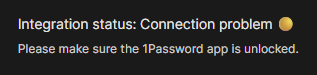
Integration Status Connection Problem W11
Hello, I started encountering this issue out of nowhere a couple of days ago. I didn't actively update any of the software involved in this problem. This was working fine before, and then all of a ...
 4 months ago
After communicating with support, we managed to resolve the issue.
It seems like the chrome extension looks for the windows app to be installed in the C drive, and I had all my Windows App installs defaulted to my D drive.
I temporarily switched the install drive to C, uninstalled and reinstalled 1Password, switched the setting back to D, and now it seems to be working.
I've had this setting in place for a number of years now; and I can't be the only one with a setup like this (non default install drive). I feel like the extension shouldn't rely on a hardcoded location to determine the connectivity; at the very least having a setting to point to the right location would be workable.
I don't think this requirement is documented anywhere.
In any case, this issue is resolved for me.
ninja0n3
4 months agoNew Contributor
After communicating with support, we managed to resolve the issue.
It seems like the chrome extension looks for the windows app to be installed in the C drive, and I had all my Windows App installs defaulted to my D drive.
I temporarily switched the install drive to C, uninstalled and reinstalled 1Password, switched the setting back to D, and now it seems to be working.
I've had this setting in place for a number of years now; and I can't be the only one with a setup like this (non default install drive). I feel like the extension shouldn't rely on a hardcoded location to determine the connectivity; at the very least having a setting to point to the right location would be workable.
I don't think this requirement is documented anywhere.
In any case, this issue is resolved for me.

1P_Dave Moderator
4 months agoModeratorThank you for sharing the solution with the community. Our support team, who you're working with over email, will make sure that your feedback gets to our development team.
-Dave


