Level up your business security with free, on-demand training and certification. Explore 1Password Academy today →
Forum Discussion

camner
2 years agoFrequent Contributor
No ability to invoke 1P from iPad under certain circumstances.
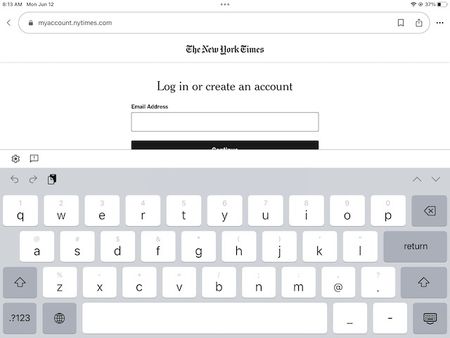
This morning I was using my iPad and clicked on a link that went to the New York Times site. That is paywalled, so I clicked on the link to login, and this is what I saw.
.
As you can see,...

camner
2 years agoFrequent Contributor
Thanks for your reply.
In your screenshot, is that Chrome or another non-Safari website?
As I think about it, I am not 100% sure. I am pretty sure that I was in my Google feed and clicked (tapped) there, and if that is correct, then I was in the internal Google browser. I can understand why it is harder for 1P to support this, and I will try to remember to "open in Safari" when I'm in the situation and needing a login.
On the iPhone and iPad the detection and filling of fields is handled by iOS itself using a technology called Password AutoFill. If a field isn't being detected by iOS then there isn't anything that 1Password can do since we're not involved in the detection/filling process; 1Password just provides the data for the experience.
Thanks for the explanation. Given what you said, I can see why it would be harder for 1Password to handle things in iOS in comparison to macOS.
Alternatively, we have an extension for Safari on iOS that works great with two-step login pages: https://support.1password.com/getting-started-safari-ios/
Thanks for this, but I already had that extension active. I'm not quite sure if you were saying that once activated, this extension should work automatically, or whether I would need to manually invoke it when I wanted a 2-step login to work better.
Finally, and this is simply a point of curiosity, I wonder why things work better for filling in the password field after I have manually entered the username in that field?


