Level up your business security with free, on-demand training and certification. Explore 1Password Academy today →
Forum Discussion

d9a
2 years agoOccasional Contributor
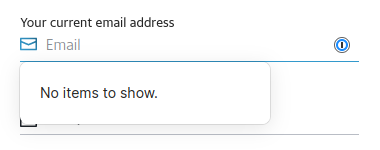
"No items to show" covers page content, making forms tedious to fill
This issue has been https://1password.community/discussion/127591/no-items-to-show-obstructive https://1password.community/discussion/134871/large-no-items-to-show-is-absolutely-unnecesary-an...

d9a
2 years agoOccasional Contributor
I've started seeing the new inline menu the past few days, but very intermittently, often flipping back and forth between the two designs between every page load. I had to check and make sure I didn't have multiple copies of the extension installed or something.
It's... certainly an improvement. The new icon feels a little uncanny, like it's somehow both larger and smaller at the same time, and it's also awkward that the rotating chevron icon that so strongly indicates "click here to expand and see more content" is still present when there's no items to show, and doesn't expand anything when clicked. But the tooltip doesn't singlehandedly cover entire other input fields, at least that I've seen so far, and that alone really makes a difference.
I do still think the experience could be cleaned up further by removing the message entirely when first focusing a field. While I can't speak for other users, nearly 100% of the time I see this message, it's when I'm in a field that I had no expectation of 1Password filling anything in, so any message that pops up at all is redundant. With the new dual-icon layout, I could see the message being conveyed just as clearly by simply changing the icon to an X or ?, something like:
Clicking the icon could then toggle the tooltip as a second-level reminder, rather than the current slightly passive-aggressive behavior that shakes the tooltip at you. That would also make the new second icon feel a bit more useful if it's being used to clean up the UI, rather than the dual icons feeling like they themselves are just new clutter.


