Level up your business security with free, on-demand training and certification. Explore 1Password Academy today →
Forum Discussion

TilRoquette
2 years agoOccasional Contributor
Safari Plug In: Drop Down Menu for Identitys
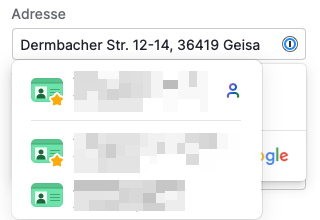
I often are faced with the problem in Safari that the drop-down menu for identities that opens covers important information in the web form.
(How) can I switch off the automatic opening ...

ChrisC1P Moderator
2 years agoModeratorHi TilRoquette thanks for reaching out!
If you don't want 1Password offering suggestions automatically you can configure the extension so that the autofill menu only shows when clicking the 1Password icon in a web form:
1. Right click the 1Password icon in your browse's toolbar and choose Settings.
1. Click Autofill in the lefthand menu.
1. Toggle off "Show autofill suggestions when a form field is in focus".
Let me know if you have any questions!


