Level up your business security with free, on-demand training and certification. Explore 1Password Academy today →
Forum Discussion

shoemaker
1 month agoNew Contributor
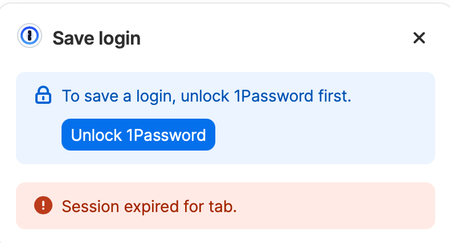
Session expired for tab
After successfully using the browser extension for Safari to log into a site, there will be a lingering pop-up from 1Password with the message "Session expired for tab". I can't find this error messa...
- 28 days ago
The solution to this problem is to completely uninstall and reinstall 1Password. I performed these steps on both machines with this issue, problem resolved.
https://support.1password.com/uninstall-1password/?mac

shoemaker
1 month agoNew Contributor
What exact steps do you take when using 1Password to fill your information?
I typically use the keyboard shortcut to populate credentials.
Are you seeing this behaviour on all websites, or only on specific ones? If it is a specific one could you share an example URL with me?
The behavior is not consistent. It seemed like every site before I followed the steps to reinstall the extension. But seems infrequent now. I just got it logging into statefarm.com.
Do you use the 1Password desktop app alongside the Safari extension, and if so, is the app running (either open or in the background) and unlocked at the time this happens?
The 1Password app is always running on my desktop, the menu bar icon is visible and 1Password is an app that starts on login to my Mac.

1P_Gem Moderator
1 month agoModeratorHi shoemaker, thanks for getting back to me!
The next time the issue occurs, I'd like to ask you to create and share a 1Password diagnostics report from 1Password in your browser:
Send a diagnostics report (browser extension)
Attach the diagnostics to an email message addressed to: support@1password.com
With your email please include:
- A link to this thread: https://www.1password.community/discussions/1password/session-expired-for-tab/169082
- Your forum username: shoemaker
You'll receive a reply with a Support ID number. Please post that number here. Thanks!



