Level up your business security with free, on-demand training and certification. Explore 1Password Academy today →
Forum Discussion

Jamsk
1 year agoOccasional Contributor
"Start here" prompts - long time user and cannot see a way to make them go away
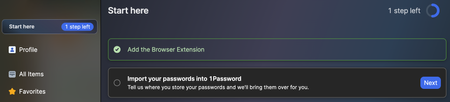
We've been using 1Password since version 3. Latest update is showing "Start here" prompts in both the app and browser extensions.
I can make Step 1 (tutorial) go away by clicking on it and then cl...
Jamsk
1 year agoOccasional Contributor
Hi Dave,
It's a Family account. The screenshots are from my wife's computer. My computer was showing the same messages, but already had the import box checked, so it was just a question of faking the tutorial etc, then clicking the finished button.
Essentially nothing in our Private vaults because we've always had access to a shared vault and we started before Families with iCloud sync etc. So I've avoided the Private vaults as they can't be shared as a whole vault (to my knowledge). I hope that makes sense. It's just the way we work.
I actually do have 6 "archived" items in my Private vault. There were only three in Sue's. So I created five random logins with usernames and passwords (it seemed to need that), then I was able to clear the message after restarting the app. Then deleted the made up login items/passwords and deleted them from deleted.
Seems like a lot of effort and hoops to jump through. Could there not just be an option to say, this doesn't apply to me, end onboarding task?
Anyhow, resolved.
Many thanks for the prompt that led me in the right direction.
All the best,
Jamie.


