Level up your business security with free, on-demand training and certification. Explore 1Password Academy today →
Forum Discussion

Jamsk
1 year agoOccasional Contributor
"Start here" prompts - long time user and cannot see a way to make them go away
We've been using 1Password since version 3. Latest update is showing "Start here" prompts in both the app and browser extensions.
I can make Step 1 (tutorial) go away by clicking on it and then cl...

mr_fixit
1 year agoNew Contributor
Apologies for thread-jacking, but I have a very similar issue.
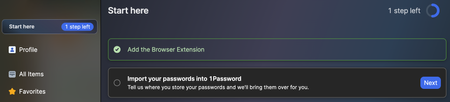
Long time user, family account. Click 1P extension icon in titlebar of browser window, popup's "start here" says I have 2 steps left. 'Add the browser extension' is the 1st step. Can't get rid of it.
But I've already added the browser extension, yes? Clicking 'Next' or radio button does nothing.
Restarting Safari didn't help, I think I have the latest versions of 1P and 1P4Safari.
Same thing happens in Chrome
macOS 14.7.1, Safari 18.1.1, 1Password for Mac 8.10.52 (81052025), Chrome 131.0.6778.86, 1Password browser extension version 8.10.52.25 (in both browsers)


