Level up your business security with free, on-demand training and certification. Explore 1Password Academy today →
Forum Discussion

bobh123
1 year agoNew Contributor
Trouble using 1P for passkeys with Firefox
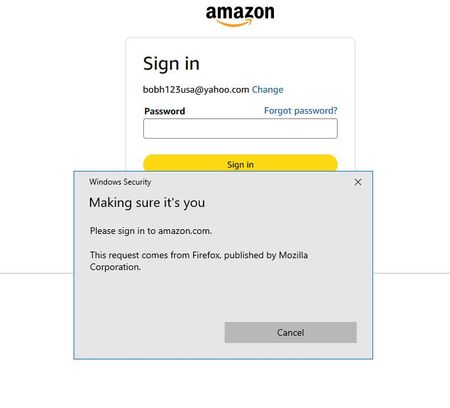
Hi. I have 1Password at home. I and my spouse use it with 2 iPhones, a Windows 10 PC and a Windows 10 laptop. All are up to date. I just decided to start considering using passkeys. As a start, I th...

1P_Dave Moderator
1 year agoModeratorHello bobh123! 👋
Thanks for reaching out. The prompts that you're seeing are coming from Windows and not 1Password. As a start, make sure that 1Password is installed in Firefox itself: Download 1Password for Firefox
Next, make sure that 1Password is set as the default password manager in Firefox:
- Open Firefox.
- Right-click on the 1Password icon in your browser's toolbar and click Settings.
- Make sure that "Make 1Password the default password manager in this browser" is turned on.
- Click Autofill & save.
- Make sure that "Offer to save and sign in with passkeys" is turned on.
Then, try to save a passkey for Amazon again: Save and sign in with passkeys in your browser
Let me know if you still see issues.
-Dave


