Protect what matters – even after you're gone. Make a plan for your digital legacy today.
Forum Discussion

docbombay
3 years agoNew Contributor
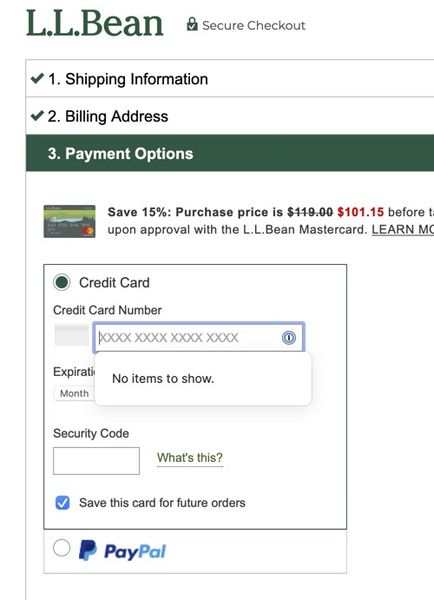
Turn off "No Items to Show" or "Save in 1Password" popups?
I use 1P8 to log in to numerous websites (banking, credit cards, businesses, etc) and find this very convenient and easy in most cases. However, in certain circumstances once working within a...

steph_giles 1Password Team
3 years ago1Password TeamHey docbombay,
I'd like to understand a little bit more about the behaviour you are looking to achieve. Is there a reason you choose not to store non-password items in your 1Password? Can we improve 1Password to help you to use it to store all of your details in one place?
We do not currently have a way to disable the inline menu for specific item types but I would be happy to file a feature request once I have a better understanding of the trouble you are facing.
In the meantime I have a couple of workaround suggestions:
- Press the ESC key or click on the 1Password icon within the field to quickly dismiss 1Password on these fields.
- Disable the inline menu altogether but this will also prevent it from appearing automatically on login forms. To do this you can right click on the 1Password icon in your browser toolbar and choose settings and then toggle off 'Show autofill menu on field focus'
I hope this helps!


