Level up your business security with free, on-demand training and certification. Explore 1Password Academy today →
Forum Discussion

jasimon9
3 years agoSuper Contributor
Upgrade to Version 8 -- many functions no longer work
I have not been able to properly use 1P anymore.
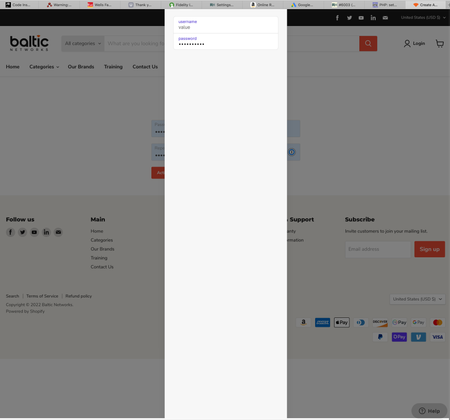
Show stopper issue: when I try to create a new login, when I click on the suggested password, I get a strange screen blocking any further action...
jasimon9
3 years agoSuper Contributor
The situation kept getting worse. The combination of the desktop version 7 plus the extension version 8 would not work. I could not get the extension downgraded. So there was no way to get back to version 7 on both desktop and extension. To get any functionality I was forced for every login to use the version 7 desktop by copying the URL into the browser, then copying the username and password from 1P to the browser login dialogs.
I was hesitant to uninstall because I did not want to lose my passwords. It seems from the discussion that unless you deliberately remove the data with extra steps the data would be safe, and you could access it at 1password.com in any case. So in desperation, I took the plunge.
I first removed from the Applications folder 1Password7.app, 1Password.app (version 8) and 1Password for Safari.app. I did not want to trash them so just moved them elsewhere. However, this caused problems as somehow the apps are linked. Later to overcome these issues I did drag the desktop versions into the Trash. Before it would let me move 1Password.app from the desktop to the Trash, I had to Quit the desktop application, even though it was running from the Applications folder. So the two instances are somehow linked.
Next I downloaded and reinstalled Version 8. Then 1Password for Safari from the App Store. I added the extension icon to the browser toolbar. This was problematic before during the bastardized install because the icon would not show up in the Customize Toolbar dialog.
I clicked on the browser extension, and the dialog opened. I used it to open and fill a website, and it worked. This also was not working during the bastardized install. However, trying to use the extension a second time, once again reverted to the blank dialog, exactly like the screen shot I uploaded on June 8.
So there is still something seriously wrong and the extension is not usable at all even with a clean uninstall/reinstall. However a few tests of open and fill from the desktop app shows that now working once again. So that is better than before. I have not yet tested the new credentials creation functions since this reinstallation. I will post again later with those results.
I would prefer to just go back to a clean installation of Version 7, because that worked, whereas Version 8 seems to have a lot of problems, as I mentioned above and also mentioned by many others.


