Level up your business security with free, on-demand training and certification. Explore 1Password Academy today →
Forum Discussion

1P_Blake Community Manager
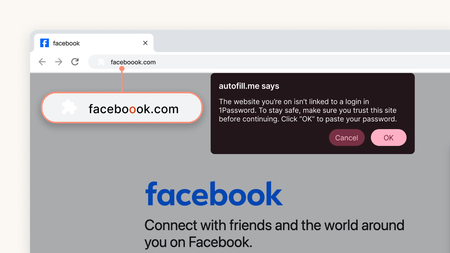
4 months agoCommunity ManagerIntroducing stronger phishing protection in 1Password
1Password has always protected you by refusing to autofill credentials on mismatched sites. But we know that sometimes you might not realize why autofill didn't work, so you'd manually copy and paste...

PuffTheDrake
3 months agoNew Contributor
Ok, so how do I disable this? I received the update today, and I'm getting this popup constantly on my work-related legitimate sites.

1P_Dave Moderator
3 months agoModeratorYou should only see the prompt if you try to copy and paste your password into a website that you don't have stored in 1Password. Double-check to make sure that your Login item's website address field matches the website address of the website that you're pasting your login into.
If you would like to turn off the feature then you can follow these steps:
- Open your browser.
- Right-click on the 1Password icon in your browser's toolbar and click Settings.
- Click Notifications.
- Turn off "Warn about potential phishing".
I hope that helps.
-Dave


