Level up your business security with free, on-demand training and certification. Explore 1Password Academy today →
best practices
189 Topics
Prioritizing Multiple Accounts
I am the travel arranger for my family, so I have multiple accounts with one airline saved in my 1Password. The unfortunate bit is that now when I log into my account, 1Password chooses my kid's account as the default instead of mine. Is there a way to order them so that my account comes up as the default? If I could just ask it to not sync family's passwords to my phone, but leave them on my computer only, that would be another way to fix it.37Views0likes3CommentsQuandry: I bought 1PW Forever Version but That Fails
I have thinking for a good while now that in spite of my judicious, careful decision making, I bought 1Password 7 as a lifetime product, and my thinking was that by investing upfront in the forever software, I would be smart. I have always been a 1PW fanboy, believing it offered huge value to my wife and I with our Mac computers and iOS items, seamlessly working together. Unfortunately, 1pw chose to move to a subscription model, and I have been left in the dust. 1PW7 only works on Safari and fails on Chrome. It still works on iOS. On one hand, I that 1pw was not honest with me, and they have chosen the big revenue direction. On the other hand, maybe I should forgive them since software does evolve. I'm interested in your thoughts on what I should do. Can two people share a single $2.99 monthly membership? We don't want two vaults: since we generally share a single password for websites like Amazon, a single membership is better than two.24Views0likes1Comment
Login QR Code Content
Hi 1Password Team, I'd like to request a small change to the login via QR experience that should improve UX by quite a bit: the data presented in the login QR should contain 1Password-specific URL information that allows the user to initiate login by simply scanning the code itself rather than opening the 1Password app and choosing the QR Code option. To expand on this a bit, here's what's presented in the 1Password login QR code (data obfuscated obviously) k9F_aZ3mQx7R2pL8vD1sWcT0uYhG5eJ4nK6bCqXrM-Vt8PzU1wEoI9fS_dA2HjN7yL3gR5xB0kQv6mT4pZ1uWc8D9eF2aYh7J3sXnVyefhdfgw When scanning this QR code, any phone will attempt to search Google for this long random string. This is obviously not ideal. For a better UX example, look at the data contained in Steam or Discord's login QR codes: https://discord.com/ra/obb6XZfsdfP67eMtNgy36zCQt5fd9kshasdftZxPRwQ https://s.team/q/1/103748407414622342091 Would it be possible for the 1Password QR code to be updated to more closely match this functionality? Even presenting the data in the format of a custom URL scheme (as below) would be more helpful, as users with the app installed would still be prompted to open the link in 1Password via normal QR scanners. 1password://k9F_aZ3mQx7R2pL8vD1sWcT0uYhG5eJ4nK6bCqXrM-Vt8PzU1wEoI9fS_dA2HjN7yL3gR5xB0kQv6mT4pZ1uWc8D9eF2aYh7J3sXnVyefhdfgw Is there a plan for this functionality in the future?8Views0likes0Comments
Firefox extension not being updated or mainted
Is there going to be any updates coming to firefox extension soon? It's been two months since the extension has been updated and chrome was updated two days ago. It would be nice if the firefox extension got a little bit more love like chrome and was updated more promptly to match current version of everything else in the ecosystem. Thank for the help in advance!Solved54Views0likes3Comments
Passport Dates
Those of us in the good ole USA are a little odd compared to most of the world. We use feet instead of meters, pounds instead of grams and we write dates in the format of mm/dd/yyyy. However, most of the world uses dd/mm/yyyy. When completing documents such as visas and even an application for USA passports. It would be great if dates on Categories/Passports appeared in the format dd/mm/yyyy so it would be easy to copy/paste into travel documents. Or at least allow me to type in a date like 31/7/2010 for July 31, 2010 in the Categories/Passwords. If you do this be sure to change the item heading to, for example, "date of issue, dd/mm/yyy" so it is clear to the user that the default formatting of this date is not being used in this specific instance. I would appreciate it if you would make this modification to 1Password. Thanks.30Views0likes1CommentPassword and RSA Token fields
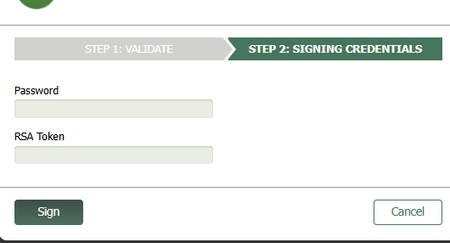
Hello, This is a screenshot of the fields I must fill in. If it does not show up it is a "Password" field above an "RSA Token" field. I must obtain the RSA Token passcode from the RSA app and enter it manually. This is the problem: When I use the 1P extension to autofill the password, it autofills the RSA field instead of the Password field. Highly annoying so I would be grateful for any suggestions. This is an iFrame which is why I am using the 1P extension to begin with. When I use MS Edge PW manager it autofills the correct password field so I guess I could use Edge PW manager just for inline webpages and 1P for everything else but I would prefer to use one or the other. (I disabled Edge PW manager when I started using 1P - does anyone have experience using both?) The password for the above field is the same as the password for the main webpage. Ideally it would just autofill but I understand there is a security reason preventing this. I understand MS Edge PW manager does not have the same security issues because it created the browser and can handle tricky field detection better than 3rd party apps. Thank you.34Views0likes3Comments
v8 not loving it - we might break up
I don't often send reviews - takes to much time to do it well - here goes my short rant forgive me. I made friends with it after LastPass major data leak user emails (2021-22) due to an employee password getting leaked! (if you had super secure password you were not as compromised but scammers had your data) v7 was a clean fresh large view interface. No distracting attention competing bright icons. Once I learned it I don't want to relearn it with an update for security esp. my password manager. Thank you Also all the Actions were conveninetly located above the item. And the default app text is smaller. v8 now replaced by a visually busy multi colored interface with small text and hidden some buttons - v7 had everything I needed regualrly at glance without googling where to dig for the action I needed. I hate dark mode. My brain likes white space and my eyesight requires the contrast. I know lots of people love it so ok if they turn it on, but don't assume everyone prefers it. Pehaps there is a 'View settings' I can change - annoying I have to dig The browser extension on all my devices also stopped working after I had to update my office password and I finally just deleted the extension and will try to reinstall it on Chrome. There are a million apps for absolutely everything now and I can't stand the cognitive demand just to mange them - I have a job and hobbies I prefer to use that limited resouce on :-) Generally I like to support open source software so I also tried Bit Warden but it was too complicated for my limited attention span. Download all the csv files and data being in the wrong order was very very frustrating. This is not an upgrade for me and we might break up.....99Views1like3Comments
How can I remove a tag from many items at once?
Mac 1Password - v 8.12 - I have many items that have two different tags. Q: How can I find all of these records with both tags and then remove one of the tags on all these records at once? I can search like this: =tag:tagA =tag:tagB And many results show up I tried to select all items at once and then if I write click on this it only allows me to archive them or move them or delete them but no editing choice After selecting all of them - the right side details menu is blank So there's no way to select a tag and remove it to all of them at once that I know of I imagine there's a better way than what I am doing –can you share any ideas on this subject?28Views0likes1Comment