Level up your business security with free, on-demand training and certification. Explore 1Password Academy today →
browser extension
32 Topics
Browser extension WebAuthn PRF extension not spec-compliant
Hi there, Noticed that the 1Password browser extension returns a non-spec-compliant response type when trying to create a credential with the WebAuthn PRF extension. I came across this while building a project using https://github.com/FiloSottile/typage#encrypt-and-decrypt-a-file-with-a-passkey. According to https://w3c.github.io/webauthn/#dictdef-authenticationextensionsprfvalues, the `results` should be of type https://webidl.spec.whatwg.org/#BufferSource which is an `ArrayBuffer` or an `ArrayBufferView`. In poking around in my browser, it seems the 1Password implementation returns a plain `Array`. I've got a fix ready for that specific library (I've contacted the author to see if they'd accept a PR) but figured I'd mention it to you folks as well just in case.30Views0likes0Comments
Feature request: Path-aware login suggestions for multiple credentials on the same domain
I'd like to file a feature request and share a use case where the current "domain-only" matching makes day-to-day autofill noticeably worse, and to ask whether path-aware matching could be reconsidered as an opt-in option Up front: I can see from a quick search that this is clearly a much-requested feature, with threads going back what feels like several presidential administrations. Normally I'd just add a thumbs-up to the canonical request rather than start a new thread - but without a feature-request tracker (more on that at the end), I genuinely couldn't tell which of the many overlapping discussions is the "live" one the team is actually watching, vs. the ones now being slowly reclaimed by the forum equivalent of moss. So I'm posting fresh rather than guessing wrong and shouting into a tomb. Apologies for the duplication; please feel free to merge this into whichever discussion is currently canonical. ## The situation I have multiple distinct logins on the same domain, distinguished only by path. For example: - https://[example.com]/[teamA]/login -> Login A - https://[example.com]/[teamB]/login -> Login B - https://[example.com]/[admin]/login -> Login C Because 1Password matches on eTLD+1 and ignores the path for suggestions, all three credentials surface every time I land on any of these pages. There is no way to tell 1Password "when the URL path starts with /teamA, prefer Login A," which means every login attempt is a small multiple-choice quiz I am demonstrably bad at. ## Why this matters The "pick from a list" flow is fine for an occasional ambiguity, but in this scenario it happens on every single login. I autofill the wrong credential maybe 1 in 3 times, which - and I cannot stress this enough - triggers the account lockout flow on at least one of these systems. My password manager and I are, in effect, collaborating to lock me out of my own accounts. Favoriting helps for exactly one of them; the others remain a coin flip with worse odds. I understand from past forum threads that 1Password removed path matching some years ago because it complicated things for typical users, and that the team is (rightly) conservative about adding options. I'm not asking for the old behavior back as a default - I'm asking whether a per-item, opt-in path constraint could fit the existing model: - Today's "Fill anywhere on this website" -> unchanged default - Today's "Only fill on this exact host" -> already path-blind - New: "Only fill when URL path starts with ..." (per Website entry) That mirrors the existing exact-host option, just one level deeper. No regex, no globs, no Turing-complete URL DSL - just a path-prefix string on the Website field when the user explicitly opts in. Items without the new option behave exactly as they do today, so there's no impact on users who don't need this. ## Alternatives I've tried - Favoriting: only helps one of N items. - Exact-host: doesn't help because the host is identical. - Splitting into separate Website entries: doesn't help because the path is dropped from matching. - Open-and-fill from the 1Password app: works, but defeats the purpose of an in-browser password manager for daily logins - at that point I'm essentially using 1Password as a fancy bookmarks menu. ## A small meta note This connects to the situation I described at the top. I understand the team's reasoning for not running a formal voting system - that vote counts don't capture the "why" behind a request, and that discussion surfaces better signal. Both of those things are true. But the current setup also means there's no way for users with the same underlying problem to converge on a single canonical request, no visible signal of how widespread an issue is, and no acknowledgement loop telling requesters whether something is even on the radar. The current incentive structure rewards starting yet another duplicate thread (hi!) over piling onto an older one nobody can confirm is still being read. A lightweight feature-request tracker - even one without public vote counts, if that's the concern - would make it easier for users like me to contribute signal without worrying we're duplicating a thread buried three pages deep. Worth considering alongside the substantive request above. Happy to discuss the use case further or test a beta if this is something the team is open to exploring. Thanks for considering it, and apologies again to whichever poor soul at 1Password has to read the seventeenth version of this request.43Views1like2CommentsNew getting-started guides, AI search, and LLM-ready docs for 1Password dev tools at 1password.dev
Hi everyone! We've been investing in making 1Password's developer documentation genuinely useful from the first click, and we wanted to share what's now live over at 1password.dev. 📖 New getting-started guides We've published workflow-based getting-started guides across every major tool area: SSH & Git, 1Password CLI, SDKs (Go, JavaScript, Python), Environments, integrations, and more. Instead of jumping between reference pages, you can follow a clear path from setup to working integration, organized around how you actually build. 🔍 AI-powered search across the docs You can hit Ctrl+K on any page and ask a question in plain language. The built-in AI assistant searches the full documentation set and gives you a direct answer with links to the relevant pages. It’s a much faster way to find what you need, especially if you’re not sure which tool or section to look in. Try it: open 1password.dev, hit ⌘+K, and type “How do I set up git commit signing with multiple GitHub accounts?” 🤖 Docs built for AI dev workflows If you use AI coding assistants like Cursor, Copilot, Windsurf, or Claude, our docs are now natively consumable. Every page is available as Markdown (append .md to any URL), and we serve llms.txt and llms-full.txt at the site root so your tools can reference 1Password docs directly. Details here: Build with LLMs 🏗️ Refreshed docs structure The documentation is now organized around the way developers work, with clearer navigation across SSH & Git, CLI, SDKs, Environments, secrets management, and integrations. If you've found our docs hard to navigate in the past, it's worth another look. 📌 One practical note: our developer docs now live at 1password.dev. All your existing developer.1password.com links and bookmarks redirect automatically, so nothing breaks. We'd love your feedback If you run into any issues or have suggestions, let us know in this thread. You can also reach us in the 1Password Developers Slack. Happy building! 🔐65Views1like0Comments
1password input focus lag with lots of inputs
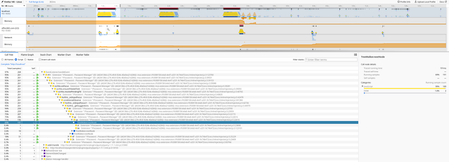
I'm running into an issue where 1password seems to significantly slow down interaction with the webpage I'm working on. There's a ton of input fields of which most are hidden, I cannot lower the amount of inputs, in fact I have to increase the amount of inputs due to how the system works. Every time I click on an input, the focus is delayed by ~200ms or so. The next time I select the same input field it's instant. 1password seems to do something that slows down the focus event. I made a performance recording in firefox. I selected 3 inputs and after the 3rd on selected the same 3 in the same order with no slowdown. I've tried adding data-1p-ignore and autocomplete="off" but it didn't solve anything.246Views4likes8Comments
Best practice for SSO login flows
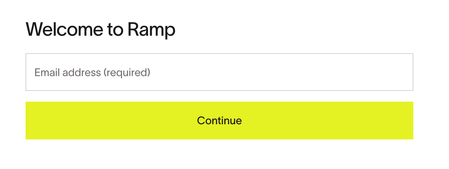
The guidance in https://developer.1password.com/docs/web/compatible-website-design is helpful for forms that render both username/email and password fields at once. The guidance is less helpful for SSO-enabled flows, where there is a check between entering a username/email and either prompting for a password, or performing a redirect to the SSO provider. An example of this style of login flow is shown below. When updating an existing login form to be SSO-aware, I experienced unexpected differences in the browser extension's behavior between localhost and deployed environments. The browser extension worked as expected on localhost: it offered autocompletion options if the username input was autofocused with just a username input in the document (no visually hidden password field), and it automatically submitted the form when the password field appeared when no SSO redirect was needed. In a deployed environment, the extension only offered autocompletion options if a visually hidden password field was present, and it did not automatically submit the form when no SSO redirect was needed. This was unexpected, especially since some websites, such as Ramp's login page shown above, work fine without a hidden password input. If there is some advanced logic that determines the expected behavior (e.g. localhost vs deployed), it would be helpful to know this too.22Views0likes0Comments
Why the requirement for group id >= 1000?
In various places people have had to discover, and workaround the fact that the 1Password Browser-Helper and CLI not only require being in a specific group (fine), and have setgid set (also fine), but the gid of that group must by greater or equal to 1000 for the integration to work: Arch: Can not connect to desktop app | 1Password Community Gentoo: [SOLVED] Browser support error on Gentoo Linux | 1Password Community NixOS: https://github.com/NixOS/nixpkgs/commit/2a58907251af76c67c6d14c1e84e73f7eaeb95e8 I've been working on a distro package for a Linux distribution I'm building and also had to discover this. As per the previous implementation in the AUR, my package uses systemd-sysusers to automatically manage users and groups required by packages. By default these automatically assigned gids are less than 1000, which causes the browser integration to fail. I can work around by hard-coding a gid, but it would be better if it just worked with the automatically assigned one. I'm wondering what's the reason for the >= 1000 requirement, and can the need for it be removed to make packaging simpler, cleaner, and consistent with other packages that need specific users and groups.47Views2likes3Comments
1Password classing input element as a username field
I am developing a React web application. On one page, I have an input element which takes a value which has nothing to do with 1Password credential or form filling, yet 1Password adds its icon to the right hand side. When I click the icon, it's not even like it's trying to autofill my details as if it were a registration form, it clearly thinks it's a username field. I realise I can add the parameter 'data-1p-ignore' to the element, but could someone explain why 1Password thinks this is a field it can autofill a username into? Is it simply because the id/name attribute has the string 'name'? I also would've assumed that autocomplete="off" would also have prevented 1Password from interacting with this element, but perhaps I'm wrong. I'd rather not have to add the 'data-1p-ignore' element to every field as this makes the code messy and just feels like a hack rather than a solution. The element in question is below, which for what it's worth, is inside a <form> tag along with another field and a submit button. Since it's a React application, this is the generated markup: <div role="group" data-slot="field" data-orientation="vertical" class="group/field flex w-full gap-3 data-[invalid=true]:text-destructive flex-col *:w-full [&>.sr-only]:w-auto" > <label data-slot="label" class="flex items-center gap-2 text-sm leading-none font-medium select-none group-data-[disabled=true]:pointer-events-none group-data-[disabled=true]:opacity-50 peer-disabled:cursor-not-allowed peer-disabled:opacity-50" for="mc_name" >Name</label ><input data-slot="input" class="h-9 w-full min-w-0 rounded-4xl border border-input bg-input/30 px-3 py-1 text-base transition-colors outline-none file:inline-flex file:h-7 file:border-0 file:bg-transparent file:text-sm file:font-medium file:text-foreground placeholder:text-muted-foreground focus-visible:border-ring focus-visible:ring-[3px] focus-visible:ring-ring/50 disabled:pointer-events-none disabled:cursor-not-allowed disabled:opacity-50 aria-invalid:border-destructive aria-invalid:ring-[3px] aria-invalid:ring-destructive/20 md:text-sm dark:aria-invalid:border-destructive/50 dark:aria-invalid:ring-destructive/40" id="mc_name" autocomplete="off" value="Some value" name="mc_name" /> </div> Thanks17Views0likes0CommentsExtension slows page even when irrelevant DOM elements are added
Hello! I've noticed that the extension slows down the webapp I'm working on quite a lot even though the vast majority of elements on the page shouldn't be relevant to the extension. The webapp in question involves displaying SVGs with lots of elements (660,000+) inline on the page, and (for various reasons) we start with an more-or-less empty <svg> tag on the page, and then later fill in the contents using `setHTML` or `innerHTML`. When that happens, I can see on a performance profile that there is a long pause caused by the 1Password extension due to (presumably) it inspecting all the inserted elements, even though they are all SVG elements and are thus not relevant to the extension. The length of the slowdown depends on the size of the SVG that's been inserted, but our SVGs are always going to be quite large, since they depict circuit boards, which are multi-layered and can get very complex. At the point that I noticed it, the slowdown was taking more than 43 seconds. (I have a profile exported if it would be useful to the extension devs, but the forums won't let me upload files or post images.) Any chance you could you look into this? I haven't been able to find any way to tell the extension to ignore part of a page, and additionally it seems like the extension should ignore SVG elements by default. Thanks!26Views0likes1Comment
Firefox extension autofill broken — InputJsonDeserializationFailed
Since updating to 1Password 8.12.5 on Linux, the autofill feature no longer works in Firefox-based browsers (Firefox and Zen Browser). The same extension version (8.12.4.46) works correctly in Chromium. Copying passwords from the extension popup works fine — only the fill/autofill operation is broken. Environment: OS: Arch Linux (kernel 6.19.6) 1Password app: 8.12.5 (also tested with beta 8.12.6-35 — same issue) 1Password extension: 8.12.4.46 (latest on AMO) Firefox: 148.0 (also tested with 147.0.4 — same issue) Chromium: autofill works with the same extension version and app Steps to reproduce: Open any login page in Firefox Focus on a username/password input field The 1Password inline menu appears and shows matching logins — this works Click on a login to fill — nothing happens Filling via the toolbar popup and keyboard shortcut also does nothing. Copying a password works fine. Error from about:debugging → 1Password → Inspect: Uncaught (in promise) Error: ⛔ Core error code: InputJsonDeserializationFailed sendCoreMessage background.js:108 nextFill background.js:108 What I've tested: Test Result Chromium + same extension + same app Fill works Firefox 148 / 147.0.4 InputJsonDeserializationFailed 1Password beta 8.12.6-35 InputJsonDeserializationFailed X11 instead of Wayland InputJsonDeserializationFailed Copy password from extension Works The Firefox extension's fill request (nextFill → sendCoreMessage) is rejected by BrowserSupport with InputJsonDeserializationFailed. The same extension version works in Chromium, so the issue is in the Firefox-specific fill payload. This is a regression from the 8.12.2 → 8.12.5 app update (downgrading is blocked by database migration).80Views0likes1Comment
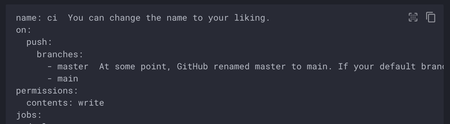
1Password Chrome extension is incorrectly manipulating <code> blocks
The latest 1Password Chrome extension is incorrectly manipulating the DOM within <code> blocks on static pages. It looks it's using prism.js to try to add syntax highlighting to <code> blocks on the entire page. If you're using a static site generator to highlight code with a different library, it causes the display to break. Example: mkdocs, a popular documentation tool If you view the documentation for customizing Mkdocs material (https://squidfunk.github.io/mkdocs-material/customization/) with the extension enabled, you'll see that the YAML example at the top is not highlighted (it should be). Under the hood, if you inspect its DOM, you can see that it's been rewritten with prismjs classes. If you disable the extension, it is highlighted: This is likely to impact a number of documentation sites in the tech community.Solved12KViews18likes54Comments