Level up your business security with free, on-demand training and certification. Explore 1Password Academy today →
browser extension
6708 Topics
Support Arc Browser integration with 1Password 8
I'm using the new Arc Browser from the Browser Company (https://thebrowser.company/), which runs on Chromium. It works perfectly but as of now it doesn't seem to by syncing with the desktop app, so I need to always type in my master password instead of being prompted for TouchID, which gets annoying. Any chance there's something you can do on your end to make this work? Thanks! 1Password Version: 8.7.1 Extension Version: 2.3.5 OS Version: Mac OS 12.2.146KViews1like39CommentsSupport for Orion Browser
Please add support for the https://browser.kagi.com. It needs explicit signature verification from 1Password to work. Otherwise, it should work out of the box. 1Password Version: Not Provided Extension Version: Not Provided OS Version: Not Provided43KViews6likes462Comments1Password in Opera browser
I use Chrome extension for Opera browser (Chromium based) on MacOS and there are many problems which became more severe in last few days making the extension unsable. TouchID (connection with desktop app) doesn't work at all, every time I have to use the password Autofill doesn't work. The suggested item shows below the field but clicking it does nothing. Probably related to this one, I already sent a log from the console: https://1password.community/discussion/139071/passwords-not-entered-and-saved#latest Suggestions in the extension don't work. They are empty all the time, when opening the extension I am always shown Favorites altought I have set Suggestions as first to show. (They are not shown because they are empty.) 1Password Version: 1Password for Mac 8.10.3 (81003012) Extension Version: Version 2.8.1 OS Version: 13.2.1 (22D68) Browser:_ Opera 97.0.4719.28 (arm64)24KViews1like13Comments
Console error: "Retrieving "b5x-stateful-inline-icon" flag errored: timed out" [Fixed in the beta]
Using Safari Extension v2.22.1 (22200103) beta I get the following console error on every page load from the injected.js : Retrieving "b5x-stateful-inline-icon" flag errored: timed out - falling back clicking the error highlights line 19578 of injected.js 1Password Version: 8.10.30 Extension Version: 2.22.1 OS Version: macOS 14.4 Browser: Safari 17.423KViews6likes56Comments
Support for Zen browser
Hi! There's this new browser called "Zen browser" It's based on Firefox but the 1password extension doesn't work with the desktop app 1Password Version: Not Provided Extension Version: Not Provided OS Version: Not Provided Browser: Not ProvidedSolved20KViews56likes183Comments
Passkeys do not work with Microsoft 365
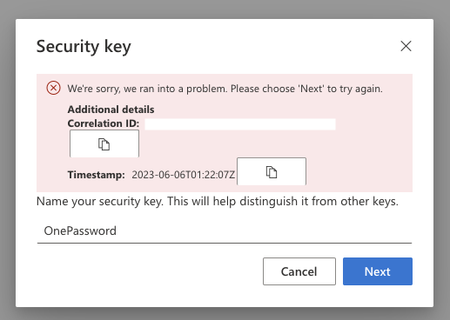
When I go to add PassKeys to my MIcrosoft 365 portal it fails at the last step. https://mysignins.microsoft.com/security-info Same error in Chrome and Brave. I was able to cancel the 1Password enrollment process and enroll a YubiKey just fine. 1Password Version: 1Password for Mac 8.10.7 (81007041) Extension Version: 2.12.0 OS Version: 13.4 Browser:_ Brave18KViews2likes71Comments
Microsoft account setup for Passkey
Hello How can I save Passkey for my personal and business Microsoft accounts? For my personal account I went to https://account.live.com/proofs/manage/additional then Add then selected Windows device. It asked for my Windows Hello PIN code and that was it. I didn't get any prompt from 1Password. I tried both in Firefox and Edge. Addon versions FF: 1Password im Browser 2.12.1 21200101, im Kanal BETA Edge: 1Password im Browser 2.12.0 21200003, im Kanal BETA15KViews0likes15Comments
Add 1Password extension for Opera & Sidekick browsers
I wish to add my voice to the many requesting native browser extensions for Opera & Sidekick. I've added Opera & Sidekick as trusted browsers using 1Password Support's process described here. https://my.1password.com/app#/everything/Search/55l4252gttwaodsvgvzin7oicu5q63bj4czfgwhl5ipfdykpxea4/edit?itemListId=agile I can open Opera & Sidekick from the Chromium Extensions in the toolbar. However, it does not open the Desktop 1Password. The same is true if I open Desktop 1Password first and then go to Opera or Sidekick. Apple Watch does not work with either, nor does TouchID. I have to type in my password, which for me raises a security concern. I don't understand why 1Password provides a native chromium extension in Brave and not Opera or Sidekick, both of which have 3rd party integration and tab features that are superior to Brave. I would also appreciate if 1Password would state why they don't support these browsers. Technical issues? Legal questions? I suspect the latter and if that is the case I respect that, but would like to know. 1Password user since 2009. Profile 1Password for Mac 8.10.33 (81033001) Sidekick Version 122.60.1.40403 (Official Build) (arm64) Opera One(version: 110.0.5130.64) (arm64) iMac Pro 2017 3.2 GHz 8-Core Intel Xeon W MacBook Air 15-inch, M3, 2024 1Password Version: 8.10.33 (81033001 Extension Version: 2.24.2 OS Version: MacOS Sonoma 14.5 Browser: Opera | SidekickSolved15KViews0likes19Comments
Passkeys not working in Firefox: "Touch your security key to continue..."
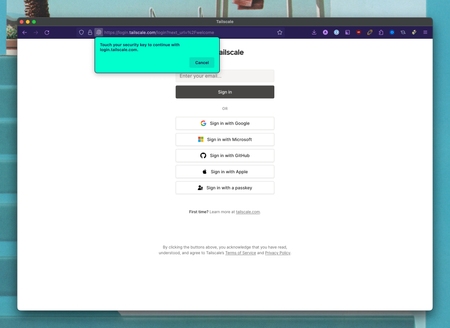
I can't always figure out how to create a passkey. When I go to a website that supports them (e.g. login.tailscale.com or passkeys.io), clicking the passkey button will give me a prompt in Firefox and not 1Password, and I don't know how to proceed. The prompt says: "Touch your security key to continue with login.tailscale.com." I have no idea what to do with this. On other websites like passkeys.guru, clicking to create a passkey gives me a prompt in 1password itself which makes sense: 1Password Version: 8.10.18 Extension Version: 2.15.1 OS Version: macOS 13.5.2 Browser: Firefox 117.0.114KViews1like9Comments