Level up your business security with free, on-demand training and certification. Explore 1Password Academy today →
browser extension
32 Topics
1Password Chrome extension is incorrectly manipulating <code> blocks
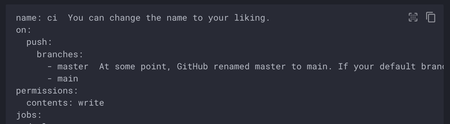
The latest 1Password Chrome extension is incorrectly manipulating the DOM within <code> blocks on static pages. It looks it's using prism.js to try to add syntax highlighting to <code> blocks on the entire page. If you're using a static site generator to highlight code with a different library, it causes the display to break. Example: mkdocs, a popular documentation tool If you view the documentation for customizing Mkdocs material (https://squidfunk.github.io/mkdocs-material/customization/) with the extension enabled, you'll see that the YAML example at the top is not highlighted (it should be). Under the hood, if you inspect its DOM, you can see that it's been rewritten with prismjs classes. If you disable the extension, it is highlighted: This is likely to impact a number of documentation sites in the tech community.Solved12KViews18likes54Comments
1PW extension bug: autofill theme detection fails when using oklch color scheme
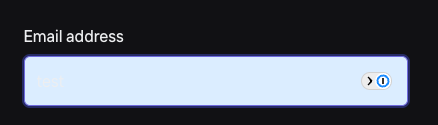
Hey, I am trying to fix the autofill background on a web app that has dark mode. Right now the 1Password extension applies light autofill background which creates unreadable contrast (1st screenshot). It's because input gets `data-com-onepassword-filled="light"` attribute with light variant. Is it possible to tell the 1PW that the page is using dark mode or what's the solution to let the 1PW set `data-com-onepassword-filled` to `'dark'`? I have set the color-scheme CSS property to `dark`. Edit: I managed to debug this issue and found out there's a bug in the theme detection by 1PW extension itself that's done via `data-com-onepassword-filled="light|dark"`. The reproduction is simple: When using `oklch` color on input text, the autofill detection breaks and resolves the theme always as light. <!DOCTYPE html> <html lang="en" style="color-scheme: dark"> <body> <h1>Working - uses hex</h1> <div style="color: #edeef0"> <input type="email" autocomplete="email" /> </div> <h1>Not working - uses oklch</h1> <div style="color: oklch(94.9% 0.003 264.5)"> <input type="email" autocomplete="email" /> </div> </body> </html> Which will result in600Views2likes10Comments
Severe slowdown in Chrome with 1Password extension 8.11.12.27 on pages with many inputs
Since updating to 1Password extension 8.11.12.27 in Chrome, pages with forms containing thousands of inputs freeze on load. The problem also occurs with many hidden inputs, which should not be processed by the extension. We run an application that makes heavy use of hidden inputs. With earlier versions of the extension this was not a problem. Profiling shows high CPU use in openOrClosedShadowRoot(), especially when called on the form element containing many inputs. After load, the function runs instantly, so the slowdown is tied to the extension’s initial DOM scan. Steps to Reproduce: Install 1Password extension v8.11.12.27 in Chrome. Open a form with thousands of inputs, including hidden ones. Example: https://inputs-1password.netlify.app/ On load, clicking buttons or opening the context menu is impossible. Chrome stays frozen until the extension finishes scanning. Expected Result: Pages should load normally, regardless of number or type of inputs. Actual Result: Pages freeze during load due to heavy time spent in openOrClosedShadowRoot(). Impact: Severe slowdown in apps with large forms. Users blocked from working with affected pages. Disabling Autofill options does not help. Using "Hide on this page" does not help. Adding data-1p-ignore to every input is not feasible for us. Rolling back the extension is not practical. Workarounds: None viable for production. Proposed fixes: Optimize DOM traversal or revert to the previous methods. Support a parent-level attribute to exclude all children from scanning. Ensure that when the extension is disabled for a page, it truly does not inject or process elements on that page.Solved461Views2likes10CommentsAdding data-1p-ignore dynamically isn't respected
Struggling with an issue in which I want to disable 1Password dynamically (after the string in the input is 3 letters or more). This seems to work with a hack (remove the item and then add it again) but stops working after. The following codepen is an example: https://codepen.io/senadir/pen/GgJBrBZ The usecase is that I want to prioritize 1Password and system autofill but after 3 letters if nothing was matched for a customer I want to go ahead and search for the field. This works the first time but once you blur and focus the field again it stops working and it stops being respected.Solved432Views0likes3Comments
Console flooded with errors when clicking links during 1Password passkey selection dialog
Hi, I’m experiencing an issue with the 1Password browser extension when testing WebAuthn API integration on my own website. Environment macOS Chrome (latest version) 1Password browser extension Issue I’ve successfully implemented WebAuthn API functionality for login on my website. However, the 1Password extension behaves unexpectedly: When the 1Password passkey selection dialog is open, if I click a link on the page, the page transition happens, but the Chrome DevTools console gets flooded with a large number of log, warn, and error messages. This feels like a bug. Steps to Reproduce Register a passkey in 1Password for the test site. Open the login page, which triggers the 1Password passkey selection dialog. While the dialog is open, click any link on the page. The navigation works, but the console outputs a large number of log, warn, and error messages. Expected Behavior Page navigation should happen without producing unnecessary console output. Actual Behavior Console is flooded with log, warn, and error messages. Additional Information I will attach/paste the console output below for reference. background.js:80 📤 Sending <NmLockState> message to native core <740716061> background.js:80 📥 Received message <NmLockState> from native core <740716061>. Duration: 4.8ms background.js:80 DeviceTrust: access denied: [ missing backoffice permission, missing admin permission ] - aborting (anonymous) @ background.js:80 background.js:80 📤 Sending <NmOfflineStatus> message to native core <3907478951> background.js:80 📥 Received message <NmOfflineStatus> from native core <3907478951>. Duration: 1.7ms background.js:80 Could not complete _handleGetCredential: disconnected (anonymous) @ background.js:80 background.js:80 📤 Sending <NmLockState> message to native core <3923595490> background.js:80 📥 Received message <NmLockState> from native core <3923595490>. Duration: 4.1ms background.js:80 📤 Sending <NmLockState> message to native core <2088568031> background.js:80 📥 Received message <NmLockState> from native core <2088568031>. Duration: 4.3ms background.js:80 📤 Sending <NmLockState> message to native core <780253718> background.js:80 📥 Received message <NmLockState> from native core <780253718>. Duration: 4ms background.js:80 📤 Sending <NmLockState> message to native core <3199044829> background.js:80 📥 Received message <NmLockState> from native core <3199044829>. Duration: 3.8ms background.js:80 📤 Sending <NmOfflineStatus> message to native core <469136938> background.js:80 📥 Received message <NmOfflineStatus> from native core <469136938>. Duration: 6ms background.js:80 Loaded page details in 2 ms. background.js:80 Analyzed the page in 0.4000000059604645 ms. background.js:80 📤 Sending <NmOfflineStatus> message to native core <2269321457> background.js:80 📥 Received message <NmOfflineStatus> from native core <2269321457>. Duration: 3.3ms background.js:80 [popup] Not attempting to connect to desktop app: already connected or connecting to desktop app background.js:80 Decided not to attempt reconnection to the desktop app. background.js:80 📤 Sending <NmLockState> message to native core <2789903974> background.js:80 📥 Received message <NmLockState> from native core <2789903974>. Duration: 2.7ms background.js:80 DeviceTrust: access denied: [ missing backoffice permission, missing admin permission ] - aborting (anonymous) @ background.js:80 background.js:80 📤 Sending <NmOfflineStatus> message to native core <3819754395> background.js:80 📥 Received message <NmOfflineStatus> from native core <3819754395>. Duration: 3.6ms background.js:80 📤 Sending <NmLockState> message to native core <1861163921> background.js:80 📥 Received message <NmLockState> from native core <1861163921>. Duration: 3.1ms background.js:80 📤 Sending <NmLockState> message to native core <2199877840> background.js:80 📥 Received message <NmLockState> from native core <2199877840>. Duration: 4ms background.js:80 Failed to refresh keysets <redacted> (anonymous) @ background.js:80 background.js:80 📥 Sync started for account xxxxxxxx - syncing all background.js:80 Failed to refresh keysets <redacted> (anonymous) @ background.js:80 background.js:80 Failed to refresh keysets <redacted> (anonymous) @ background.js:80 background.js:80 Failed to refresh keysets <redacted> (anonymous) @ background.js:80 background.js:80 Failed to refresh keysets <redacted> (anonymous) @ background.js:80 background.js:80 Managed Apps - Feature flag is NOT enabled background.js:80 ✅ Sync completed for account xxxxxxxx - took 969ms background.js:80 📤 Sending <NmOfflineStatus> message to native core <335039426> background.js:80 📥 Received message <NmOfflineStatus> from native core <335039426>. Duration: 8.1ms background.js:80 Failed to refresh keysets <redacted> (anonymous) @ background.js:80 background.js:80 📥 Sync started for account xxxxxxxx - syncing all background.js:80 Failed to refresh keysets <redacted> (anonymous) @ background.js:80 background.js:80 Failed to refresh keysets <redacted> (anonymous) @ background.js:80 background.js:80 Failed to refresh keysets <redacted> (anonymous) @ background.js:80 background.js:80 Failed to refresh keysets <redacted> (anonymous) @ background.js:80 background.js:80 Managed Apps - Feature flag is NOT enabled ✅ Sync completed for account xxxxxxxx - took 935ms 📤 Sending <NmOfflineStatus> message to native core <228318852> 📥 Received message <NmOfflineStatus> from native core <228318852>. Duration: 1.9ms Failed to refresh keysets <redacted> (anonymous) @ background.js:80 📥 Sync started for account xxxxxxxx - syncing all Failed to refresh keysets <redacted> (anonymous) @ background.js:80 Failed to refresh keysets <redacted> (anonymous) @ background.js:80 Failed to refresh keysets <redacted> (anonymous) @ background.js:80 Failed to refresh keysets <redacted> (anonymous) @ background.js:80 📤 Sending <NmLockState> message to native core <3763395867> 📥 Received message <NmLockState> from native core <3763395867>. Duration: 3.1ms Managed Apps - Feature flag is NOT enabled ✅ Sync completed for account xxxxxxxx - took 900ms 📤 Sending <NmOfflineStatus> message to native core <527828929> 📥 Received message <NmOfflineStatus> from native core <527828929>. Duration: 3.3ms Could not complete _handleGetCredential: disconnected (anonymous) @ background.js:80 DeviceTrust: access denied: [ missing backoffice permission, missing admin permission ] - aborting (anonymous) @ background.js:80 📤 Sending <NmOfflineStatus> message to native core <3893879316> 📥 Received message <NmOfflineStatus> from native core <3893879316>. Duration: 1.7ms 📤 Sending <NmLockState> message to native core <2484059834> 📥 Received message <NmLockState> from native core <2484059834>. Duration: 4.3ms 📤 Sending <NmLockState> message to native core <567699292> 📥 Received message <NmLockState> from native core <567699292>. Duration: 3.8ms 📤 Sending <NmLockState> message to native core <2496790293> 📥 Received message <NmLockState> from native core <2496790293>. Duration: 3.6ms Failed to refresh keysets <redacted> (anonymous) @ background.js:80 📥 Sync started for account xxxxxxxx - syncing all Failed to refresh keysets <redacted> (anonymous) @ background.js:80 Failed to refresh keysets <redacted> (anonymous) @ background.js:80 Failed to refresh keysets <redacted> (anonymous) @ background.js:80 Failed to refresh keysets <redacted> (anonymous) @ background.js:80 Managed Apps - Feature flag is NOT enabled ✅ Sync completed for account xxxxxxxx - took 1264ms 📤 Sending <NmOfflineStatus> message to native core <2459928279> 📥 Received message <NmOfflineStatus> from native core <2459928279>. Duration: 3.1ms Failed to refresh keysets <redacted> (anonymous) @ background.js:80 📥 Sync started for account xxxxxxxx - syncing all Failed to refresh keysets <redacted> (anonymous) @ background.js:80 Failed to refresh keysets <redacted> (anonymous) @ background.js:80 Failed to refresh keysets <redacted> (anonymous) @ background.js:80 Failed to refresh keysets <redacted> (anonymous) @ background.js:80 Managed Apps - Feature flag is NOT enabled ✅ Sync completed for account xxxxxxxx - took 891ms 📤 Sending <NmOfflineStatus> message to native core <346739443> 📥 Received message <NmOfflineStatus> from native core <346739443>. Duration: 4.3ms 📤 Sending <NmLockState> message to native core <1926301438> 📥 Received message <NmLockState> from native core <1926301438>. Duration: 3.9ms Failed to refresh keysets <redacted> (anonymous) @ background.js:80 📥 Sync started for account xxxxxxxx - syncing all Failed to refresh keysets <redacted> (anonymous) @ background.js:80 Failed to refresh keysets <redacted> (anonymous) @ background.js:80 Failed to refresh keysets <redacted> (anonymous) @ background.js:80 Failed to refresh keysets <redacted> (anonymous) @ background.js:80 Managed Apps - Feature flag is NOT enabled ✅ Sync completed for account xxxxxxxx - took 974ms 📤 Sending <NmOfflineStatus> message to native core <4246935782> 📥 Received message <NmOfflineStatus> from native core <4246935782>. Duration: 3.7ms Failed to refresh keysets <redacted> (anonymous) @ background.js:80 📥 Sync started for account xxxxxxxx - syncing all Failed to refresh keysets <redacted> (anonymous) @ background.js:80 Failed to refresh keysets <redacted> (anonymous) @ background.js:80 Failed to refresh keysets <redacted> (anonymous) @ background.js:80 Failed to refresh keysets <redacted> (anonymous) @ background.js:80 Managed Apps - Feature flag is NOT enabled ✅ Sync completed for account xxxxxxxx - took 871ms 📤 Sending <NmOfflineStatus> message to native core <969923831> 📥 Received message <NmOfflineStatus> from native core <969923831>. Duration: 3.2ms 📤 Sending <NmLockState> message to native core <2384356258> 📥 Received message <NmLockState> from native core <2384356258>. Duration: 4.1ms Failed to refresh keysets <redacted> (anonymous) @ background.js:80 📥 Sync started for account xxxxxxxx - syncing all Failed to refresh keysets <redacted> (anonymous) @ background.js:80 Failed to refresh keysets <redacted> (anonymous) @ background.js:80 Failed to refresh keysets <redacted> (anonymous) @ background.js:80 Failed to refresh keysets <redacted> (anonymous) @ background.js:80 Managed Apps - Feature flag is NOT enabled ✅ Sync completed for account xxxxxxxx - took 865ms 📤 Sending <NmOfflineStatus> message to native core <1380548022> 📥 Received message <NmOfflineStatus> from native core <1380548022>. Duration: 1.7ms 📤 Sending <NmLockState> message to native core <2946571035> 📥 Received message <NmLockState> from native core <2946571035>. Duration: 3.1ms 📤 Sending <NmLockState> message to native core <2259480419> 📥 Received message <NmLockState> from native core <2259480419>. Duration: 2.4ms 📤 Sending <NmLockState> message to native core <2244117207> 📥 Received message <NmLockState> from native core <2244117207>. Duration: 4ms Could not complete _handleGetCredential: disconnected332Views0likes3CommentsHow To enable Flatpak VScode, toolbox and 1password to integrate together
Since i have been struggling on this way too long and it was keeping me out of developing and my setup workflow wasent working i was determinate to quit first and go to mutable systems, but something kept me pushing my limits and figure how this total setup can be done and i have finally cracked the code to make flatpak VScode to connect to toolbox as user and enable 1password authentication to commits and secrets. The journey wasent easy and i think i got more gray hair than i should of have, but after i got it working spending literally a week to test wipe, broken kinoite, wipe again now it works. First lets start that on this system at this point you still need 1password and 1password-cli as layered and that is only layers on my setup with nvidia rest are systemd-sysext and flatpaks. First add 1 password repo Edit the repo file and remove ” from gpgkey sudo nano /etc/yum.repos.d/1password.repo Then just rpm-fusion install 1password 1password-cli Reboot Login to your vaults and app as normal Now comes the parts what kept me frustrated for days wahs that the old wrappers we used to use with podman-host dont work anymore and vscode cant see containers and if we layer VScode it is on root and this wont work. So what i actually found there is the script that makes everything for you and it works https://github.com/owtaylor/toolbox-vscode This made things so much better follow the installation method and then enter you toolbox container and type code and magick happens Now comes the 1password issues where i got it 80% working but it never worked since it was looking that /opt/1Password/op-ssh-sign': No such file or directory error:fatal: failed to write commit object So lets start getting Flatpak permissions and this was taken from Dave Jansson guide https://davejansen.com/using-vscode-flatpak-with-1password-ssh-git-signing/ Thank you for that and follow the guide as it explains all what needs to be done Then comes the last part to fix the signing issue and that took me way too long time to figure and solution is so simple. Go to your git config file and just remove the line that says program = /opt/1password/op-ssh-sign and you are all good all commits are now working and 1password app prompts authentication when it detects commits or authentication is needed.Solved254Views0likes2Comments
1password input focus lag with lots of inputs
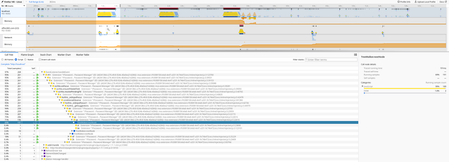
I'm running into an issue where 1password seems to significantly slow down interaction with the webpage I'm working on. There's a ton of input fields of which most are hidden, I cannot lower the amount of inputs, in fact I have to increase the amount of inputs due to how the system works. Every time I click on an input, the focus is delayed by ~200ms or so. The next time I select the same input field it's instant. 1password seems to do something that slows down the focus event. I made a performance recording in firefox. I selected 3 inputs and after the 3rd on selected the same 3 in the same order with no slowdown. I've tried adding data-1p-ignore and autocomplete="off" but it didn't solve anything.216Views4likes8Comments
1P Nightly: getting spammed to download "Apollo Devtools" Chrome Extension!
I've been running 1P Nightly, and currently have v8.12.4.6 installed. Today I went to open my Chrome DevTools console and saw this message: "Download the Apollo DevTools for a better development experience: https://chrome.google.com/webstore/detail/apollo-client-developer-t/jdkknkkbebbapilgoeccciglkfbmbnfm" Which leads to this page for "Apollo Client Devtools" ? I found that link in the 1P Nightly extension's codebase. Why is this prompt appearing? Don't like this at all...Solved200Views0likes7Comments
Safari & Firefox extensions still break <pre>/<code> blocks after page load
Hi 1Password team 👋, I’m opening this discussion specifically for Safari and Firefox. While the original issue appears to be resolved for Chrome, the same behavior is still reproducible in other browsers. For reference, this is the original Chrome-related discussion: 1Password Chrome extension is incorrectly manipulating <code> blocks | 1Password Community Environment Tested on macOS with the following versions: Firefox: 146.0.1 (aarch64) 1Password extension: 8.11.23.2 (Dec 16, 2025) Safari: Version 26.2 (21623.1.14.11.9) 1Password extension: 8.11.22.27 Current status The issue is still present in: Firefox (reliably reproducible) Safari (very noticeable once the extension initializes) Observed behavior <pre><code> blocks render correctly on initial page load (syntax highlighting and line numbers are visible) As soon as the 1Password extension finishes initializing, the DOM is modified Syntax highlighting and line numbers disappear This happens without any user interaction, simply by enabling the extension The behavior matches the previously reported Chrome issue, but remains unresolved in Safari and Firefox. Why this matters Many developer-focused sites rely on client-side syntax highlighting (e.g. Prism, Highlight.js, Shiki). Post-load modification of code blocks breaks documentation and significantly impacts readability. Request The Chrome fix is very much appreciated 👍 It would be great to see the same behavior addressed consistently for Safari and Firefox, so code blocks are handled uniformly across all 1Password browser extensions. Thanks a lot for the continued work — and happy to help with further testing if needed. Wishing you all a happy new year 🎉 Best regards146Views0likes2Comments