Our community is getting an upgrade on July 2nd! Learn more in the FAQs →
community
22 TopicsFrequently asked questions about the new 1Password Community
On July 2nd, 2026, the 1Password Community is moving to a new platform. Here we have put together common questions and answers about what’s changing, what happens to your Community account and content, and what to expect during the transition. Will there be any downtime during the transition? Yes. There will be a brief period from June 25th, 2026 to July 2nd, 2026, where our existing Community (1password.community) will be read-only. This is to ensure all data is transferred smoothly when we move to the new platform. We'll provide advance notice and updates via the Community (1password.community) so you're informed every step of the way. If you have any questions about your 1Password account during this period, please contact support. Why are we migrating? Our new Community will include an improved layout, easier navigation, and better tools for discussions. It's designed to make your experience more intuitive and enjoyable, with better support, opportunities for feedback, and more. If you have any questions or platform feedback, please email us at community@1password.com Will I need to create a new account or re-register? Your existing account will be carried over to the new 1Password Community, but you will need to reset your password when you first sign in. What happens to my content? If you have an existing 1Password Community account, it will be migrated to the new platform, along with all your posts, replies, and interactions. When you sign in to the Community after July 2nd, you'll have the same username, but will need to create a new password. What if I don't want my current Community user account to be migrated to the new Community? If you do not want your data to be migrated to the new Community platform, please opt out by sending us an email at community@1password.com by June 23rd, 2026. You must use the email address associated with your current Community account and include your community username. This written notification is required for us to delete your profile before the migration to the new Community. If you opt out, your existing Community account will not be migrated and you will no longer be able to log in to the Community without creating a new account. Your Community user will be permanently deleted within 30 business days. Your previous posts and comments will remain accessible in the new Community under an 'Anonymous User’ label If you want to delete all of your data, including comments and posts, please make your request clear when you opt-out. How will this affect ongoing discussions and current threads? All ongoing discussions and current threads will be preserved during the migration. You'll be able to continue conversations seamlessly after the transition downtime described above. Where will my data be stored in the new Community? Our new Community platform, Gainsight, is hosted on Microsoft Azure cloud servers located in the United States and Germany. For more details on Gainsight data handling, see Gainsight’s Privacy Policy.1.8KViews3likes19CommentsDrop your questions in the Random but Memorable mailbag! 🎙️
Hey everyone 👋 We're putting together a special episode of Random but Memorable, our award-winning podcast, and we'd love for you to be part of it. Got a question about cybersecurity, privacy, passwords, or passkeys? Leave it in the comments below and we may answer it on the podcast! Whether you're just getting started with online security or you've been in the space for years, we want to hear what you're curious about. Note: Product questions are welcome, but please send any bug reports to our support team so they get the right attention. We’re aiming to keep things here focused on general cybersecurity or best practices! Thanks for being a part of the 1Password community. We're excited to dig into your questions on the show!79Views2likes0CommentsMay 2026 at 1Password: Native macOS AutoFill, a new developer site, and more!
In May, we introduced new features for Autofill on macOS and Android, as well import/export enhancements, and a way to create items more efficiently. We also relaunched our developer documentation hub with new quick start guides, powerful search features and a fresh domain change to match. In case you missed it macOS native AutoFill in beta We know you've been waiting for this one! In the latest 1Password for Mac beta release (version 8.12.22) we've integrated 1Password with Apple's native Passwords API. This allows your password manager to act as a system-level Credential Provider on macOS. Using the native Passwords API, alongside Universal Autofill and 1Password in the browser, will give you a more consistent filling experience across macOS. This is one of our most requested features, and we’re working hard to bring it to the production channel after the beta release. Follow these steps to try macOS AutoFill for yourself: Install the latest version of the 1Password for Mac beta. Navigate to 1Password Settings > Autofill > Set up macOS AutoFill. Select “Turn On” from the macOS permission prompt. If you’re using Safari, confirm Safari Settings > AutoFill > User names and passwords is enabled. * This feature requires macOS 14 Sonoma on Apple silicon. We’d love to hear your feedback on the update in our announcement post! Updated developer documentation Interested in setting up a service account for your AI agent, securely provisioning secrets, or managing your project’s environment variables? You’ll find in-depth guides covering all this and more on 1Password.dev, our new developer documentation hub. Our team has refreshed and reorganized the documentation to make it even easier to get started with our developer tools. We’ve also added some new get-started guides for developers, admins, and partners, as well as enhanced search functionality that lets you ask questions in plain language. 👉Read the full announcement in the Developer Community. More product updates announced this quarter If the macOS update wasn’t enough, May also brought a number of product updates including: the Autofill health check, Credential Exchange Protocol (CXP), and smarter login creation. You often need to tweak multiple system settings in multiple menus to ensure a consistent autofill experience on Android. If you miss a setting, or your device changes something without telling you, it can be tough to track down and fix the issue. Our new Autofill health check brings these settings into one place and highlights any settings that need to be changed. You might recall that we’ve been working on a new way to import and export data. This work is part of an industry wide effort to better facilitate credential migration across different systems with the CXP. That new process is now live in iOS and Android, making it easier to move everything including passkeys (yes, you can now export passkeys!) between different password managers. Last but not least: instead of starting with a blank login item, you can now type the name of widely used websites, like Reddit or Steam, into the title to prefill key fields. This not only means you can create items faster, but also helps ensure your items are filled where you use them. Random but Memorable May 7th was World Password Day! To mark this special day, we sat down with 1Password CISO Jacob DePriest to talk about the future of identity security. If you want to know where the cybersecurity industry is going, this one's for you!". In our latest episode, Gerald Auger, founder of Simply Cyber, shares his tips to stay secure during the summer travel season. The future of identity security | World Password Day special! Cybersecurity tips for the modern traveler Don’t forget to subscribe to the Random but Memorable YouTube channel! Release note highlights Browser Extension Creating a new item in the 1Password browser extension now opens a pop-up window instead of opening the full 1Password app window. Fixed an issue where you weren’t prompted to update a saved login after you changed your username on a site but kept the same password. Fixed an issue where the 1Password could lock unexpectedly after you switched tabs. Fixed an issue where 1Password in Safari could show an endless loading state when it couldn’t connect to the desktop app. Mac, Windows, and Linux You can now use Codex to interact directly with 1Password Environments using a local MCP server (currently in beta). We’ve improved support for importing your data from Bitwarden using CSV files. Secondary windows of the 1Password app will now open on your active display instead of your primary display. You’ll no longer see the option to share an item if item sharing is turned off for your 1Password account. iOS, and Android [iOS only] You can now control whether or not you’re prompted to unlock 1Password when you see prompts to save items in 1Password for Safari. [iOS only] Fixed an issue where you could see two prompts to unlock with Face ID when you selected a login to fill above your keyboard. [Android only] Fixed an issue where dates wouldn’t be localized according to your system locale settings if your in-app language was set to “Use system defaults”. [Android only] Fixed an issue where similar Identity items would be hidden from Autofill suggestions.576Views2likes0CommentsNew MSP capabilities for simpler client onboarding and stronger control
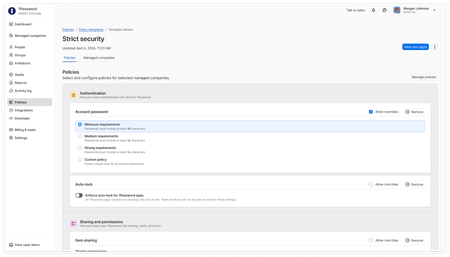
Hey everyone! We've introduced new capabilities in 1Password Enterprise Password Manager – MSP Edition to reduce client onboarding effort and give MSPs stronger control over policies, access, and usage across every managed company. What’s new: Policy templates for MSPs: Define policies with customizable templates once and apply them across some or all your clients environments. Enforce consistent security settings and control what policies clients can override. Seat limits for managed companies: Set limits on licenses per client to align with contracts and avoid unexpected overages. Also available: Granular vault permissions: Released in February, this feature gives managed companies precise control over technician role or group based access to shared vaults, supporting least-privilege access between MSPs and clients. Why it matters: Reduce repetitive client tenant set up, standardize minimum security policy standards across environments, and maintain control over access and usage as your business grows. These features are now available in 1Password Enterprise Password Manager – MSP Edition. Existing customers can start using these new capabilities through the MSP console. For more details, check out our latest blog.186Views1like1CommentApril 2026 at 1Password: Post-quantum protection, External Checks close the access gap, and AI-era security
In April, we began rolling out new protections that will keep your data safe in a world with quantum computers, we expanded how teams can enforce access with External Checks in 1Password Device Trust, and shared new thinking on AI agents, credential sprawl, and what it takes to secure systems in a faster-moving threat landscape. In case you missed it A first step toward post-quantum security Introducing the first major milestone in our post-quantum cryptography (PQC) journey: as post-quantum protection in the 1Password web app! 1Password now supports hybrid post-quantum key exchange in PQC-capable browsers like Chrome or Firefox. It all happens automatically – no user action required. This helps protect against "harvest now, decrypt later" attacks, where adversaries capture encrypted traffic today in the hope that future quantum computers will be able to decrypt it. This is the first phase of a broader post-quantum roadmap focused on protecting your data against the threats of today and tomorrow. Read more about our first step toward post-quantum security. Building a Mythos-ready security program AI is accelerating how quickly vulnerabilities can be found and exploited, and security programs need to keep up. We looked at what security leaders can do now to prepare for a world where AI-driven vulnerability discovery happens at machine speed. The takeaway: patching still matters, but it can't be the entire strategy. Teams also need to limit the blast radius by controlling access, isolating agentic identities, replacing long-lived secrets, and making it harder for a single exploit to escalate into a larger breach. Read the full post on building a Mythos-ready security program. External Checks in Device Trust 1Password Device Trust can now factor in signals from other systems before allowing access to protected apps. With External Checks, access decisions can include more than device posture. Admins can pull in things like security training completion, policy acknowledgments, MFA enrollment, active employment status, and other verification signals from external systems. External Checks closes the gap between having a policy in place and actually enforcing it when someone tries to reach company apps and data. Learn more about External Checks in 1Password Device Trust. What we learned using AI agents to refactor a monolith We shared a behind-the-scenes look at how 1Password used AI agents to help refactor a large Go monolith. The work demonstrated how agents can be genuinely useful, especially for analyzing large codebases, building deterministic tools, and executing well-scoped changes. It also showed where they still need strong constraints, clear specifications, and human judgment. Read more about what we learned using AI agents to refactor a monolith. Protecting against OAuth-based supply chain breaches Credential sprawl continues to spread across SaaS apps, developer tools, automation workflows, and AI agents. OAuth makes it easy to connect new tools, but those connections can quietly become supply chain risks when permissions are broad, long-lived, or poorly tracked. We looked at how OAuth-based supply chain attacks happen, how Google Workspace admins can check which third-party apps currently have access, and why ongoing discovery is more effective than a one-time audit. Read more about protecting against OAuth-based supply chain breaches and credential sprawl. Chasing Entropy (Season 2) Season two of Chasing Entropy kicked off in April with three new episodes: Why secure-by-design is an incentives problem, with Bob Lord. Dave Lewis and Bob Lord get into secure-by-design principles, AI systems, software supply chains, and why security outcomes need to be owned at the organizational level. What cyber conflict reveals about power and doctrine, with Allie Mellen. Dave talks with analyst and author Allie Mellen about cyber conflict, attribution, geopolitics, and why defenders need to understand intent, not just indicators. Why friction is a security risk, with Dustin Heywood. Dave and IBM's Dustin Heywood (aka EvilMog) get into agentic AI, machine identity, quantum planning, and why security controls that add friction tend to get bypassed. Listen to Chasing Entropy wherever you get your podcasts. Random but Memorable April brought three new episodes of Random but Memorable to catch up on: What it takes to protect – and break into – data centers with Deviant Ollam Are you oversharing with AI? Author Jamie Bartlett has thoughts What to do if you’ve been hacked, with Glenn Wilkinson This month covered the physical side of security, safer AI habits, what to do after a compromise, and how supply chain attacks are feeding into one another. Release note highlights Browser extension Added settings that let you choose which item types appear as autofill suggestions in the inline menu. Reorganized Autofill settings for easier navigation. Fixed an issue where the browser extension didn’t unlock with the 1Password app. Fixed issues with the sign-in banner and Quick Access suggestions in Chrome and Chromium-based browsers on Mac. Fixed several autosubmit and website-specific autofill issues. Mac, Windows, and Linux Improved localization across supported languages. Updated the wording for unlock preset options. Fixed an issue where a LastPass import could fail if the account had multi-factor authentication enabled. Improved how 1Password recovers drafts of items. App icons shown in SSH, CLI, and SDK authentication prompts now display more quickly. [Mac only] Improved handling for shortened Apple Maps links. [Windows only] Fixed an issue where 1Password couldn’t be used as the Windows passkey manager when installed on an external drive. [Linux only] Added a “Start at login” setting, enabled by default in Settings > General. iOS and Android Improved localization across supported languages. Updated the wording for unlock preset options. Improved how 1Password recovers drafts of items. [iOS only] Fixed an issue that could cause excessive background battery use after using AutoFill. [iOS only] Fixed an issue that could prevent 1Password for Safari from unlocking. [Android only] Fixed a crash that could occur when first launching the app. 1Password CLI Added Shell Plugin support for Claude Code CLI, Scaleway CLI, AWS SAM CLI, AWS eksctl, AWS awslogs, and OpenAI Codex CLI. The AWS CDK shell plugin now supports AWS profiles that assume a role with the --profile flag. op run now properly terminates subprocesses when cancelled. 1Password CLI commands now support the Account Trust Log when authenticating with the 1Password desktop app.437Views0likes1CommentUpcoming 1Password webinars
Hi folks, Here's an overview of all the webinars we have coming up in the next several weeks. I hope we'll see you there! Tuesday, April 14th at 9 AM PDT / 12 PM EDT (60 minutes): The AI access shift: Securing agentic and non-human identities In this session, we’ll explore how to discover, secure, and audit non-human access starting at the endpoint, so organizations can adopt AI and automation without expanding unmanaged credential risk. Wednesday, April 22nd at 9 AM PDT / 12 PM EDT (60 minutes): Secure agentic development: Just-in-time secrets as the new default Join Sidharth Sudhir, a Developer on the Developer Platform at 1Password, and Hugo Charre, Field Engineer at Cursor, as they walk through a practical framework for secure AI-powered development. You’ll see how 1Password Environments can be used alongside Cursor Hooks to enable just-in-time secrets, runtime injection, and least-privilege access only at execution time without slowing teams down. Wednesday, April 29th at 6 AM PDT / 9 AM EDT (60 minutes): 1Password in action: A live demo for MSPs Join us for an upcoming session to see a demo of 1Password Enterprise Password Manager – MSP Edition, built specifically for MSPs. We'll walk you through the 1Password MSP console from end to end, including client onboarding, billing and seat management, granular technician access controls, and activity log visibility. Then we'll show you exactly what your clients will experience, so you can sell this solution with confidence. Wednesday, June 3rd at 9 AM PDT / 12 PM EDT (60 minutes): What's new? The 1Password quarterly security spotlight and roadmap review In this webinar, you can look forward to learning about our recent product releases, a glimpse into our product roadmap, upcoming events with 1Password, a deep dive into actionable ways 1Password can support your business' security goals. Thursday, June 4th at 11 AM BST / 12 PM CEST / 1 PM EEST (60 minutes): What's new? The 1Password quarterly security spotlight and roadmap review This is the same webinar, but scheduled to be more convenient for Europe, the Middle East, and Africa. We also have a new webinar available on demand! Watch Credential sprawl: The risk your IAM stack can’t see to learn why credential sprawl has become one of the most overlooked drivers of enterprise breaches, and how AI has fundamentally changed the identity threat model.109Views0likes0CommentsSecurity Automation Integrations and Users API for Partners in Public Preview
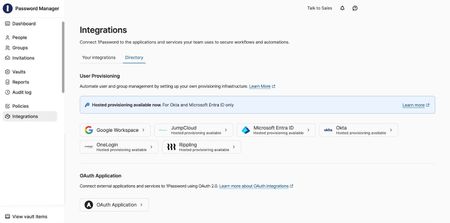
Today, 1Password is expanding Enterprise Password Manager (EPM) through the public preview of Users API for Partners, enabling security teams to respond to incidents faster during active security events. Powered by Users API for Partners, security automation integrations with partners like CrowdStrike, in addition to BlinkOps, Elastic, Sumo Logic, Tines, and Torq enable mutual customers to automatically suspend or restore users in EPM when risk is detected. Why it matters Security teams can now embed identity actions programmatically into coordinated SOC workflows to suspend or restore user access based on active security events in 1Password Enterprise Password Manager, without manual intervention. Helping teams reduce exposure time and act on risk with greater speed and consistency. Users API for Partners in Public Preview The API introduces OAuth 2.0-based authentication designed for secure, enterprise-grade security. Partners can now build with 1Password Enterprise Password Manager and use delegated, scoped authorization to list users, suspend access when risk is detected, and restore access after remediation. New security automation integrations 1Password Enterprise Password Manager customers can now enable security automation integrations with CrowdStrike, as well as BlinkOps, Elastic, Sumo Logic, Tines, and Torq. These integrations allow customers to: Automate identity response workflows Orchestrate enforcement of access policies Maintain audit-ready visibility Learn more Check out our full blog announcement for more details on how to get started with either Users API for Partners in public preview or setting up one of our new security automation integrations.161Views0likes0CommentsFebruary 2026 at 1Password: Benchmarking AI security & helping developers access secrets everywhere
February was all about AI agent security and developer workflows. From benchmarking model behavior to expanding programmatic access in 1Password Environments and SDK authentication, we continued strengthening how teams build and secure with 1Password. In case you missed it An ongoing conversation on OpenClaw and AI agents OpenClaw exploded in popularity this month, sparking curiosity across AI and tech circles. In short, OpenClaw is an AI agent that runs locally and performs personal assistant-style tasks such as managing your calendar, checking your email, or prioritizing tasks in your GitHub repository. From making reservations to building custom integrations, users have been quick to push the boundaries of OpenClaw. But with the excitement has also come concern. Agent gateways, such as OpenClaw, have access to the systems where they’re installed, making them a prime target for malicious actors. Since the beginning of the year, we’ve already seen skills that secretly instruct AI agents to deliver malware. As the use of tools like OpenClaw expands, it’s increasingly important to understand how to use them securely, and where the potential threats lie. Interested in the whole story? Our VP of Product, Jason Meller, has penned two recent write-ups on the topic: It’s incredible. It’s terrifying. It’s OpenClaw From magic to malware: How OpenClaw's agent skills become an attack surface Security Comprehension and Awareness Measure benchmark You might know how to spot and avoid phishing attacks, but can AI agents navigate the same scenarios? In our testing, even the most capable AI models were susceptible to common phishing strategies. As AI agents take on more tasks for us, and begin to act like employees, how they handle phishing is becoming a significant security concern. That’s why we built the Security Comprehension and Awareness Measure (SCAM). It’s a benchmark that tests how AI models handle phishing attacks when performing tasks like scanning your inbox or filling credentials. Security Comprehension and Awareness Measure (SCAM) Demo Alongside the benchmark, we also created a security skill. that serves as a phishing crash course for AI models. Introducing this skill improved the likelihood that each model we tested would detect and avoid a phishing test by as much as 59.9%. Programmatic access to 1Password Environments beta and desktop SDK authentication general access Building on last year’s introduction of 1Password Environments, we’re now adding programmatic read-only access. This release allows you to programmatically fetch secrets via CLI and SDKs when those secrets are needed, and only for the time that they are needed. Secure your secrets at runtime with the 1Password CLI and Environments With many thanks to our developer community for testing and feedback, we’re also introducing an update to 1Password SDKs. SDK integrations can now authenticate through the 1Password desktop app with a biometric, or password prompt. This supports workflows such as vault management, vault permissions, and batch item operations. Secure your desktop apps with 1Password SDKs Read the full launch post Evolving our partner ecosystem The 1Password Partner Program enables MSPs and other partners to help their customers adopt the familiar security solutions we provide. This program includes access to sales and technical training, as well as go-to-market resources to support onboarding and growth. We’re now focusing on simplicity, transparency, and consistency to best serve our mutual customers, and help partners scale their businesses. If you’re interested in becoming a partner, or learning more about the program you can read more in our blog post, or check out our partner program site. Random but Memorable February marks the start of a new season for Random but Memorable, our award-winning cybersecurity podcast! In this month’s episodes you can learn about practical security for the people you care about most, as well as guiding children to securely adopt AI tools. How security professionals actually protect their own families AI security tips for modern families with Childnet Release note highlights 1Password in the Browser 1Password items are now immediately cleared from the browser extension when a user is suspended. We’ve fixed an issue where 1Password could get stuck in a loop of repeatedly unlocking in Safari. We now correctly detect GitHub redirect URLs in the “Sign in with” flow. We’ve fixed an issue where 1Password could unexpectedly reload on a new tab in Firefox. Mac, Windows, and Linux We’ve fixed an issue where a prompt to turn on two-factor authentication couldn’t be selected. We’ve fixed an issue where the multi-factor authentication prompt could be missing when trying to unlock the app. We’ve added a new developer setting to enable SDK integrations, so you can authenticate SDKs with authorization prompts from the 1Password desktop app. If you load an empty .env file in Developer > Environments, it will now show a message saying no variables were found. [Windows only]: 1Password now supports a wider set of custom trusted browsers. [Windows only]: We’ve fixed an issue where the Windows Hello prompt could appear behind other windows or seem unresponsive. [Linux only]: We’ve updated our Flatpak Freedesktop dependencies to version 25.08. iOS, and Android [iOS only]: We’ve fixed an issue where Secure Note text would be cut off. [iOS only]: We’ve fixed an issue where exporting through Credential Exchange could fail for items with empty or incomplete website addresses. [iOS only]: We’ve fixed an issue where fields were intermittently visible when switching apps on iOS 26 if “Lock on Exit” was set to “Immediately”. [iOS only]: When a file attachment preview screen is dismissed in search results, it no longer re-appears automatically. 297Views1like0Comments
What's next for 1Password education
Update: Introducing 1Password Academy! We’re excited to share 1Password's new Customer learning platform – 1Password Academy. Whether you’re leading security for your organization or just getting started with 1Password, our new free training programs will help you build confidence, deepen your expertise, and empower your entire team to stay secure and productive at work. Here's what's new: Become a certified 1Password Business Admin Get in-depth expertise by becoming a Certified 1Password Business Administrator through 1Password Academy. Designed for admins rolling out or managing 1Password Enterprise Password Manager across their business, this free program gives you everything you need to to streamline set up and adoption. Whether you're a small team or growing business or a larger enterprise connecting 1Password EPM to your IdP, there's a program for you. You’ll learn how to get started with your organization's account, define polices and permissions, onboard your team, and monitor security risks. Empower your team with 1Password Academy This collection of courses is designed for 1Password team members who want to learn how to get started with 1Password. Help your team build confidence and security know-how with team member training. In this free, self-paced program team members will learn how to set up their account, use 1Password to save passwords, and sign in to apps and websites, as well as how to stay on top of account security with Watchtower. Plus, they'll learn how to set up their free 1Password Families account to stay secure at home. We're already working hard on an the next set of courses and we'll share more updates soon. Have questions or feedback? Get in touch at support@1password.academy. We’re working hard to evolve our customer education resources to provide the most up-to-date content and introduce exciting new formats. As part of this evolution, 1Password University will be closing its doors on Wednesday 5th February, 2025. But don’t worry–this isn’t goodbye, it’s just the beginning of our efforts to bring you a new, streamlined experience and improved learning resources. We’ll be unveiling our new learning experience soon, complete with up-to-date resources, and new ways to learn, so you can get the most out of 1Password products. We can’t wait to show you what we’re working on! How you can stay connected While we prepare for the relaunch, there are still plenty of ways to learn and connect: 1Password Community: You're already here! Join the conversation, ask questions, and share your knowledge with other 1Password customers. Resource Center: If you’re using 1Password at work, check out our Resource Center, where you’ll find guides like the 1Password Launch Kit to help your team hit the ground running. 1Password blog: Using 1Password at home? Our blog is packed with useful articles, including guidance on how to get started using 1Password with your family. Share your feedback We’d love to hear from you! If there are specific courses or lessons from 1Password University that you found particularly valuable, let us know in the comments. Not only can we help you find similar resources, but your feedback will play a key role in shaping the future of our education initiatives. Stay in the loop Want to be the first to hear about our relaunch? Drop a comment below and when this post is updated, you’ll hear about it first. If you have any questions, please get in touch with us. Thank you for learning with us. We’re excited to take this next step in the journey with you, and we’re looking forward to sharing more soon!25KViews1like10CommentsAugust 2025 at 1Password: Android filling updates, Pax8 Marketplace, and AI security insights
Welcome to your monthly roundup of what’s going on in the world of 1Password! Updates to autofill in Chrome and Brave on Android devices Google’s recent changes to Chromium browsers on Android introduced improvements, but also created points of friction for third-party password managers like 1Password. In response, we’ve updated 1Password for Android’s integrations with Chrome and Brave to provide a stable native autofill experience. Install the latest version of Chrome or Brave, then follow the steps in our guide to get your browser integrated with 1Password for Android. You can learn more in a detailed post from Patrick, our Android developer extraordinaire! 1Password MSP edition now available on the Pax8 Marketplace After the general access launch of 1Password MSP edition earlier this year, we’re excited to announce our enterprise password manager is now available in the Pax8 Marketplace. The MSP edition of our enterprise password manager has been purpose-built in collaboration with over 1,000 MSPs to offer simple yet comprehensive tools for managing multiple clients, improving profitability while scaling, and protecting client data. Enhanced access review features with 1Password SaaS Manager 1Password SaaS Manager is helping to close security gaps created by unmanaged app access, shadow IT, and more. We’ve made this process easier and more efficient than ever with new access reviews. These new capabilities allow security teams to conduct continuous and scheduled reviews supporting proactive deprovisioning and access auditing across all apps. Reviews are automated and fully auditable with clear, detailed reporting. Research on security challenges caused by AI AI is front of mind for tech and security experts alike. In our ongoing work to lead security conversations relating to AI, we commissioned a survey of 200 North American security leaders which identified four key concerns around AI governance and security controls: Limited visibility into AI tool usage AI and security policy enforcement Unintentional exposure via AI access Unmanaged AI You can find more about these security concerns, and how to mitigate them with 1Password, in our blog post. Random but Memorable episodes in August How AI is supercharging social engineering attacks with Rachel Tobac 7 steps to secure digital parenting with Alanna Powers from FOSI Release note highlights Browser Extension An issue with “Hide on this page” has been fixed Improvements to performance with reduced input/output on page load An issue where the extension could become unresponsive in Firefox has been resolved Fixes and enhancements to saving, singing in with, and authenticating passkeys Improved filling behaviour on payhoa.com, ticketmaster.com, and chexsystem.com Mac, Windows, and Linux Hardware acceleration has been enabled by default on Wayland Fixes for incorrect update notices, incorrect banners requesting Git commit signing reconfiguration, erroneous “Item created in” notifications, and formatting for some right-to left-text locales A filling issue with Universal Autofill has been resolved iOS, and Android Fixes for a crash on unlock, and an autofill crash Passkey support for related URLs and subdomains, plus other passkey related enhancements A fix for an issue affecting SSO users that could prevent unlock after an email change271Views0likes0Comments