Level up your business security with free, on-demand training and certification. Explore 1Password Academy today →
integrations
94 TopicsRequest for feedback: DMNO 1Password integration - env var/configuration tooling
Hello! TL;DR - If you've ever wanted to use secrets from 1Password in your JavaScript/TypeScript project without the hassle of writing custom scripts then check out our 1Password Plugin. We launched DMNO early this year and we've been continuously expanding our list of plugins and integrations. We're particularly proud of the 1Password plugin because it makes it very easy to retrieve secrets stored in 1Password and use them in your applications with minimal code. In addition to using values stored in 1Password, our plugin gives you: Coercion and validation Leak detection and prevention Log redaction and domain allow/deny lists for individual items Flexible storage in 1Password, from a single .env style blob to individual items Full TypeScript features including detailed IntelliSense docs and autocomplete Drop-in integrations for Remix, Next.js, Astro, Vite, and Node.js Best of all, it's completely free and open source. We'd love for other 1Password users to try it out. If there's a feature you want, we can probably add it for you and your team.174Views3likes4CommentsIntroducing 1Password SDKs for Desktop Integrations
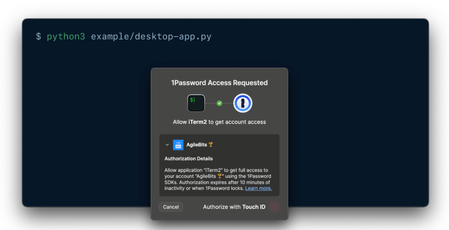
We’re excited to announce new authentication capabilities in the 1Password SDKs! Developers can now build integrations that authenticate directly through the 1Password desktop app using the same trusted methods users already know —Touch ID, their account password, or other supported options. 🏗️ What this unlocks: Native and seamless integrations: Build integrations that connect directly with the 1Password desktop app using the SDK. It’s a secure, native way to integrate with 1Password — no extra setup or dependencies required. Human-in-the-loop workflows: Enable user-scoped authentication in your integrations to support secure, approval-based workflows that keep users in control. Easy to build and adopt: Simplifies integration setup and makes authentication effortless for end users. Now available in public beta for macOS and Linux in the SDKs for Go, JavaScript, and Python. Video not displaying? Watch it here. 💬 Share feedback, get swag We’d love to hear how this feature performs in your integrations — is it reliable and easy to use in your workflows? What would you like to see next? 📖 Read the docs to get started 🧢 The first 10 developers to share feedback on the 1Password Developer Community Hub by November 30th will receive exclusive 1Password swag. Be sure to tag your post with #beta-sdk-desktop-integrations.314Views3likes0Comments[new tool] varlock: schema-driven env vars
TL;DR: We've launched something new, it's called varlock. It's like DMNO but simpler and easier to get started. It's built on top of the .env files you're already using. It makes them safer to use and share. We'd love your feedback. >> 🧙♂️https://varlock.dev --- We've been heads down working on the next evolution of secrets and configuration tooling building on what we've learned so far creating DMNO. If you've used DMNO, varlock will feel familiar. But instead of writing schemas in TypeScript, we've created a lightweight DSL that sits on top of your .env files. We think this allows for much simpler onboarding (and offboarding!). And because it's all based on decorators in comments, it should play nice with your existing tools. For any tools that would like to make use of this new syntax, we've also created an open specification, we call it @env-spec, and there's an active RFC if you would like to get involved. >> RFC: https://github.com/dmno-dev/varlock/discussions/17 —- So why varlock? Varlock is a suite of tools built to improve the experience of working with environment variables, both in terms of security and developer experience. It provides: Validation - catch errors in development instead of production Type-safety - improved DX via detailed IntelliSense Security - secret redaction in stdout and global console methods Environments - Compose defaults, environment-specific .env files, and local git-ignored overrides Secrets - use any third party provider that has a CLI to load values What next? We're just getting started and we have big plans to expand the feature set of varlock. Coming soon you'll see: Local override encryption via a desktop app using biometrics Shared team vaults with trustless cloud storage GitHub App to track config changes with audit trails Deeper integration with providers like 1Password If you've read this far, thank you. Please check out varlock and let us know what you think by replying to this post, or joining us on Discord. Tools like this are only as good as the community that shapes them. >> 🧙♂️https://varlock.dev Thanks ✌️Solved399Views3likes1Comment
Win11 -> WSL2 -> devcontainer ssh-add not accessible anymore
Hi all, I'm working on Windows 11 Pro, where 1 Password in the latest stable version is installed. I have WSL2 enabled with Ubuntu 24.04 installed and inside there I have docker installed to run devcontainers for VS Code. In 1Password I have all my ssh keys to interact with git and I have the ssh-agent option enabled. On Windows I can see all my keys in a terminal when executing ssh-add -l. In WSL I can also see all keys when executing ssh-add.exe -l and when opening a cloned repository in WSL in VS Code, the authentication works fine. (I love it). Now up until a couple days ago, I could also open a repository which has been cloned into WSL inside a devcontainer and the ssh agent forwarding was working like a charm, I could even sign commits, I have no clue how this magic works, but I loved it. Then it stopped working and I can't figure out why. Of course, all involved tools (Windows, WSL, VSCode, 1Password, etc.) install updates in the background, so it could be due to this. I disabled and enabled the 1Password ssh agent in the settings, no difference. I recreated the WSL instance, no difference. I reinstalled 1Password. In the VSCode devcontainer extension is the option to forward services, that is still checked, I tried toggling that as well. In WSL I still see the keys via ssh-add -l, but when I do the same inside a devcontainer I only see: Could not open a connection to your authentication agent. When I check the value of $SSH_AUTH_SOCK it is empty in both WSL and devcontainer, should it have a value? In the 1Password help around this topic I couldn't find it mentioned anymore. If this setup is still working for someone else, could you please check the value of this variable and post it?Solved1.5KViews3likes14Comments
Feature request - general encryption utilities
As a builder of dev tools dealing with sensitive data (see dmno.dev), sometimes I need to encrypt/decrypt arbitrary data in a local cache. Currently I have to store a key somewhere, which is usually a file sitting somewhere else on disk - obviously not that secure... It would be really cool if I could rely on the user's local 1Password app for that instead. I would imagine this would look like the CLI and SDK (eventually) providing arbitrary `encrypt` and `decrypt` methods, which interact with the user's local 1password application. The existing biometric auth and locl/unlock mechanisms would mean I'd get encryption without storing a key locally and so the user would have to periodically re-prove their identity.110Views2likes1CommentEnv var loading and validation for 1Password (open source!)
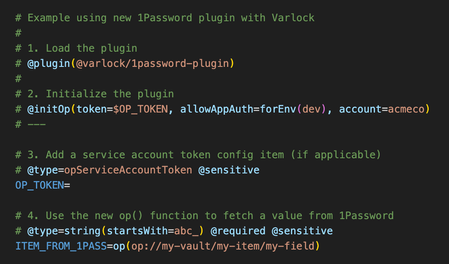
If you are using 1Password to manage any dev/application secrets, you might be interested in our open source tool - https://varlock.dev We just released a new update that introduces a plugin system and our first plugin is for 1Password (of course) - see https://varlock.dev/plugins/1password/ Our tool lets you define a .env.schema file, which can contain decorator style comments to add additional metadata to your env. This is then used to do validation, generate types, etc. The tool also introduces a new function call syntax, and while you can talk to any external cli using the exec() function, the new 1Pass plugin also adds a new op() function which fetches items from 1Password. So how is this different from using `op run`? Uses the SDK and service account tokens for deployed environments, and (optionally) uses op CLI for local dev (with biometric auth via the desktop app) Adds validation and coercion Automatic type generation (right now just for TypeScript, more to come) Understands which items are sensitive, and adds leak detection when possible Supports loading multiple env-specific files (.env.local, .env.production, etc) Supports explicit imports to break up files however you like Drop in integrations for many frameworks You can also use Varlock alongside the new environments beta by syncing your environment to a local file (such as `.env.local`) and varlock will automatically load those values, and apply its validation on top. Would love for y'all to take a look, and to hear what you think! Oh and please give us a ⭐ on GitHub @ https://github.com/dmno-dev/varlock --- An example .env.schema file using the new 1Password plugin106Views2likes0Comments
Feature Request: API Endpoints for 1Password Usage Reports
Today, it doesn't look possible to pull the usage reports via API. We have clients who request these reports, and having to login to each customer and manually pull the report from within the Admin portal can be very time consuming. Having the ability to pull these reports via API would speed up this process, and even allow us to schedule these reports.114Views2likes2Comments
SCIM Bridge
Why is the SCIM Bridge needed? If I already have to create an Enterprise Application in Azure, then the SCIM bridge really becomes an unnecessary and overcomplicated step. I should not have to register a new domain or spin up a separate VM just to get an integration to pull accounts automatically. As an MSP and reselling this to potentially 50 different organizations, this step becomes very time-consuming and wasteful.285Views2likes4CommentsNew getting-started guides, AI search, and LLM-ready docs for 1Password dev tools at 1password.dev
Hi everyone! We've been investing in making 1Password's developer documentation genuinely useful from the first click, and we wanted to share what's now live over at 1password.dev. 📖 New getting-started guides We've published workflow-based getting-started guides across every major tool area: SSH & Git, 1Password CLI, SDKs (Go, JavaScript, Python), Environments, integrations, and more. Instead of jumping between reference pages, you can follow a clear path from setup to working integration, organized around how you actually build. 🔍 AI-powered search across the docs You can hit Ctrl+K on any page and ask a question in plain language. The built-in AI assistant searches the full documentation set and gives you a direct answer with links to the relevant pages. It’s a much faster way to find what you need, especially if you’re not sure which tool or section to look in. Try it: open 1password.dev, hit ⌘+K, and type “How do I set up git commit signing with multiple GitHub accounts?” 🤖 Docs built for AI dev workflows If you use AI coding assistants like Cursor, Copilot, Windsurf, or Claude, our docs are now natively consumable. Every page is available as Markdown (append .md to any URL), and we serve llms.txt and llms-full.txt at the site root so your tools can reference 1Password docs directly. Details here: Build with LLMs 🏗️ Refreshed docs structure The documentation is now organized around the way developers work, with clearer navigation across SSH & Git, CLI, SDKs, Environments, secrets management, and integrations. If you've found our docs hard to navigate in the past, it's worth another look. 📌 One practical note: our developer docs now live at 1password.dev. All your existing developer.1password.com links and bookmarks redirect automatically, so nothing breaks. We'd love your feedback If you run into any issues or have suggestions, let us know in this thread. You can also reach us in the 1Password Developers Slack. Happy building! 🔐65Views1like0CommentsAbility to edit vaults for service accounts
Right now it doesn't look like there's a way to add/remove vaults for a service account without deleting the entire service account and recreating it - thus resetting the OP token. Is there any way to do this? Just seems like that would be a pretty handy thing to be able to do in the web UI. Love the service accounts!20Views1like0Comments