Level up your business security with free, on-demand training and certification. Explore 1Password Academy today →
integrations
94 Topics
Win11 -> WSL2 -> devcontainer ssh-add not accessible anymore
Hi all, I'm working on Windows 11 Pro, where 1 Password in the latest stable version is installed. I have WSL2 enabled with Ubuntu 24.04 installed and inside there I have docker installed to run devcontainers for VS Code. In 1Password I have all my ssh keys to interact with git and I have the ssh-agent option enabled. On Windows I can see all my keys in a terminal when executing ssh-add -l. In WSL I can also see all keys when executing ssh-add.exe -l and when opening a cloned repository in WSL in VS Code, the authentication works fine. (I love it). Now up until a couple days ago, I could also open a repository which has been cloned into WSL inside a devcontainer and the ssh agent forwarding was working like a charm, I could even sign commits, I have no clue how this magic works, but I loved it. Then it stopped working and I can't figure out why. Of course, all involved tools (Windows, WSL, VSCode, 1Password, etc.) install updates in the background, so it could be due to this. I disabled and enabled the 1Password ssh agent in the settings, no difference. I recreated the WSL instance, no difference. I reinstalled 1Password. In the VSCode devcontainer extension is the option to forward services, that is still checked, I tried toggling that as well. In WSL I still see the keys via ssh-add -l, but when I do the same inside a devcontainer I only see: Could not open a connection to your authentication agent. When I check the value of $SSH_AUTH_SOCK it is empty in both WSL and devcontainer, should it have a value? In the 1Password help around this topic I couldn't find it mentioned anymore. If this setup is still working for someone else, could you please check the value of this variable and post it?Solved1.5KViews3likes14Comments
How to Use 1Password Connect with Docker Compose workloads?
I can't find a guide on how do I integrate 1Password Connect server (that I deployed in kubernetes) with docker compose workload. Something as simple as not hardcoding passwords `POSTGRES_PASSWORD: "op://stuff/pgdb/password"` . I know there are `op run/inject/read` but these are a part of Connect.Solved838Views0likes1Comment
How do I use the SSH agent in headless Linux?
I want to clone a Git repository that needs SSH authorization. On my desktop this is straightforward: I have the 1Password app installed and the SSH agent enabled in its settings. git clone with an SSH URL makes the desktop app prompt me for approval and I get connected properly. However I want to clone a repository in a Debian Linux LXC. It does not have any GUI installed; I can only connect to it via a shell. I have the 1Password CLI app op installed and connected properly because op vault list works. However I cannot use the SSH agent: # ssh-add -l Could not open a connection to your authentication agent. My ~/.ssh/config looks like: Host * IdentityAgent ~/.1password/agent.sock More context about my CLI installation which is installed from the 1Password Debian repository: # apt info 1password-cli Package: 1password-cli Version: 2.31.1-2 Maintainer: 1Password <support@1password.com> Installed-Size: unknown Homepage: https://agilebits.com/ Vendor: 1Password <support@1password.com> Download-Size: 6729 kB APT-Manual-Installed: yes APT-Sources: https://downloads.1password.com/linux/debian/amd64 stable/main amd64 Packages Description: The official 1Password command-line tool. # op --version 2.31.1 I don't have a ~/.1password directory so the agent is not set up or not running. How can I get it running without a GUI to approve its use?Solved599Views0likes6CommentsRails integration
Hi, I've been reading today about how you can integrate 1Password with Rails Kamal. Can I integrate 1Password with the regular Rails Credentials file? If so, is there any documentation for this? 1Password Version: Not Provided Extension Version: Not Provided OS Version: Not Provided Browser: Not Provided453Views0likes6Comments[new tool] varlock: schema-driven env vars
TL;DR: We've launched something new, it's called varlock. It's like DMNO but simpler and easier to get started. It's built on top of the .env files you're already using. It makes them safer to use and share. We'd love your feedback. >> 🧙♂️https://varlock.dev --- We've been heads down working on the next evolution of secrets and configuration tooling building on what we've learned so far creating DMNO. If you've used DMNO, varlock will feel familiar. But instead of writing schemas in TypeScript, we've created a lightweight DSL that sits on top of your .env files. We think this allows for much simpler onboarding (and offboarding!). And because it's all based on decorators in comments, it should play nice with your existing tools. For any tools that would like to make use of this new syntax, we've also created an open specification, we call it @env-spec, and there's an active RFC if you would like to get involved. >> RFC: https://github.com/dmno-dev/varlock/discussions/17 —- So why varlock? Varlock is a suite of tools built to improve the experience of working with environment variables, both in terms of security and developer experience. It provides: Validation - catch errors in development instead of production Type-safety - improved DX via detailed IntelliSense Security - secret redaction in stdout and global console methods Environments - Compose defaults, environment-specific .env files, and local git-ignored overrides Secrets - use any third party provider that has a CLI to load values What next? We're just getting started and we have big plans to expand the feature set of varlock. Coming soon you'll see: Local override encryption via a desktop app using biometrics Shared team vaults with trustless cloud storage GitHub App to track config changes with audit trails Deeper integration with providers like 1Password If you've read this far, thank you. Please check out varlock and let us know what you think by replying to this post, or joining us on Discord. Tools like this are only as good as the community that shapes them. >> 🧙♂️https://varlock.dev Thanks ✌️Solved366Views3likes1CommentWebauthn Integration Not Working URL mismatch?
I have built a webauthn integration that works perfectly with native android, google password manager, and bitwarden password manager. However, when I try to use 1Password to save the passkeys I get an error message: "Unable to save passkey. For security reasons, 1Password did not save this passkey. The associated URL for this passkey does not match the selected app." I can't find anywhere in the docs how to address this issue. I assume that it is related to the RP ID. I have tried the FQDN as well as the "android:apk-key-hash:" that android returns after a successful verification. Has anyone run into this before? Is there documentation on how I should be configuring my Attestation payload to be compatible with 1Password?Solved327Views1like7CommentsIntroducing 1Password SDKs for Desktop Integrations
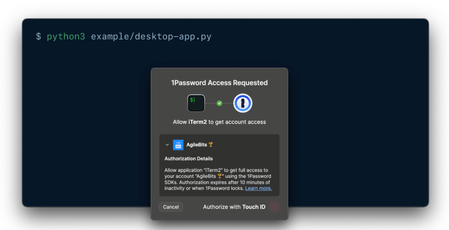
We’re excited to announce new authentication capabilities in the 1Password SDKs! Developers can now build integrations that authenticate directly through the 1Password desktop app using the same trusted methods users already know —Touch ID, their account password, or other supported options. 🏗️ What this unlocks: Native and seamless integrations: Build integrations that connect directly with the 1Password desktop app using the SDK. It’s a secure, native way to integrate with 1Password — no extra setup or dependencies required. Human-in-the-loop workflows: Enable user-scoped authentication in your integrations to support secure, approval-based workflows that keep users in control. Easy to build and adopt: Simplifies integration setup and makes authentication effortless for end users. Now available in public beta for macOS and Linux in the SDKs for Go, JavaScript, and Python. Video not displaying? Watch it here. 💬 Share feedback, get swag We’d love to hear how this feature performs in your integrations — is it reliable and easy to use in your workflows? What would you like to see next? 📖 Read the docs to get started 🧢 The first 10 developers to share feedback on the 1Password Developer Community Hub by November 30th will receive exclusive 1Password swag. Be sure to tag your post with #beta-sdk-desktop-integrations.300Views3likes0Comments
New Item Type recommendation: API Keys
I would like to see a new item type: API Key for securely storing machine-to-machine credentials used in development and automation. It would include fields for the key, environment, service name, expiration, rotation schedule, and scope. This would help developers separate API credentials from personal passwords, reduce misuse, and support compliance best practices. This important because API keys are generally created and shared only once. Being able to store these safely in 1Password would be a big help. By having a new Item type, these can be more easily browsed as a group. Recommended Required Fields Field Name Type Purpose Service Name Text Identifies the platform or API (e.g., “OpenAI API”). API Key Concealed The actual secret string; hidden by default, revealable on demand. Environment Text/Selection Helps differentiate between “Production,” “Staging,” or “Development.” Key Type Text/Selection Identifies the key’s purpose — e.g., “Secret,” “Public,” “Bearer Token,” “Client Token.” Created Date Date Tracks when the key was generated. Recommended Optional Fields Field Name Type Purpose Description Text (multiline) Freeform notes about usage, permissions, quotas, etc. Service URL / API Console URL URL Direct link to the managing website or API dashboard. Expiration Date Date Useful for keys with rotation or expiration requirements. Key Owner / Issued To Text Identifies who or which system owns the key. Scopes / Permissions Text Lists the granted permissions or access scopes. Rotation Schedule Date or Text Next planned rotation or rotation policy (“every 90 days”). Linked Account Reference or Text Optional link to the related Login item or user account. Tags Text (multiple) Categorization (e.g., “AWS,” “internal,” “low risk”). Attachment File (optional) Store related configuration files like .env or key manifests.Solved300Views1like2Comments
SCIM Bridge
Why is the SCIM Bridge needed? If I already have to create an Enterprise Application in Azure, then the SCIM bridge really becomes an unnecessary and overcomplicated step. I should not have to register a new domain or spin up a separate VM just to get an integration to pull accounts automatically. As an MSP and reselling this to potentially 50 different organizations, this step becomes very time-consuming and wasteful.270Views2likes4CommentsHow To enable Flatpak VScode, toolbox and 1password to integrate together
Since i have been struggling on this way too long and it was keeping me out of developing and my setup workflow wasent working i was determinate to quit first and go to mutable systems, but something kept me pushing my limits and figure how this total setup can be done and i have finally cracked the code to make flatpak VScode to connect to toolbox as user and enable 1password authentication to commits and secrets. The journey wasent easy and i think i got more gray hair than i should of have, but after i got it working spending literally a week to test wipe, broken kinoite, wipe again now it works. First lets start that on this system at this point you still need 1password and 1password-cli as layered and that is only layers on my setup with nvidia rest are systemd-sysext and flatpaks. First add 1 password repo Edit the repo file and remove ” from gpgkey sudo nano /etc/yum.repos.d/1password.repo Then just rpm-fusion install 1password 1password-cli Reboot Login to your vaults and app as normal Now comes the parts what kept me frustrated for days wahs that the old wrappers we used to use with podman-host dont work anymore and vscode cant see containers and if we layer VScode it is on root and this wont work. So what i actually found there is the script that makes everything for you and it works https://github.com/owtaylor/toolbox-vscode This made things so much better follow the installation method and then enter you toolbox container and type code and magick happens Now comes the 1password issues where i got it 80% working but it never worked since it was looking that /opt/1Password/op-ssh-sign': No such file or directory error:fatal: failed to write commit object So lets start getting Flatpak permissions and this was taken from Dave Jansson guide https://davejansen.com/using-vscode-flatpak-with-1password-ssh-git-signing/ Thank you for that and follow the guide as it explains all what needs to be done Then comes the last part to fix the signing issue and that took me way too long time to figure and solution is so simple. Go to your git config file and just remove the line that says program = /opt/1password/op-ssh-sign and you are all good all commits are now working and 1password app prompts authentication when it detects commits or authentication is needed.Solved254Views0likes2Comments