Level up your business security with free, on-demand training and certification. Explore 1Password Academy today →
integrations
94 Topics
We need a way to disable password prompts for a period of time
It would be better if we could disable the password prompt on a particular item for a period of time, rather than unlocking the whole thing. For when automated agents access op:// passwords, it's currently dangerous because then they can access any other credentials for a period of time. Instead, it would be more ideal to say: "Do not ask again for X hours for this password".30Views0likes0CommentsSecure your Codex workflows without exposing secrets 🚀
If you’re using coding agents like Codex to build and ship production code, you’ve probably run into the problem of credentials being copied into .env files, scripts, or hardcoded in repositories, where they can be easily exfiltrated and are difficult to govern and audit. That’s why we collaborated with OpenAI to bring the 1Password Environments MCP Server for Codex to life, making 1Password a trusted access layer for Codex. Credentials from 1Password are issued to Codex just-in-time, scoped to the task, while keeping them outside the model’s context window. With the integration, you can: Bootstrap new projects with 1Password-managed environments so you don't have to create or share .env files. Allow Codex to create and manage environments so your code runs with the right configuration, while underlying secrets stay in 1Password. Stay in control of every access since each Codex interaction with 1Password requires explicit user approval. Use Codex to scan repositories for secrets in plain text, then move these secrets into 1Password for secure storage, and replace them with references in code. And much more! Under the hood, your 1Password secrets never leave 1Password and are always secure. They aren’t returned through or read by the MCP, written to disk, or surfaced in the model’s context window. At runtime, 1Password injects the required variables directly into the application process when it runs and only exists in memory for the user authorized process. 👉 Read our full blog post to see how it works and how to get started with it.149Views0likes0Comments
SSH Agent should support host-to-key mapping to avoid MaxAuthTries exhaustion
The 1Password SSH agent currently offers all keys in the vault sequentially for every SSH connection, regardless of which key is relevant to the target host. This triggers an error for a number of hosts: Too many authentication failures Servers configured with MaxAuthTries below the number of SSH certs on in 1Password run the risk of being unreachable thanks to the way that the agent presents the keys. Best practice (https://linuxize.com/post/ssh-hardening-best-practices/) suggests 3-4 for the setting, and according to the man page for sshd indicates that the default is 6 (https://unix.stackexchange.com/questions/418582/in-sshd-config-maxauthtries-limits-the-number-of-auth-failures-per-connection) To reproduce: Have 6+ SSH keys in your 1Password vault Connect to a server with MaxAuthTries 3 (or default) configured The correct key in vault order is greater in count to the setting on the host Result: Received disconnect from [host]: Too many authentication failures Evidence from verbose SSH output: debug1: Offering public key: GitHub ED25519 ... agent debug1: Offering public key: GitLab ED25519 ... agent debug1: Offering public key: K8sFrontEnd ED25519 ... agent Received disconnect: Too many authentication failures The correct key (4th in vault) was never reached since the MaxAuthRetry was set to 3. Workaround: Save the relevant public key to disk and use IdentitiesOnly yes + IdentityFile in ~/.ssh/config to pin a specific key to a host. This works but defeats much of the convenience of the agent. Feature request(if the devs are looking here): Allow users to associate a key with one or more hostnames directly in the 1Password vault item or SSH Agent UI. The Bookmarks tab suggests this infrastructure may already be in progress. If bookmarked hosts could drive key selection, that would solve this entirely. This is a natural extension of what 1Password already does well: matching credentials to their intended destination.20Views0likes0CommentsNew getting-started guides, AI search, and LLM-ready docs for 1Password dev tools at 1password.dev
Hi everyone! We've been investing in making 1Password's developer documentation genuinely useful from the first click, and we wanted to share what's now live over at 1password.dev. 📖 New getting-started guides We've published workflow-based getting-started guides across every major tool area: SSH & Git, 1Password CLI, SDKs (Go, JavaScript, Python), Environments, integrations, and more. Instead of jumping between reference pages, you can follow a clear path from setup to working integration, organized around how you actually build. 🔍 AI-powered search across the docs You can hit Ctrl+K on any page and ask a question in plain language. The built-in AI assistant searches the full documentation set and gives you a direct answer with links to the relevant pages. It’s a much faster way to find what you need, especially if you’re not sure which tool or section to look in. Try it: open 1password.dev, hit ⌘+K, and type “How do I set up git commit signing with multiple GitHub accounts?” 🤖 Docs built for AI dev workflows If you use AI coding assistants like Cursor, Copilot, Windsurf, or Claude, our docs are now natively consumable. Every page is available as Markdown (append .md to any URL), and we serve llms.txt and llms-full.txt at the site root so your tools can reference 1Password docs directly. Details here: Build with LLMs 🏗️ Refreshed docs structure The documentation is now organized around the way developers work, with clearer navigation across SSH & Git, CLI, SDKs, Environments, secrets management, and integrations. If you've found our docs hard to navigate in the past, it's worth another look. 📌 One practical note: our developer docs now live at 1password.dev. All your existing developer.1password.com links and bookmarks redirect automatically, so nothing breaks. We'd love your feedback If you run into any issues or have suggestions, let us know in this thread. You can also reach us in the 1Password Developers Slack. Happy building! 🔐65Views1like0CommentsPrompted every time I need to sign a git commit or tag
I have 1Password set up to sign git commits and tags in both Windows and WSL (I use the latter most for development). Starting a few months ago but getting increasingly frustrating (especially when I rebase a lot of commits), I'm prompted every time I need to sign. My ~/.gitconfig is set up like so (relevant settings shown): [user] signingkey = ssh-ed25519 PUBKEY [core] sshCommand = ssh.exe [gpg] format = ssh [gpg "ssh"] program = "/mnt/c/Users/USERNAME/AppData/Local/Microsoft/WindowsApps/op-ssh-sign-wsl.exe" [commit] gpgsign = true [tag] gpgsign = true `ssh-add -L` (both the ELF executable in WSL as well as running the PE/COFF `ssh-add.exe`) shows my ssh auth and signing keys. 1Password - the desktop app - is also configured to only prompt when 1Password is locked or after 4 minutes. I get this same prompt-on-every-use behavior whether 1Password is open and unlocked or not. Works as expected for my browser extension, though. I found a post from about a year ago that someone resolved a similar behavior by re-installing 1Password. I may try that, but would rather hear from a dev to troubleshoot the issue in its current state so a proper fix could be made so this doesn't keep happening after winrot or whatever is causing this happens again to anyone.81Views0likes2Comments
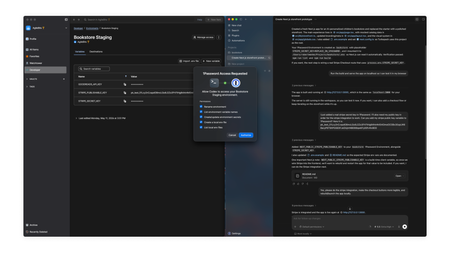
AWS Secrets Manager integration: destination won't persist, zero API calls reaching AWS
Hi all, Looking for help / similar reports on the AWS Secrets Manager (Environments) integration. Our sync has completely stopped working and re-creating the integration does not bring it back. A support ticket is already filed; posting here in case anyone has hit the same and found a faster fix. ## Symptoms - Changes in 1Password Environments (additions, edits, deletions of any variable) do **not** propagate to AWS Secrets Manager. - The integration card in the 1Password UI stays in the unconfigured "Configure destination" state. There is no "connected" / "ready" indicator, just the configuration prompt. - This affects **all environments** simultaneously, not just one. - The "Configure destination" save action visually succeeds with no error, but immediately reverts the screen back to the unset "Configure destination" state. Re-entering and saving multiple times produces the same revert. The destination is never persisted. - Recreating the integration (deleting and setting it up again, even with a brand new target secret name) does not restore sync. The new target secret is also never written to. - This was working previously; the last successful sync (visible in AWS as the secret's `LastChangedDate`) was 25 days before the issue began, and the freeze started without any change on our side. ## Environment - 1Password plan: Individual - 1Password Desktop App: 8.12.12 (Windows, latest) - AWS region: us-east-1 ## What we've verified on the AWS side - AWS CloudTrail (`lookup-events` filtered by the target secret's resource name) shows **zero `UpdateSecret` / `PutSecretValue` events** in the past 24 hours from any principal — i.e., 1Password is not even attempting an API call. There is no AccessDenied / ThrottlingException either, just no request reaching AWS. - IAM role / SAML provider used by the integration still exists with unchanged trust policy and `secretsmanager:*` permissions on the target. - KMS key is intact, no SCP changes in the org. - Other AWS-bound integrations from our account work normally. ## Parallel fresh integration test To rule out integration-specific corruption, we set up a completely new parallel integration without deleting the existing one: - New 1Password Environment (different name) - New SAML Identity Provider in AWS (different name) - New IAM Policy in AWS (different name, scoped to a new secret name pattern) - New IAM Role in AWS (different name, with `SAML:sub` trust condition matching the SAML subject value provided in the 1Password configuration page) - New target secret name in 1Password's destination config Result: **identical failure mode**. - Clicking "Create integration" reverts the destination to unset, no error shown. The integration card never moves out of the unconfigured state. - AWS CloudShell verification: zero matching secrets created, zero `CreateSecret` events recorded across the entire account in the time window of the parallel save attempts. - A sanity-check `describe-secret` call against an unrelated existing secret returns successfully, confirming our AWS CLI access is functional. This pattern (no API call at all, save action not persisted, parallel fresh integration also broken) suggests an account-level issue on the 1Password side — possibly invalidated integration credentials, a stuck sync worker, or a silent server-side validation failure preventing the destination from being persisted. We can't diagnose further from the AWS side. ## Questions 1. Has anyone else seen this — silent sync stop affecting all environments simultaneously, with the save action visibly succeeding but the destination never persisting? 2. Is there a way (CLI / SDK / admin console) to check the integration's internal sync status / last-attempted-sync timestamp / error log on the 1Password side? 3. Any way to force-trigger a sync attempt from outside the standard "save in environment" path? Save-and-edit no longer triggers anything reaching AWS. We have already filed a support ticket. Posting here in case anyone has hit the same and found a fix faster than support turnaround. Thanks!32Views0likes1Comment
Automated bi-directional sync between 1Password and AWS Secrets Manager — is this actually possible?
Hey everyone, SRE at a small startup here. We've been using 1Password for a while and overall love it, but we're running into a friction point with our AWS setup that I'm hoping someone has solved. What we're trying to achieve: We want a proper bidirectional sync between 1Password vaults and AWS Secrets Manager. Specifically: 1Password → AWS SM: When someone on the team updates a credential in 1Password, it should automatically propagate to AWS Secrets Manager so our workloads pick it up without anyone having to manually copy-paste things. AWS SM → 1Password: We use AWS Secrets Manager's native auto-rotation for some credentials (RDS passwords, API keys, etc.). When AWS rotates a secret automatically, we'd want that updated value to flow back into 1Password so our employees can always go to 1Password as the single source of truth and get the current credential. On the new "Environments" feature (beta): We noticed the new Environments feature and got excited — it looked like exactly what we needed. But after digging in, it seems pretty limited right now. From what we can tell: There's no SDK support for managing environments programmatically There's no CLI support either (`op` doesn't seem to have environment management commands yet) Everything has to be done through the UI wizard This makes it really hard to automate. We provision new environments dynamically as part of our infrastructure-as-code workflows (Terraform), so we need to be able to create and configure environments programmatically. Is this on the roadmap? Are there any workarounds people are using? The SAML IdP requirement in Environments: Related to the above — the Environments setup wizard seems to require a SAML Identity Provider to be configured for each environment. We use Azure Entra ID as our IdP (federated through AWS Cognito), and we have a single IdP setup that covers all our environments. Is it actually required to have a separate SAML IdP per environment, or is there a way to reuse a single IdP across multiple environments? The wizard flow makes it seem like each environment needs its own IdP configuration, which would be a significant blocker for us — we can't dynamically spin up new IdP configurations every time someone creates a new environment in our platform. If this is a hard requirement, it basically rules out Environments for our use case entirely, since we'd need to automate IdP provisioning as part of environment creation, which is a whole other can of worms. Summary of questions: Has anyone built a reliable bidirectional 1Password ↔ AWS Secrets Manager sync? Especially the AWS SM → 1Password direction for auto-rotated secrets? Is there any programmatic/API access for Environments (SDK, CLI, REST API) that isn't documented yet, or is it genuinely UI-only right now? Is a separate SAML IdP per environment actually required, or can you reuse one IdP across environments? Thanks!172Views0likes3CommentsEnvironments Beta AWS SM sync not configurable
Hi community. Any one else noticed that 1Password Environments (Beta) had a recent problem with the destination sync to AWS Secrets Manager? In the last 24 hours, we noticed that all our environments no longer have a AWS Secrets Manager "Destination" config secret changes in the desktop app are no longer synced to the previously configured AWS Secrets Manager destination (add/delete/update a secret for a specific environment) when configuring a new AWS Secrets Manager destination (either an existing environment or a new environment), pressing "Create integration" appears to work, however the config is not saved. See point 1 above. It was working fine yesterday (around 5pm GMT+10 6th May 2026) but we noticed the above issues this morning (around 10am GMT+10 7th May 2026) So its clear, the OSX desktop app still lists the available environments the desktop app UI allows us to added/delete/update a secret & the values are persist within 1password op command line can list the secrets including the recently edited secret key/value We're using OSX 26.4.1 1Password Desktop for Mac 8.12.12 (81212044) Production channel Also tried the Nightly 1Password Desktop for Mac 8.12.20 (81220001) but it has the same symptoms 1P_Phil we have 23 1Password environments of which 14 had a working AWS Secrets Manager destination configured. Its been working great the past few weeks & we love the product. Maybe we've tripped on a bug. Sharing the above details to help make the product better. Thanks22Views0likes0CommentsSecurity bump is required for devs!
Hi there, I’ve been using 1Password for both websites and various aspects of my personal life. Recently, I’ve been working on developing tools to securely save data on my account instead of my computer or in plain text. This approach actually works and is more secure. However, for this to be effective, I needed to compromise my entire account, including all the vaults, to make them accessible to the CLI tool. I would like to limit the scope of the CLI tools to specific vaults rather than my entire account, which includes shared vaults and detailed information. Is this possible? Thanks28Views0likes1Comment