Our community is getting an upgrade on July 2nd! Learn more in the FAQs →
linux
608 Topics
Support for Zen browser
Hi! There's this new browser called "Zen browser" It's based on Firefox but the 1password extension doesn't work with the desktop app 1Password Version: Not Provided Extension Version: Not Provided OS Version: Not Provided Browser: Not ProvidedSolved21KViews56likes183Comments
Linux desktop client crashes on startup
Since updating to the latest version of the client, the Linux desktop client consistently crashes on first startup, and sometimes crashes again after already running. I have the browser extension and desktop app integration enabled, and I use my system unlock method as the unlock option for the desktop app (local account password popup instead of biometrics). This crash happens regardless of triggering unlock via the extension, launching the desktop app directly, or triggering the app's global search shortcut (ctrl-alt-space for me). This happens on both Kubuntu 24.04.1 LTS and Pop!_OS 22.04 LTS. In both cases, the desktop app is installed via apt. Quick edit: I originally wrote this for desktop client version 8.10.48. I updated to version 8.10.50 and the issue does still exist.Solved5.2KViews13likes105Comments
Integration between Linux app and Snap Firefox
Some days ago it was released the support for Native Messaging (still experimental) with Snap Firefox. I checked, but the integration between Linux app and Snap Firefox still doesn't work. I was wondering if the integration uses Native Messaging or other way to implement, and if it is using other way, if it could be ported to use Native Messaging, so Linux app could work with Snap Firefox. We are discussing this matter here 1Password Version: 8.9.0~1.BETA Extension Version: 2.3.7 OS Version: Ubuntu Kinetic Browser:_ Firefox4KViews6likes44Comments
New item login field already populated
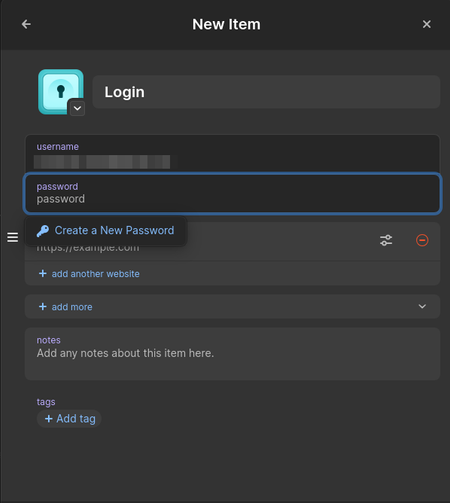
Hi, When I create a new item in the Linux, Android and iOS 1Password apps, the login field is already populated with an email address and focus is set on the password field. How to change that? I would like it to be empty. It is especially annoying because in my case, it is filled with a an email address I am not using that often. This change of behavior seems to be relatively recent. Thanks for your help. SpacehogSolved2.1KViews5likes33Comments
1Password Shortcuts on Wayland
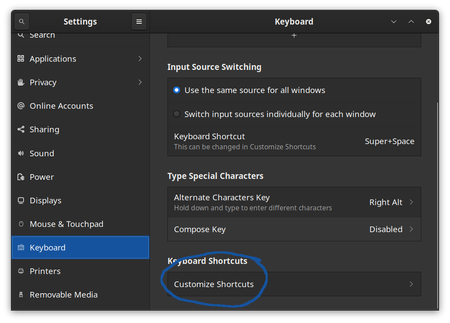
1Password is an application that works very well when users can invoke it from anywhere. Quick Access in particular is a feature that is meant to be invoked from anywhere on your desktop. However, as many of you know, the Wayland developers made a deliberate choice to not allow applications to set global shortcuts. To my knowledge, all Wayland implementations have continued to honor this choice. The reasoning is valid, though: global shortcuts make keyloggers trivial. 1Password can run as a native Wayland application, and defaults to XWayland. This, however, does not help since the primary desktop environment is itself Wayland. For a variety of reasons, we have provided command line options for several of the most useful 1Password commands. In this article, I'll describe how to use those options to set up global shortcuts for 1Password with both Gnome Shell and Sway. It is, fortunately, very easy. Gnome Shell For this example, I'm running Gnome Shell 40.4.0, Wayland mode, on Fedora Core 34. Start by finding Keyboard > Customize Shortcuts in your Settings application. Next, select Customize Shortcuts Your list of custom shortcuts may start empty, but you will want to get to something like this: Press the + button at the bottom to create a new shortcut, and you'll get a screen like this: As you create each shortcut, name each one in a way that makes sense to you. In the Command field, you will write a trivial script that invokes 1Password with the option that you want. Once you have created that invocation, set the keyboard shortcut as you desire. I recommend multiple key bindings that all work together. The following is the 1Password defaults set on other platforms, and on XOrg-based displays. Name Command Shortcut Open or Toggle 1Password 1password --toggle Ctrl + p Lock 1Password 1password --lock Ctrl + Shift + L Open Quick Access 1password --quick-access Ctrl + Shift + Space note: there is no default for Open or Toggle 1Password, so I made something up. Sway Sway does not have a GUI configurator, but instead does everything in the configuration file at ~/.config/sway/config . Fortunately, this is very easy to set up: bindsym Ctrl+Shift+l 1password --lock byndsym Ctrl+Shift+space exec 1password --quick-access KDE Plasma coming soon6.7KViews4likes16CommentsSupport for immutable linux (Bazzite, etc)
1password is rough to use on immutable fedora (Bazzite, Aurora, etc), since flatpak doesn't let 1password communicate with browser, use SSH, or fingerprint scanner. I'm not fully sure what solution would be since AppImage is depreciated. Maybe flatpak permissions config that would let 1password talk to browser?761Views4likes3Comments
Feature Request: Show Original Contributor of Items in Shared Family Vaults
Summary Please add a built-in way to display who originally created or contributed an item to a shared vault in 1Password Family. Problem In shared family vaults, it is currently not possible to see who an item originally belongs to once it has been shared. This makes it unclear who owns a specific account, even though the item is visible to everyone in the family. As a workaround, we manually add tags with the name of the person who created or contributed the item. This allows sorting and filtering by owner, but it is manual, error-prone, and easy to forget. Proposed Feature Display non-editable metadata such as: “Contributed by: Name” or “Original owner: Name” This information should remain visible in the item details after sharing or moving an item into a shared family vault. Benefit This makes it easy to understand who an account actually belongs to, even when it is shared for convenience. It improves clarity in family vaults, avoids confusion, and removes the need for manual tagging. Reference Apple Passwords already shows this information for shared items using labels like “Contributed by: Name”, which provides clear ownership at a glance.134Views4likes5CommentsWayland clipboard broken till when?
It's been years at this point where 1Password has not worked properly on Wayland, having quirks here and there and never "officially" supported. I'm paying for a product that I genuinely believe is best, but can't even have copy functionality working on a major platform. Workarounds to use X11 are no longer acceptable in 2025, and having a password manager that can't even copy from its desktop app overshadows all the other good things this product does. I just ran into an issue where said workaround from "forcing 1Password to run on X11 so I can copy to Wayland" stopped working because of my compositor and after quickly reverting back the change I realized it's not worth my time trying to triage these issues on something I'm spending money for,. I've stopped using this on my main system as a result. Since I still like the product, I'll wait, but come December, I'll come back to see if *complete* Wayland support is there (clipboard, rich prompt if you have them or disabled, no windowing issues, system authentication behaving, etc), and if it hasn't I'm not renewing my subscription nor will I be recommending this to anyone using Linux anymore. I will be using Bitwarden in the meantime, which does have copy/paste because it's really not that hard guys. And I'm sure it's not a dev problem, that's all I'm going to say. For the people that are still reading, I really hope you can sit down and provide a clear timeline of when Wayland support is coming, what are you doing to fix these issues, and where. This is what your users need. I genuinely believe you have the best password manager, and it saddens me to see the state of Linux support for years, and coming back to those user needs, if there aren't too many, if you don't have the will to allocate resources to it, then if anything you should drop it as a supported platform instead of getting users and paid customers you're not gonna work for. Sorry for the tone, see you in December.Solved972Views4likes8Comments
Support for Imput's Helium Browser
Hiya! I'm an avid 1Password user and I utilize every possible corner of it. BUT there's a certain issue that I'm facing when I'm using it with unsupported browsers. Mainly, Helium Browser (https://github.com/imputnet/helium) which includes unbiased privacy at no compromise to webpage functionality isn't supported. This is an issue because there's no other browser I'd use. The problems that arise are apparent on all platforms, like: Manual addition in the 1Password app on macOS (which, lately, seems to spaz out when using it with the extension) Inability to use with the system app on Windows which inconveniences users by making them log into their vault twice (which, if I guarantee, many have a complex password for and can't bore themselves typing it out multiple times per session) Broken behaviour on Linux, where even with the custom browser config it still can't unlock the vault if it's unlocked on the system. No, I wasn't running the Flatpak version. IMHO 1Password is better than the competition in terms of UX, but seeing my daily driver struggle with that with no way to fix without resorting to this is awful.1.5KViews3likes6CommentsUse TPM 2.0 PCR binding to allow password-less unlock after reboot on Linux
The Problem: Windows/macOS: Users can reboot and immediately use Windows Hello or Touch ID to unlock. The Master Password is rarely needed. Linux: Even with "System Authentication" enabled, we are forced to type the full Master Password at least once after every reboot or app restart. The Proposal: I would love to see 1Password for Linux implement native TPM 2.0 support to securely store the vault decryption secret, bound to the system's hardware state. Since modern Linux distributions (like Arch, Fedora, Ubuntu) now have mature TPM support (e.g., via systemd-cryptenroll), the infrastructure is ready. How it could work: 1.Secret Sealing: 1Password could seal the necessary decryption key into the TPM chip. 2.PCR Binding: Bind this key to specific Platform Configuration Registers (PCRs), such as PCR 7 (Secure Boot state) and PCR 0 (Firmware). The Result: On boot, if the system hasn't been tampered with (Secure Boot is valid), the TPM releases the key, and 1Password unlocks automatically—or just asks for a fingerprint—without needing the Master Password. Why this matters: Parity: It brings the Linux client up to par with the "magic" experience on other platforms. Security vs. Convenience: It encourages users to set incredibly long, complex Master Passwords because they won't have to type them daily. I know many power users in the Linux community are already using TPM for disk encryption (LUKS). It would be amazing to see 1Password leverage this same hardware capability. Does anyone else in the community want this? Please vote or comment if you do! Thanks123Views3likes2Comments